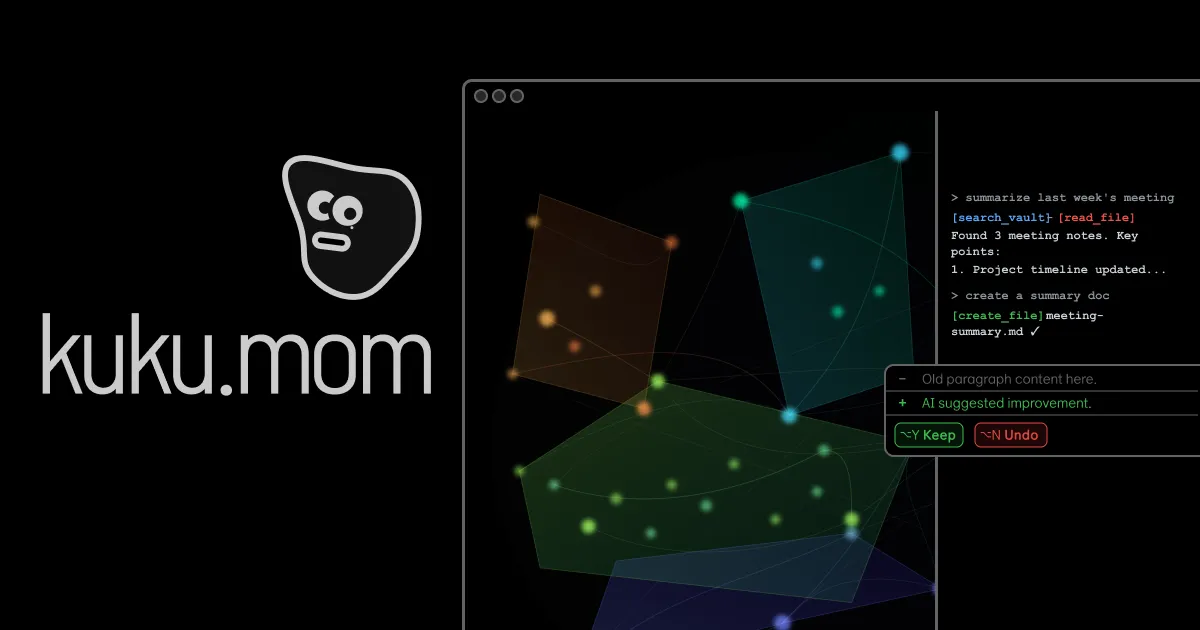
Kuku is an AI-native Markdown editor for macOS that helps you connect your thoughts and write smarter. It stores notes as plain .md files with wikilinks, backlinks, and graph view.
kuku is an AI-native Markdown editor for macOS that transforms how you capture and connect your thoughts. Built on Tauri for native performance, it offers a local-first, offline-first environment where your notes remain plain .md files with full ownership. This AI Markdown editor combines the simplicity of Markdown with intelligent features like wikilinks, backlinks, and an interactive graph view, making it ideal for knowledge workers, researchers, and developers who want a secure, non-cloud knowledge management system. At its core, kuku helps you write smarter by keeping your entire vault accessible and connected, reducing the friction between thinking and recording.
The primary pain point kuku addresses is the constant friction of losing context and scattered information. Traditional note-taking apps often lock data in proprietary formats or require constant cloud connectivity, causing anxiety over data ownership and access. Users find themselves jumping between files, apps, and searches, losing the thread of their thoughts. kuku solves this by providing instant answers from your notes with sub-second retrieval, so you never fumble mid-thought. It also connects your notes through wikilinks and backlinks, building a web of knowledge that surfaces related ideas when you need them. This eliminates the need to manually organize or remember where information was saved, letting you focus on thinking and creating rather than managing files.
First major feature group: 'Instant Context'. kuku gives you instant context while you work through a powerful AI that searches your entire vault in milliseconds. With ⌘K you can search for any term and get relevant results, and the AI can read your notes and provide answers directly. It learns from past sessions, suggesting answers from prior threads to accelerate your workflow. The AI also picks up on context and suggests follow-up prompts to keep your thinking moving, such as 'Summarize risks from [[Team Sync]]' or 'Draft next steps as bullets'. This feature ensures you never lose your train of thought because relevant information is always at your fingertips, connected across all your documents. The benefit is dramatic reduction in cognitive load and time wasted searching.
Second major feature group: 'Full Vault' within reach. kuku provides a Markdown-first editing experience that understands structure. You write with standard Markdown, and the editor surfaces headings, lists, code blocks, and wikilinks intelligently. The AI reads your documents and can upload any file to learn its content for instant retrieval. It works offline too, ensuring your notes are always available without internet dependency. The graph view visually connects your notes through wikilinks and backlinks, showing clusters and themes. When AI edits your vault, it presents changes as reviewable diffs similar to Cursor, letting you accept or reject modifications with full transparency. This combination of Markdown simplicity, AI assistance, and offline reliability gives users complete control over their knowledge base.
Publisher
A
admin
Launch Date2026-01-28
Platformdesktop
Pricingfree
Tech Stack
#Tauri v2 Rust backend#React 19 UI framework#Tiptap Editor core#SQLite FTS5 search#Gemini AI engine#Whisper Local STT
Domain Authority
Ahrefs DR12/100