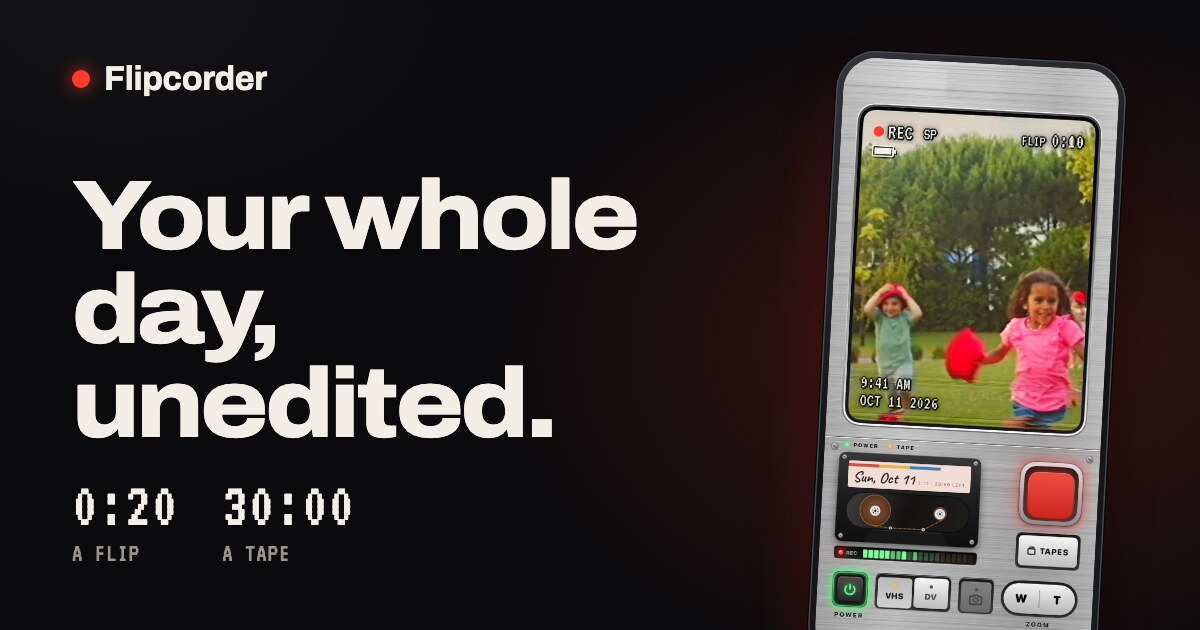
Flipcorder is a retro camcorder app for iPhone that turns the phone into a 1991 camcorder. It is built for catching small moments through your day rather than producing one polished video: you press record whenever something is worth keeping, film in short flips, and at the end of the day you get one raw film of your day to save or share. The app is made for iPhone Duo and works on any iPhone on iOS 26 or later, with the iPhone Duo extras requiring iOS 27.1. Its purpose is stated plainly on the site: film little moments all day, 20 seconds at a time, and nothing is edited out.
The app exists as a reaction to how people now film. As the makers put it, we have lost touch crafting perfect videos for social media, and Flipcorder instead encourages you to take shorter flips of 20 seconds each throughout your day to enjoy as a home video at the end of the day. The site describes the product as being for catching small moments through your day, with no editing and nothing removed: the chatter, the pauses, and you fumbling for the stop button all stay in. The maker, Matt of Lotus Apps, describes it as the app he wanted for himself — as a dad, he wanted home video that feels real, with the chatter left in, and he wanted to build something for iPhone Duo.
Turning the camcorder on is part of the experience. You press the glowing POWER key and the viewfinder warms up like an old TV; on iPhone Duo, opening the fold does it. The interface is styled as a camcorder body, complete with printed details such as “MADE BY LOTUS · AUTO FOCUS · Ø 52 · 8× ZOOM · 1 : 1.6 · f = 5.4 – 43 mm”, a lens-cap motif that reads “OPEN TO FILM” or “LENS CAP ON”, and a standby screen showing STBY with the time and date and today's cassette. Rather than a generic camera grid, the screen presents a flip counter such as “3 FLIPS · 0:52” and a red record key, so the shooting experience feels like operating a physical camcorder.
Filming a flip is deliberately limited. By default, a flip stops by itself at 20 seconds, with a quiet countdown, so a moment is caught without the recording running indefinitely; the 20-second limit can be turned off in settings. You can also close the camcorder mid-flip, and the flip is saved before the camcorder powers down, onto today's tape. On iPhone Duo, the person you are filming sees themselves on the outside screen, in the same retro look, with a REC light so they know when to wave — a small detail that turns the filmed moment into a shared one.
Every day gets its own tape, with a handwritten label, and a fresh one loads every midnight. A tape holds thirty minutes, and the app frames the limits as the fun: twenty seconds is enough to catch a moment and get back to your day, and thirty minutes is what a day's tape holds. If today's tape fills up, a flip that runs into the end is cut short and saved, never lost. Tapes accumulate on a tape shelf: a row of cassettes, one for each day, each labelled with its day or a name, showing how much is on it and whether it was saved in VHS or DV style, and you pick a tape to play it.
The editing philosophy is the core of the product. There is no trimming, no cutting and no importing: every flip goes onto that day's tape in the order you filmed it, mistakes included. At the end of the day the day's tape can be saved to Photos as one film, and shared with a friend, a group chat, or wherever you like to post. The site's own description of the value is that the chatter stays in — the pauses and the fumbling for the stop button are part of the record rather than something to cut around.
Flipcorder films clean video; the VHS or MiniDV look is a small extra you add when you save, so the same footage can be the clean HD original, VHS, or MiniDV. You can play a tape and switch between the three while it runs. The VHS look is described as softer and warmer, with color that bleeds, a tracking glitch that rolls through the picture and a white date stamp. Because the look is applied at save time rather than baked into the recording, one tape can be kept as a clean original and also saved with a retro look, and the time and date are stamped on every flip in the retro presentation.
Privacy is handled by keeping everything on the phone. There are no accounts, no Flipcorder cloud and no tracking; videos stay on your phone until you save or share them. Every tape lives inside Flipcorder on your iPhone, one folder for each day, and they are included in your iPhone's backup. Copy new flips to Photos is off by default, so nothing goes to Photos unless you say so, and after you save a tape to Photos it is just a video in Photos. If the app crashes it can send a crash report, and it sends anonymous usage stats that can be turned off in settings; neither is linked to you and neither ever includes your videos.
Getting to the camcorder quickly is supported in several ways. A widget shows today's tape as a cassette with a flip from today in its window; tap it and the camcorder opens ready to film, or today's tape opens in the player, and widgets read only a copy kept on your phone, with a “Show flips in widgets” setting that switches the pictures off. The Record control can be added to Control Center, the Lock Screen or the Action button, or you can ask Siri to “Record on Flipcorder”, or touch and hold the app icon and choose Record — any of them opens the camcorder on today's tape ready to go, and you still press REC yourself. Optional reminders offer a quiet morning nudge, an afternoon check-in while today's tape is still blank, and an evening note when it's ready to play; they are off until you turn them on and never count the days you missed.
Flipcorder costs $4.99 once. There is no subscription, no watermark, no in-app purchases and no ads, and the site summarises it as one price with nothing locked. It works on any iPhone on iOS 26 or later, while the iPhone Duo extras need iOS 27.1. The app has been featured in WIRED, 9to5Mac, Stuff and The Mac Observer, and it reports being #3 in Top Paid Photo & Video on the US App Store. The maker is Matt of Lotus Apps in Knoxville, Tennessee, who has built software for other people since 2008 and started Lotus Apps in 2015. Coming later this year are a much more organized and useful library for when tapes start to fill up, and an Apple TV app.
The site shows what the output looks like with six days saved as tapes, each a few short flips through one day saved as one tape: a picnic in the park, a family day from 10:12 in the morning to 5:58 pm; Sunday with the cats, a day at home with a black cat and a cream one from 10:04 in the morning to 6:05 pm; golden hour at the lake, an evening by the water from 5:10 pm to the sunset at 7:25 pm; Scout at the park, a collie at the park from 8:05 in the morning to the sunset at 6:12 pm; kitten nap day, a kitten asleep through the day with the time and date stamped on every flip; and zoo day, one Saturday at the zoo from 10:15 in the morning to a lioness at 4:05 pm, with a white tiger, a lion, giraffes and ostriches on the way. These examples show the intended workflow: shoot a few short flips as the day happens, then watch the day back as a single tape.
Flipcorder's value proposition is that your whole day, unedited, becomes something you can watch back tonight. By keeping the limits — twenty seconds a flip, thirty minutes a tape, no editing — it removes the work of producing a video and leaves the record of the day, with the chatter and mistakes intact, saved as one film you can keep or share, with a retro VHS or MiniDV look available at save time if you want it.
Publisher
A
admin
Launch Date2026-10-27
Platformmobile
Pricingpaid