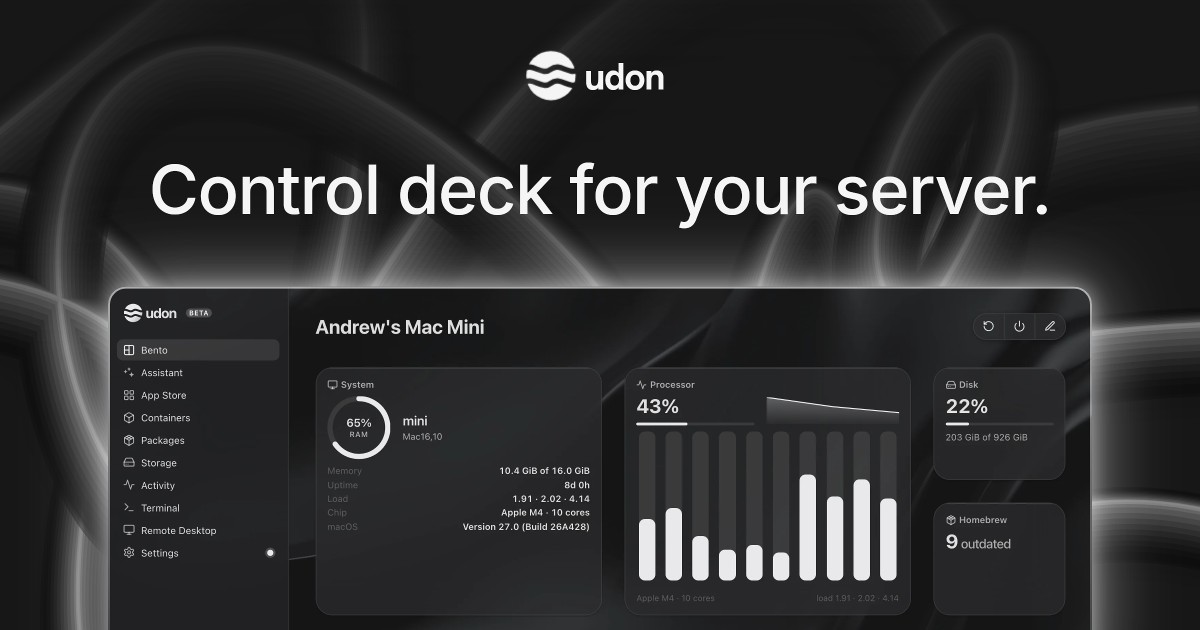
Udon is a control deck for a Mac home server. It turns an Apple Silicon Mac into a home for your files, photos, media, and apps, letting you keep your digital life on hardware you own and manage it all from your browser. It is built for people who want to self-host without leaving the Mac ecosystem: instead of a dedicated NAS, a Raspberry Pi, or x86 server hardware, Udon runs on the Mac you already have. From a single dashboard you can install and run self-hosted applications, manage containers and packages, browse and share storage, open a terminal or the Mac's own desktop remotely, and watch live system activity. An optional AI sysadmin can install apps, check the server, or investigate a problem, and a mobile companion app for iPhone and Android is coming soon.
macOS has no dashboard for running self-hosted apps, so anyone who wants to host their own media, photos, or files on a Mac usually falls back to manual SSH work and a container tool such as Portainer, or buys dedicated hardware. Udon adds the missing control layer. A Mac mini idles at a few watts, runs near silent, and still has power to spare for media, photos, and a dozen containers, which makes it a practical always-on home server. Udon exists so that the Mac keeps working as a normal Mac while also serving your files and apps, giving you a single browser-based place to run and monitor everything rather than juggling command lines and separate tools.
The AI sysadmin is the feature that sets Udon apart. You can ask it to install apps, check your server, or investigate a problem, and it responds through the dashboard. It is optional and stays off until you turn it on. You choose which AI provider to connect, or run a local model on the same Mac: Udon supports an Anthropic or OpenAI API key, a coding CLI such as Claude Code or Codex, or a local model. By default the assistant asks before every change, and it records its actions in an audit log, so you stay in control of what happens on your machine. This turns routine server administration, which normally requires knowing command-line tools, into a conversation.
Containers and Packages let you choose the software your Mac runs. Udon manages Docker images and Homebrew packages in one place, so system utilities installed through Homebrew and containerized applications live under the same roof. It runs standard images from Docker Hub, GitHub Container Registry, or any other registry, on Apple Container (Apple's native runtime) or OrbStack (Docker-compatible). On OrbStack you can also build compose stacks in the visual Composer, which means multi-container setups can be assembled and adjusted graphically instead of by hand-editing configuration.
Terminal and Remote Desktop bring your Mac within reach from any browser. You can work on the machine from anywhere, with its terminal and its desktop both available, and your terminal sessions stay open between visits so you can pick up where you left off. Storage and Sharing is the other half of the everyday workflow: keep your files on your own drives, browse and preview them, check drive health, and share folders across your home network as SMB shares. Together these features mean the Mac's files, screen, and shell are accessible without sitting in front of it.
The App Store lets you build a photo library, stream your media, or organize documents at home by installing self-hosted apps with their settings pre-filled, or by finding more on Docker Hub and Homebrew. Tailscale lets you take your apps and files with you while your Mac stays home: you connect over your own Tailscale network, and the dashboard gets trusted HTTPS. Activity gives you an at-a-glance picture of how your Mac is doing, following CPU, memory, network, and power use live and showing which processes are running, so you can spot heavy workloads or problems as they happen.
Udon installs with a single terminal command, curl -fsSL https://udon.sh/install | bash, and then serves its dashboard in the browser, for example at mac-mini.local:4443. Under the hood it runs containers on Apple Container or OrbStack, and it manages Homebrew packages alongside them. The Mac keeps working as a normal Mac. Udon runs on any Apple Silicon Mac (M1 or newer) with macOS 26 or later, including Mac mini, Mac Studio, MacBook, and iMac; Intel Macs are not supported. Licensing is tied to your Mac's serial number, so there are no accounts to create.
The benefit is ownership without administration overhead. Your files, photos, and media stay on your Mac rather than in someone else's cloud, and the dashboard is served over HTTPS while remote access runs over Tailscale, your own private network. If you connect a cloud AI model, it sees what you ask the assistant to work on, which Udon states plainly. Because it is a one-time purchase, there is no subscription to renew, and updates are included. Terminals that persist between visits, live system stats, drive health checks, and the audit log all reduce the friction of running a server at home.
Concrete uses follow the apps people host: stream media with Jellyfin or Plex, back up photos with Immich, sync files with Nextcloud, keep passwords in Vaultwarden, block ads for the whole network, archive documents with Paperless, and automate it all with n8n. Udon can also host your development environments and coding agents, which you reach from a laptop or iPad anywhere. The App Store's pre-filled settings make these installs quicker, and compose stacks on OrbStack let the more involved setups be assembled visually.
Udon is aimed at people who want to own their digital life and are comfortable starting from a Mac, particularly owners of a Mac mini, which is described as the usual pick for an always-on home server because it is small, quiet, and draws a few watts at idle. It integrates with Docker Hub, GitHub Container Registry, OrbStack, Apple Container, Homebrew, Tailscale, and AI providers including Anthropic, OpenAI, coding CLIs such as Claude Code or Codex, and local models. Udon is free for 5 days with no card required; every feature is included and the trial starts when you install. After that, a lifetime license is $29 one-time (listed at $49, saving $20, 41% off for early supporters), includes every feature and updates, is tied to your Mac's serial number, and comes with a 14-day money-back guarantee. When the trial ends the dashboard locks until you buy a license, while containers keep running and your files and settings stay as they are.
Udon's core promise is simple: own your digital life, starting with your Mac. It brings self-hosted apps, containers, storage, monitoring, remote access, and an optional AI sysadmin into one browser-based control deck, so an Apple Silicon Mac can serve your files and media at home while remaining a normal Mac. For anyone comparing it with Unraid, TrueNAS, Proxmox VE, a Synology NAS, Umbrel, CasaOS, or OpenMediaVault, or simply managing things manually with SSH and Portainer, Udon offers a Mac-native, pay-once alternative.
Publisher
A
admin
Launch Date2026-10-09
Platformweb
Pricingpaid
Tech Stack
#macOS#Apple Silicon#Apple Container#OrbStack#Docker#Homebrew