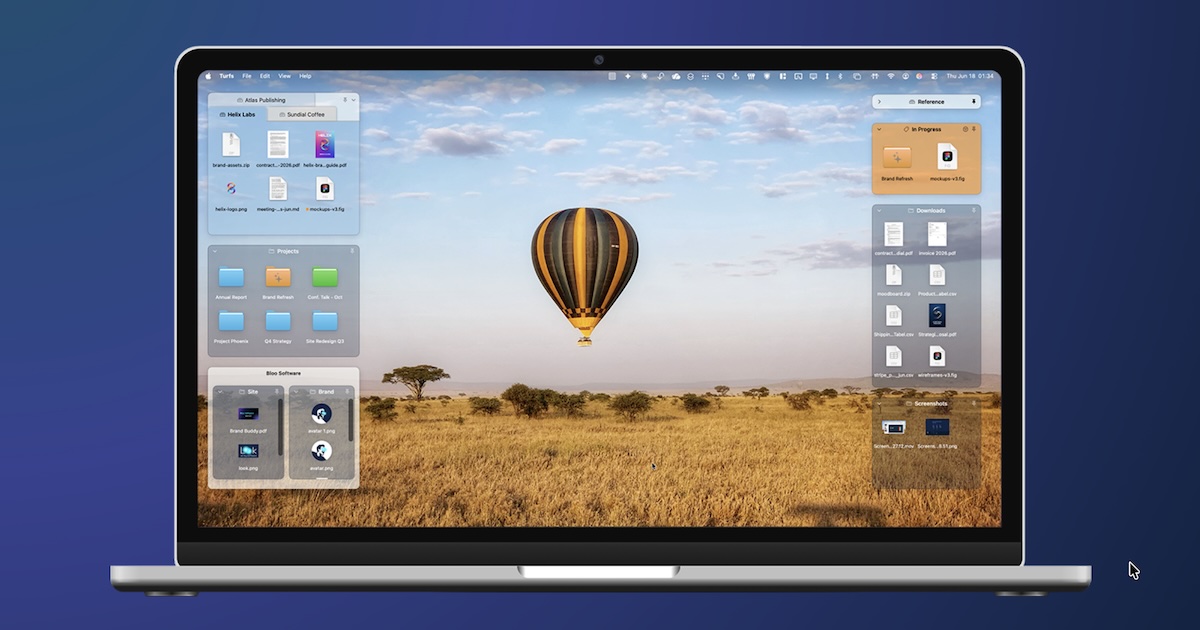
Turfs is a native desktop organizer for macOS that lets you use the desktop to keep content from across your Mac accessible and organized in defined areas — or simply to keep it clutter-free. Instead of scattering loose files across the screen, you carve the desktop into labeled areas called turfs, each with its own behavior, and arrange what belongs in each one with intent. It is built for Mac users who want their wallpaper to still show through, Mission Control to keep working, and their desktop to finally do something. Turfs requires macOS 14 Sonoma or later, with Apple Silicon recommended.
The Mac desktop has barely changed since 2007 and it never grew up the way the Windows desktop did. Windows users have had Stardock Fences since 2009 — twenty million downloads — and a whole generation of PC users learned what a desktop could be: defined areas, labeled groups, files arranged with intent. Many of those users then switched to Mac and waited. Apple shipped Stacks, which group by file type, a scheme that rarely matches how anyone actually thinks, and Tags, which are invisible until you open a sidebar. Third-party attempts came and went: iCollections shipped, stalled and faded, and Stardock looked at porting Fences to Mac and walked away. The Mac desktop became the last place a Windows refugee felt homesick, and in 2026 it works almost exactly the same as it did in 2007. Turfs exists to close that gap natively.
Turfs comes with three turf types, and the type you choose determines what happens to a file on disk. A folder turf is backed by a real folder: when you drag a file in, it moves into that folder, so the filesystem stays clean and the file has a real home that is visible on the desktop. A tag turf is backed by a Finder tag: when you drag a file in, it receives the tag, and the turf shows every file carrying that tag from anywhere on your Mac, without the file moving at all. A collection turf is a virtual grouping: files you drag in appear in the turf but stay exactly where they are on disk, so nothing destructive ever happens. Together these three behaviors cover the different ways people want to organize — physically, by metadata, or purely visually — and you can mix them freely on the same desktop.
Turfs replaces Finder's own desktop icon layer with its own, and that is what makes the rest possible. Your wallpaper still shows through, Mission Control still works, and turfs stay put through Show Desktop — you choose what Mission Control does with them. Because it operates at the level of the desktop icon layer, it can never be sandboxed or sold on the Mac App Store; it is available via direct download and is signed with a Developer ID certificate and notarized by Apple. Loose icons stay loose: files that do not belong in a turf remain exactly where you put them on the desktop, and they dodge out of the way when you move a turf over them. Native behavior extends everywhere it matters — Quick Look with the spacebar, Get Info with Cmd-I, Trash with Cmd-Delete, drag to any app, alias arrows, folder paper-peek and the whole context menu. Turfs uses macOS conventions because anything less would feel like a Windows port. Quit Turfs, and the desktop returns to exactly the way macOS shipped it.
Every detail of a turf is customizable: background color, opacity, border, corner radius and label visibility, plus a hover-only mode for a clean desktop. You can snap turfs to a grid or snap them to other turfs, decide per-Space behavior so an area shows on all Spaces or is pinned to a single Space, and use tabbed turfs to keep related areas together. The defaults look good, and the customization is there when you want it. Turfs also roll up: any turf can collapse into a thin strip that shows just its name and item count, and one click or hover brings it back full-size. That makes it practical to keep references, archives and anything else you want close at hand without giving up screen space.
Overall, Turfs is deliberately local-first. It collects nothing about you or your files, requires no accounts, runs no servers and does no tracking. Its only network activity is an update check and a one-time first-run count, both of which are a fetch of a small file from GitHub containing nothing about you. Your turfs live in a single JSON file inside ~/Library/Application Support/. The app has shipped at a steady cadence — nine releases since 15 June 2026, with the most recent being 1.2.1 on 7 September — and the license key works offline with no account needed.
The result is a desktop that reads as a feature rather than a mess. Content from across your Mac becomes accessible at a glance and organized into areas that stay where you put them, instead of drifting into a pile of loose icons. Because a turf can be folder-backed, tag-backed or virtual, you decide how much structure you want and how much the filesystem should change — you can keep files exactly where they are on disk while still seeing them grouped on screen. Native macOS behaviors mean there is nothing to relearn: the keyboard shortcuts, Quick Look, context menus and drag-and-drop all work as they always have. Local-first storage means no accounts, no tracking and no servers holding your file names. And a single one-time purchase with free updates forever means the organizer does not turn into another subscription.
Turfs fits into ordinary Mac workflows. Someone who came from Windows and misses Fences can recreate that experience: a labeled area for current work, another for downloads, another for screenshots. A writer or designer can back a turf with a Finder tag so every file carrying that tag — wherever it lives on the Mac — shows up on the desktop without being moved. Someone handling a temporary batch of files can drop them into a collection turf, see them grouped, and know that nothing on disk changed. Anyone with a busy desktop can roll reference turfs and archives into strips and keep them one hover away. And because turfs stay put through Show Desktop and behave predictably in Mission Control, the arrangement survives the everyday ways people move around macOS.
Turfs is aimed at Mac users who want a defined structure on their desktop — particularly former Windows users who miss Fences, people who looked for a Mac equivalent in 2018, 2021 and 2024, and anyone who tried iCollections and found it wasn't it. It requires macOS 14 Sonoma or later and recommends Apple Silicon. It is distributed by direct download rather than through the Mac App Store. Pricing is a one-time $29 with a 10-day free trial that requires no card; the purchase includes unlimited turfs from day one, all three turf types (folder, tag and collection), full appearance customization, free updates forever, and a license key that works offline with no account needed. There is no subscription and no renewal.
Turfs brings the idea Fences proved on Windows for fifteen years to the Mac desktop: defined areas, labeled groups and files arranged with intent. It does this natively, keeps your data local, and stays out of the way until you need it — the desktop as a feature, not a mess.
Publisher
A
admin
Launch Date2026-09-22
Platformdesktop
Pricingpaid