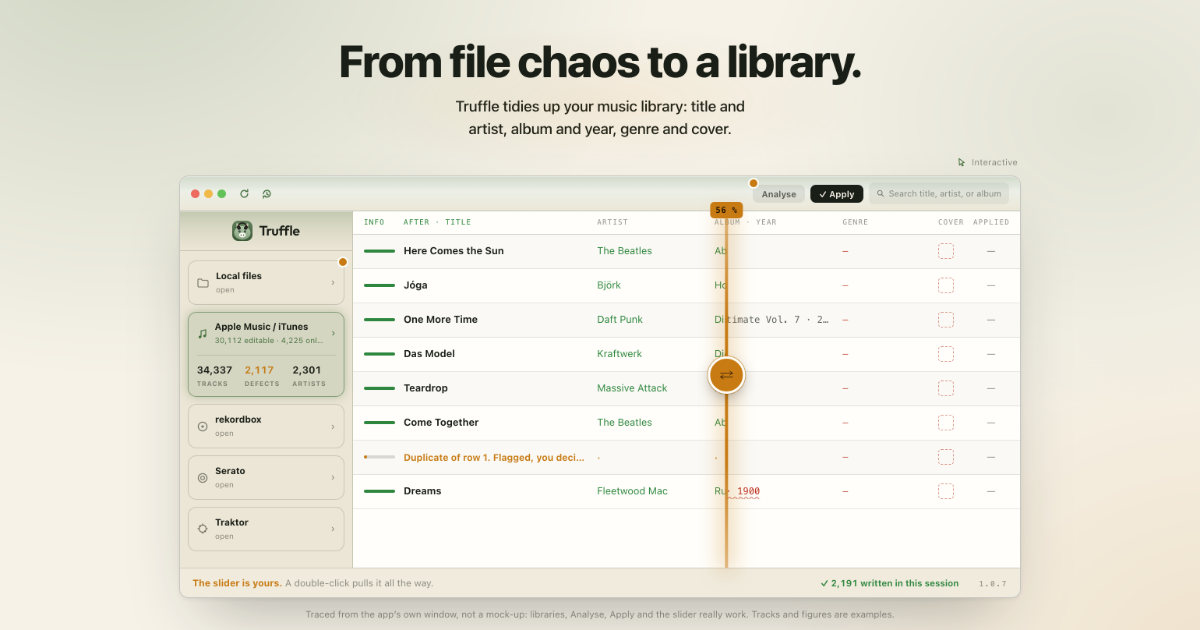
Truffle is a music tag editor for the Mac that tidies up a music library: title and artist, album and year, genre and cover. It works with the Apple Music library (formerly iTunes), with folders of local files on disk, and with the collections of rekordbox, Serato and Traktor, playlists included. Truffle recognises each track by its sound and checks eight sources to produce one suggestion per field, and it writes nothing until the user confirms. Files stay where they are: Truffle moves nothing and renames nothing, and it writes into the audio files rather than into a DJ program's database.
The starting point is usually a library that has been broken in over many years. Ripped CDs arrive without covers, accents arrive garbled — the app's own example is “Björk — Jóga”, mojibake since 2014 — titles arrive in capitals, edits carry “(ORIGNAL MIX!!)” in the name, and one album is spelled three different ways. Files are called “Track 12” or “come_together_finalFINAL.mp3”, tempo and key are missing, and the same playlist exists as Summer, Summer (1) and Summer 2. The Music app's Info window is enough for a few tracks, but with a large library it lacks a preview, a check and a way back. Truffle is built for exactly that situation: an old iTunes library from the CD days, with garbled accents and albums spelled three ways.
Recognition is the core of the product. Even when the file gives nothing away, Truffle recognises the track by its sound: an audio fingerprint, unambiguous and unaltered, using Apple's Shazam recognition (ShazamKit). Around that fingerprint sit eight sources that together give one answer per field. Audio recognition identifies the recording; Apple/iTunes supplies spelling and genre; MusicBrainz supplies album and year with evidence; audio analysis measures BPM and key locally on the device; Deezer finds the cover; Cover Art Archive confirms the cover; Beatport provides a second opinion on BPM and key; and a web lookup steps in when no catalogue knows the track. One click, done — and each of these sources can be switched off.
Covers, spelling and measurement are handled in one pass. When an album has no image, Truffle finds one up to 1000 px and, in the app's words, from the right release, with Cover Art Archive confirming it. Broken umlauts, shouting titles, “(ORIGNAL MIX!!)” and albums spelled three ways all come back into shape. Tempo and key are measured on the Mac straight from the audio, so no internet is needed, and above about 130 BPM the tempo is an approximation. Tempo and key are written only on an explicit click, which matters for anyone who trusts their own analysis.
Bulk edit (⌘B) sets one field to the same value across all selected tracks, finds and replaces text — regular expressions included — or changes capitalisation, and the preview shows every line before anything is written. Duplicates are recognised by title, artist, album and length and marked, with the file left on the Mac and nothing deleted without asking; duplicate playlists such as Summer, Summer (1) and Summer 2 are merged. Album coherence finds tracks of one album that disagree and sorts the changes by kind: missing album artist, different spelling, missing year, a compilation without its checkmark, a missing cover. Albums with several years are gone through one by one, because on best-ofs that is often intended.
The overall approach is preview first, write second. The interface is traced from the app's own window rather than a mock-up: libraries are listed with track and defect counts, Analyse runs, Apply writes, and a slider sits between the two, with a double-click pulling it all the way. Nothing is written until the user confirms, and the history knows every change: searchable, restorable one by one or as a whole session. Before Truffle writes a file it backs up the original. Only deleting is not taken back, and deleting is the user's alone.
For DJs the promise is that the collection and playlists are read without the database being touched. Truffle reads the exported XML from rekordbox with playlists included, the Serato database with crates included, and Traktor's collection.nml with playlists included. It writes into the audio files, never into the database of rekordbox, Serato or Traktor, so cues, loops, beat grids, crates and sets stay as they are and the program re-reads the tags. With Serato, cues and loops live in the file itself and Truffle writes around them. Special care is taken with DJ files: remixes and edits keep their name, DJ pool endings with tempo, key and codes are taken out of the title, the artist in the filename counts, and cues, beat grids, crates and sets stay.
Classical music gets its own handling. Besides pop, rock and electronic music, Truffle recognises classical recordings by their sound and suggests fields one by one: work titles with catalogue numbers such as BWV, KV and op.; orchestra and conductor as the recording names them; and the cover of the recording rather than just any cover. The examples shown in the app run from Beethoven's Fifth and Bach's Toccata und Fuge to Mozart's Eine kleine Nachtmusik, Debussy's Clair de lune, Grieg's Morgenstimmung, Handel's Messiah, Satie's Gymnopédie n° 1 and Vivaldi's La primavera.
Truffle works across five libraries — Apple Music/iTunes, local files, rekordbox, Serato and Traktor — and knows 17 file extensions, from mp3 via m4a and flac to aiff and wav; what it does not know, it leaves untouched. Tracks that are only in iCloud are marked with an iCloud symbol and changed details are written to the library through the Music app. Streamed tracks from an Apple Music subscription are not files on the Mac, so Truffle recognises them, excludes them from editing and says why in the list. A folder can be dragged into the window and left where it is on disk.
The outcome is order across the whole library rather than one file at a time: titles and artists that match the recording, albums that hold together as one tile, years that reflect the original release instead of a reissue, covers that come from the right release, and genres that are spelled one way. Because every write is preceded by a backup and recorded in the history, that order can be reached without losing the state a collection was in. For DJs the benefit is narrower and more valuable: cleaner tags in the files with the cues, grids and sets still exactly where they were.
Typical workflows follow the shape of the library. Someone with an old iTunes library from the CD days runs Analyse over the whole thing and accepts suggestions album by album. Someone who cannot find anything fixes genre consistency — Rap, HipHop and Hip Hop becoming 7 × Hip-Hop — in Bulk edit, checking the preview line by line. A file called “Track 12” or “AUD_0037.mp3” gets a title, artist and album from audio recognition. A DJ prepares a set by repairing tags in the files while the rekordbox or Traktor database stays closed. A classical collection gets work titles with catalogue numbers and the conductor as the recording names them.
Pricing is a one-time €59.99 as an in-app purchase in the Mac App Store: once, for life, no subscription, updates at no extra cost, on every Mac signed in with the Apple Account. Before buying, the app is a free download that analyses 100 tracks and writes 20 in total, with no feature locked. Truffle requires a Mac with Apple Silicon and macOS 14 (Sonoma) or later, comes from the Mac App Store and runs in the macOS sandbox. There is no account with the vendor, no telemetry, no ads and no tracking; only the metadata of the track being checked and, for audio recognition, a short fingerprint of the audio leave the Mac. The app and the website are available in 20 languages, and there is no Windows or Android version.
Truffle's value proposition is narrow and complete: take a messy Mac music library — Apple Music, folders on disk, or a DJ collection — and put it back in order from the sound of the tracks themselves, with eight sources agreeing on one suggestion per field, a preview before every write, and a history behind every change.
Publisher
A
admin
Launch Date2026-10-24
Platformdesktop
Pricingpaid
Tech Stack
#ShazamKit#macOS 14 Sonoma#Apple Silicon