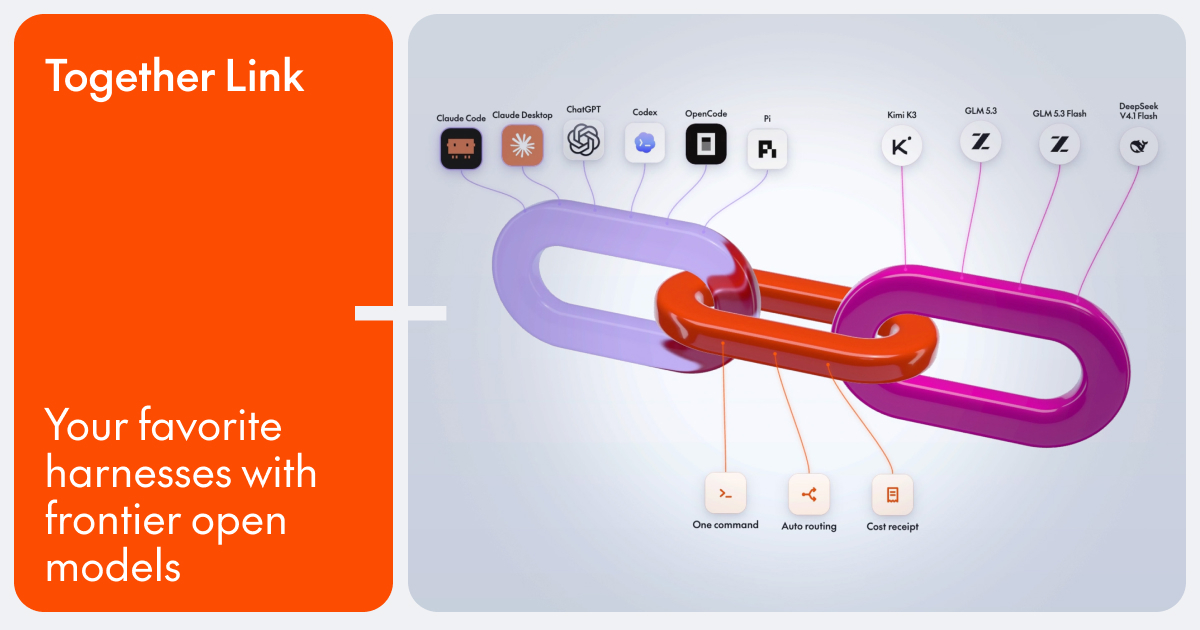
Together Link is a free, open-source tool from Together AI that connects the coding agent you already use to open models running on Together AI. Instead of switching editors, terminals, or chat apps, you keep the harness you already know — Claude Code, Claude Desktop, Codex in the ChatGPT app, ChatGPT Desktop, OpenCode, or Pi — and point it at open models such as Kimi K3, GLM 5.3, MiniMax M3, and DeepSeek V4.1 Flash. It is aimed at developers and teams who want to run their everyday coding work on affordable open models while keeping their existing login, settings, history, and habits exactly where they are. Together Link is currently in beta.
Coding agents have become the place where a lot of development work actually happens, and most of that work runs on closed frontier APIs priced per token. Together Link starts from a simple observation on its own site: open models cost a fraction of closed frontier APIs per token, so moving a team's everyday coding work onto them cuts the bill by more than half. At the same time, open models such as GLM 5.3, Kimi K3, DeepSeek V4.1 Flash, and MiniMax M3 are described as handling real coding work at frontier level, and because they ship with open weights they are fully in your control. Together Link exists to make that swap practical without asking anyone to leave the tool they already use.
Auto Router is the default in Together Link, and it is the setting that decides which model handles a task. When you set the model to Auto, the router reads the first task in each session and weighs it on the way through: quick work goes to a low-cost model such as GLM 5.3, while harder problems are sent to a more capable one. If you use an Anthropic API key in Claude Code or Claude Desktop, the router routes between Opus 5.5 and GLM 5.3. The site frames the trade-off in three phrases: per-session routing, lower cost, and frontier when needed. You are never locked into the router, either — you can also pick a model yourself, right from your agent's model menu.
Getting started is deliberately minimal and is described as one paste, six agents, and no config edits. You install it in one quick command, then run Together Link in your terminal to launch your agent. The site lists six supported harnesses: Claude Code, Claude Desktop, ChatGPT Desktop, Codex, OpenCode, and Pi. OpenCode support requires version 2 or later, and Pi support requires version 0.80.8 or later. Each harness launches with its own command, such as togetherlink claude. Existing configuration files are left alone rather than rewritten.
Together Link prints a receipt for every session. Every proxied session prints its token totals and dollar totals when you leave, so the cost of a piece of work is visible the moment it finishes. A usage report shows the last seven days of spend, and the togetherlink usage command shows your running total. You can also switch back anytime: profiles are reversible, your config is untouched, and a single command takes you back to your own setup. The site states that Together Link cuts coding agent spend by 50-80% compared with running every session on Opus 5.5.
Under the hood, the approach differs slightly by harness, but the destination is the same open model lineup. For Claude Code, the gateway translates Claude Code's traffic to Together, you stay signed in, and the session prints its cost on exit. For Claude Desktop, one command installs a reversible profile and reopens the app with the Together lineup in its model menu for Chat, Cowork, and Code alike. ChatGPT Desktop opens on a separate Together Link profile and is turned off with togetherlink chatgpt off. For Codex, one command adds Together as a provider in the Codex CLI on its own profile, switched off with togetherlink codex off. OpenCode already supports Together, so one command adds your key and the router so every open model lands in its model list. For Pi, one command registers Together in Pi's model list so you can cycle between open models mid-session without leaving the terminal. Terminal agents get settings that last only for that session, while Claude Desktop and ChatGPT Desktop use their own profiles that switch back with one command. Longer answers live in the docs, which your agent can read on its own.
The benefits come down to three stated reasons to use it. First, you keep the harness you already know: Claude Code, Claude Desktop, Codex in the ChatGPT app, OpenCode, and Pi, with your login, settings, history, and habits staying exactly where they are. Second, you cut agent spend — open models cost a fraction of closed frontier APIs per token, and moving your team's everyday coding work onto them cuts the bill by more than half. Third, you get frontier quality on models you control, because open weights keep those models fully in your hands. Alongside those, automatic routing means the cheap model handles the easy work and the capable model is reserved for hard problems, while the per-session receipt and seven-day usage report make the spending visible rather than surprising.
Concrete workflows follow the harnesses listed on the site. A developer writing everyday code in Claude Code can point the gateway at Together, stay signed in, and see the session cost printed on exit. A Claude Desktop user can install a reversible profile and use the Together lineup in the model menu for Chat, Cowork, and Code. A Codex CLI user can add Together as a provider on its own profile while keeping sandbox and approval settings. An OpenCode user can add a key and the router so open models land in the model list beside other providers. A Pi user can register Together in the model list and cycle between open models mid-session without leaving the terminal. A team can watch the usage report to see the last seven days of spend as it moves everyday coding work onto open models and cuts its coding agent bill by 50-80% compared with running every session on Opus 5.5.
Getting started requires a Together AI API key, macOS or Linux, and a supported coding agent. Installation runs with curl -fsSL https://link.together.ai/install | bash, and togetherlink configure adds your key. Together Link itself is a free, open-source tool; you pay only for model usage at Together AI's per-token rates. Published model pricing includes Kimi K3 at $3.00 in and $15.00 out, GLM 5.3 at $1.40 in and $4.40 out, MiniMax M3 at $0.30 in and $1.20 out, and DeepSeek V4.1 Flash at $0.30 in and $1.20 out. Switching between models or back to your original setup is a command away, so nothing about the arrangement is permanent.
Together Link's core promise is simple: pair your favorite coding agent with affordable open models, keep the harness, login, settings, and history you already rely on, and let automatic routing, per-session receipts, and usage reporting keep costs transparent and down.
Publisher
A
admin
Launch Date2026-10-10
Platformdesktop
Pricingfree
Traffic Insights
Month2026-10
Estimated Visits800.9K
MoM Visits GrowthN/A
Avg Time on Site-
MoM Time GrowthN/A
Global Rank#591,598
Bounce Rate-
Updated 2026-10-10