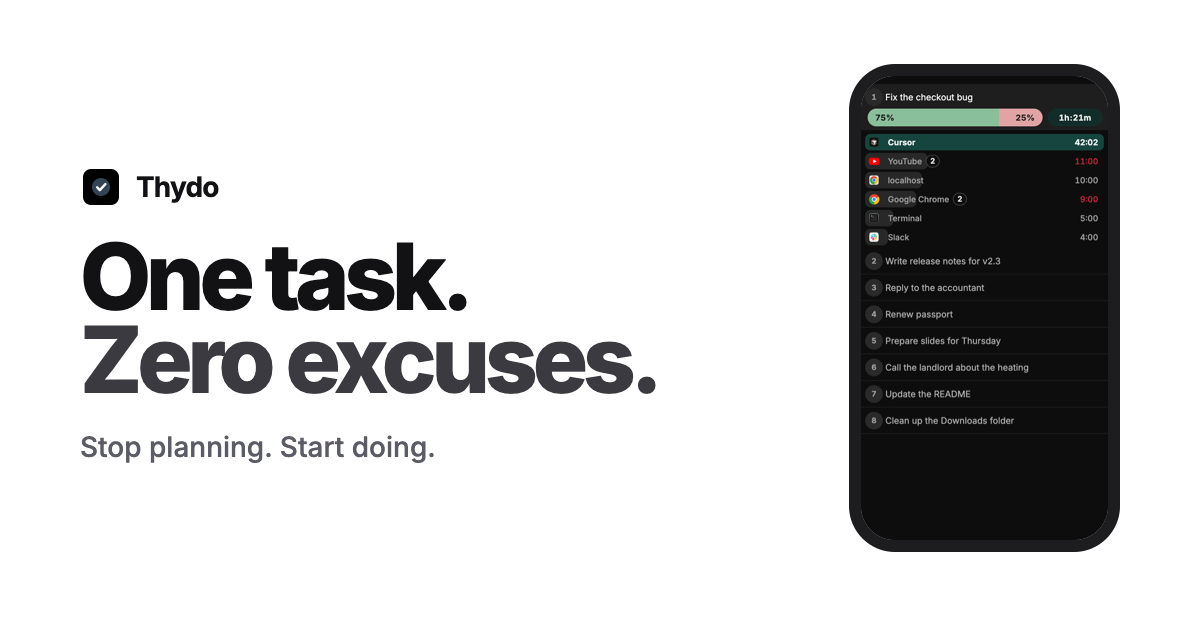
Thydo is a productivity tool that turns your phone into a procrastination beater. It pairs a lightweight desktop app for macOS and Windows with mobile apps for Android and iOS, so the apps and websites you use on your computer are tracked against the task you are supposed to be working on. Your phone, propped on a stand beside the monitor and plugged in with the screen facing you, becomes a live display of how your day is actually going. Thydo is built for people who already know what needs doing — developers, office workers, anyone who sits down at a computer with every intention of getting something done — and who want an honest, real-time view of where their attention goes, plus a reminder when it wanders.
The problem Thydo addresses is not planning, it is execution. The maker, a developer, describes having tried the lists, tried organizing the lists, and probably spent too much time thinking about how to organize the lists — and concluding that the problem was never really knowing what to do, it was actually doing it. The site cites a Workplace Productivity Report from 2019, based on a survey of 1,057 US office workers, in which 53% of respondents admitted using technology to procrastinate at work, and notes that was seven years ago, before doomscrolling was even a thing. Thydo is positioned squarely at that gap between writing something down and getting it done, closing it with one task at a time, a clear view of where time goes, and a small reminder when attention slips.
The first pillar is the priority task list. Thydo asks you to pick your next task, and the task at the top of the list is treated as the one that matters now. You add, edit, and reorder tasks in the web app on your computer, where a keyboard and mouse make organizing faster, and the list syncs to your phone so the same prioritized queue is in front of you on both devices. Because only the top task is the active one, the tracking and the statistics all attach to a single, concrete piece of work rather than to an abstract category of busyness. That focus makes the feedback meaningful: instead of a vague sense of having been on the computer all day, you get a productivity and procrastination split for the specific task you chose to work on.
The second pillar is automatic activity tracking. The lightweight desktop app for macOS or Windows automatically tracks which applications and websites you are using, and attributes that time to the task at the top of your list. On Windows, you also install a browser extension for Chrome, Edge, or Brave to track individual websites; without it, the Windows app tracks the browser as an application without identifying individual websites. The extension reports the focused regular tab's URL and title to the Windows app only — it does not read page contents, browsing history, or keystrokes, and there is a published extension privacy policy. You enable website tracking explicitly from the extension menu after reading a data disclosure, and you can pause it again from the same window, since the extension starts with tracking off. Optionally, you can allow the extension in Incognito or InPrivate windows to count that time, which Thydo records as "Incognito" while omitting private tab URLs and titles.
The third pillar is visibility. The task view shows time on the task at the top of your list, split into productivity and procrastination, app by app, with activity bars for each application and grouped browser activity and procrastination times shown in red. The Today view, reached by tapping Today in the bottom toolbar on the phone, shows your whole day — every app, every site, every minute. A productivity bar for the current task displays the percentage split between productive time and procrastination alongside the total time spent on the task, so a glance at the phone tells you whether the last hour went the way you intended.
Underneath the stats sits a simple rules engine: your rules, your productivity. You decide which apps and websites count as productive, so working on a website can be marked productive while watching movies in VLC can be marked as procrastination, and Thydo follows your rules. Desktop apps start as productive and websites start as procrastination, and one switch flips either designation. There is no guessing and no judging — the classification is whatever you say it is, which means the numbers reflect your own definition of work rather than a generic blocklist.
The final pillar is the interruption itself. You set an alert delay in seconds, and when you have been distracted for too long Thydo shows an alert on your phone and plays a sound. The alert asks whether the activity is helping your task and offers three responses: pause your task, close the alert, or mark the activity as productive. The sound repeats until you choose one of them, which makes it hard to simply ignore the phone and keep drifting. It is a small mechanic, but it converts passive time reporting into an active intervention at the moment the distraction is happening.
Putting it together, the workflow is deliberately short. You install and connect the desktop app, put your phone on a stand near the screen, and open the Thydo app. Thydo then tracks your desktop app and website activity for each task. You plan in the web app, where changes sync to your phone, work on the task at the top of the list, and watch the productivity bar in real time; when procrastination goes too far, the phone reminds you to return to work. Windows users get detailed installation instructions covering Install.cmd, approving the computer, keeping Thydo running in the notification area, loading the unpacked browser-extension folder in Developer mode, confirming that "Thydo browser activity" appears and is enabled, repeating the process in each browser used, and keeping the selected folder in place. Troubleshooting guidance covers checking that Thydo is connected and tracking is not paused, re-running browser tracking setup, reloading the extension, avoiding multiple browser profiles that can interfere, and disabling the extension in every browser before upgrading the Windows app.
The intended outcome is honesty followed by better habits. Thydo's own framing is to track your progress, be honest with yourself, and build better habits based on results — knowing exactly which activity slowed you down rather than relying on a feeling. Because every app and site is attributed to a task and colored red or green according to your own rules, the day stops being a blur and becomes a record you can act on. The reminder then converts that record into a correction in the moment, and the single priority task keeps the correction pointed at the thing that actually matters now.
Concrete scenarios follow from that. A developer debugging a checkout bug can keep that task at the top of the list and see precisely how much of the session went to the editor, the terminal, and Slack, and how much went to YouTube or a news site. Someone who works on a website can mark that site productive and stop being penalized for it. A person who loses track of time in a browser gets a phone alert with a sound after a configurable delay, and can pause the task or reclassify the site on the spot. Anyone reviewing their day can open Today to see every app, every site, every minute, and compare the work they planned with the time they actually spent.
Thydo runs on macOS and Windows desktop apps, and on Android and iOS mobile apps, with a web app for managing the task list and viewing live productivity stats. The browser extension for Chrome, Edge, and Brave is required on Windows only for individual website tracking. There is one plan, priced at five cents a day and €18 billed annually, and it includes the priority task list, desktop activity tracking for macOS and Windows, live productivity stats on web, Android, and iOS, and procrastination reminders on your phone. A 14-day free trial is available with no credit card required, and the site's own summary of the value is that if Thydo helps you reclaim even a few minutes, that is a pretty good deal.
The takeaway is narrow and deliberate: Thydo does not try to tell you what to work on, it makes it harder to avoid the thing you already chose. One priority task, tracked apps and websites, live productivity versus procrastination, and a phone that speaks up when you drift — that is the whole product, and it is aimed at the gap between writing it down and getting it done.
Publisher
A
admin
Launch Date2026-11-24
Platformweb
Pricingpaid