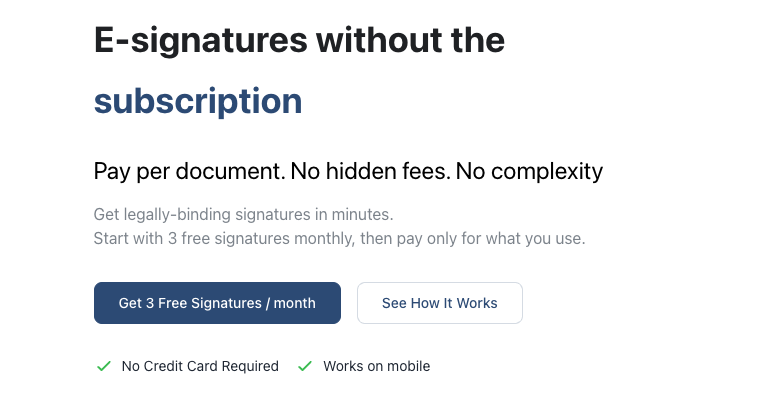
SignWith is an electronic signature product built around a pay-per-document model rather than a monthly subscription. You upload a document, add the people who need to sign it, place signature, date and text fields for each of them, send it, and then receive the signed copy back together with a Certificate of Completion. The product is aimed at founders, CPAs, consultants, agencies, HR teams and other businesses that need compliant e-signatures but do not send enough documents to justify a recurring subscription. It is used by more than 1,000 businesses worldwide, and the people who sign your documents do not need an account, an app or a password — they open the link in their email and sign in their browser on any phone, tablet or computer.
Traditional e-signature platforms are usually sold as monthly or annual subscriptions, which means someone who sends only a handful of documents a month pays the same as a heavy user. The website frames the product directly against that model: pay per doc, not per month. SignWith's own estimate in the pricing section compares a typical $20/month subscription at $240/year with a SignWith user sending about five documents a month, who would pay $19/year with three free documents included every month plus one Pro pack when needed. The intent is to make professional e-signatures affordable for occasional and low-volume senders — the freelancer sending a retainer agreement, the CPA returning an IRS response, the consultant sending a statement of work — without asking them to commit to a plan they will not fully use.
The core workflow is deliberately short: four steps from upload to signed copy. You drag in a PDF, JPEG or PNG with no need to rebuild the document, then add your signers and place fields for each of them. SignWith supports six field types — signature, initials, date, text, number and checkbox. You decide who signs first by setting a signing order; the next signer is only invited once the person before them has signed. If you are the only signer, Self Sign lets you place your own fields, sign and download the finished document in about a minute. Multiple people can sign one document, each with their own fields, and every signer can open, review and sign on a phone, tablet or computer without installing anything.
Verification and evidence are included on every account, including the free one. Email OTP verification asks a signer to enter a six-digit one-time code sent to their email before the document opens, so a forwarded link is not enough to access it. Behind the scenes, every step is logged in an audit trail with its timestamp, IP address and browser details, from the first email to the last signature, while live status tracking shows when each document was sent, opened, viewed and signed. Every signed document comes with a Certificate of Completion recording who signed, when and from where, plus a SHA-256 fingerprint that shows the document has not changed since signing. Documents are encrypted in transit and at rest and stored on AWS, and consent and signing records are designed to be compliant with e-signature laws such as the ESIGN Act and UETA.
As a document library grows, folders keep contracts organised, so client work and signed agreements stay separated as the library expands. Templates let you reuse a contract repeatedly, and the MCP documentation describes an assistant turning a contract into a template with signature and date fields, duplicating an NDA template for a new client, or archiving templates that are no longer used. Automatic reminders chase signers who have not yet signed, up to three times, until the document is done, which removes the need to track down individuals manually. Combined with live status tracking, this means you can see at a glance what is pending and what is complete, and never have to guess whether a document is sitting unread in someone's inbox.
The distinguishing feature of SignWith is its pricing model. Every account can sign three documents free each month with no credit card required, and after that you buy one-time credit packs: Basic gives 10 credits for $9 at $0.90 per signed document, Pro gives 25 credits for $19 at $0.76 per document, and Business gives 50 credits for $29 at $0.58 per document. One credit covers one signed document however many people sign it, and credit packs are valid for 12 months. There is also a Lifetime Deal at a one-time $199 payment, reduced from $299, with unlimited signed documents that never expires, and a custom Enterprise option for large teams with volume discounts, custom integration, dedicated support and a custom SLA. Because there is no subscription, there is nothing to cancel: the free monthly documents renew automatically and credit packs are one-time purchases.
SignWith also exposes the same document workflow to software and AI assistants. A REST API lets you send PDFs for signature from your own product, follow every signer and download the signed copy with its audit trail, with cURL, Node and Python examples in the documentation. Signed webhooks tell your server the moment anything changes, with events for sent, viewed, signed, declined and completed. Separately, a remote MCP server at app.signwith.co/mcp connects AI assistants such as Claude, ChatGPT, Cursor, VS Code and Claude Code, offering 18 tools for documents, signers and credits. The assistant can draft a document, add signature fields, send it with email verification, report who has signed, send reminders or cancel a request, and it asks before it sends, reminds or cancels anything. You sign in with SignWith rather than an API key, and both the API and the MCP server use the same pay-per-document credits with no separate API plan or monthly fee.
The practical outcome is that sending a document for signature costs a fraction of a subscription and takes minutes rather than a procurement decision. Recipients never need to create an account, so there is no friction at the signing step and no support burden explaining how to register. Because OTP verification, audit trails and completion certificates are included on every account rather than gated behind an upgrade, even a single document can be sent with the same evidence trail as a high-volume account. Documents remain in your account until you delete the account, and the signed copy and its Certificate of Completion are also emailed to everyone who signed. The published customer quotes describe the product as easy to use, straightforward compared with DocuSign, and valued specifically for its pay-per-use pricing model.
The website lists the document types people sign with SignWith: client contracts such as agency retainers and project agreements, service agreements covering scopes, renewals and change orders, legal documents including consents, declarations and notices, sales proposals and accepted commercial terms, one-way and mutual NDAs, HR documents such as offers, policies and acknowledgements, real estate applications, disclosures and approvals, and financial documents including authorisations and tax responses. It also covers waivers, authorisations and approvals more generally, on the principle that if it needs a signature, you can send it. Customer stories on the page reference a user experience designer and consultant sending client contracts, a startup founder and agency owner using it for agency contracts, a CPA professional sending an IRS response, and founders using it as a DocuSign alternative and for team onboarding.
SignWith is positioned for founders, CPAs and consultants, and the page notes it is rated five stars by founders, CPAs and consultants — along with businesses that send a modest number of documents each month. The customer logo wall names Express Employment Professionals, Paul Davis Restoration, Buckner International, Alliance Aerospace Group, Erlang Ecosystem Foundation, Lowdefy, Crossbeam Communications, Cold Brew Studios and AeroSync Digital among the businesses using it. Signers themselves only need a browser, so the delivery channels are the web app plus the API and MCP routes for developers and AI assistants. Support and sales contact run through team@signwith.co, and Enterprise enquiries are routed to a conversation with the founder.
In short, SignWith takes the e-signature workflow most businesses already know — upload, add signers, place fields, send, track, collect the signed copy — and removes the subscription from it. Three free documents a month, credit packs from $9, a one-time lifetime option, and features including OTP verification, signing order, audit trail and Certificate of Completion available on every account. That combination is the product's core value proposition: professional, evidence-backed e-signatures priced per document.
Publisher
A
admin
Launch Date2026-10-17
Platformweb
Pricingfreemium
Tech Stack
#AWS