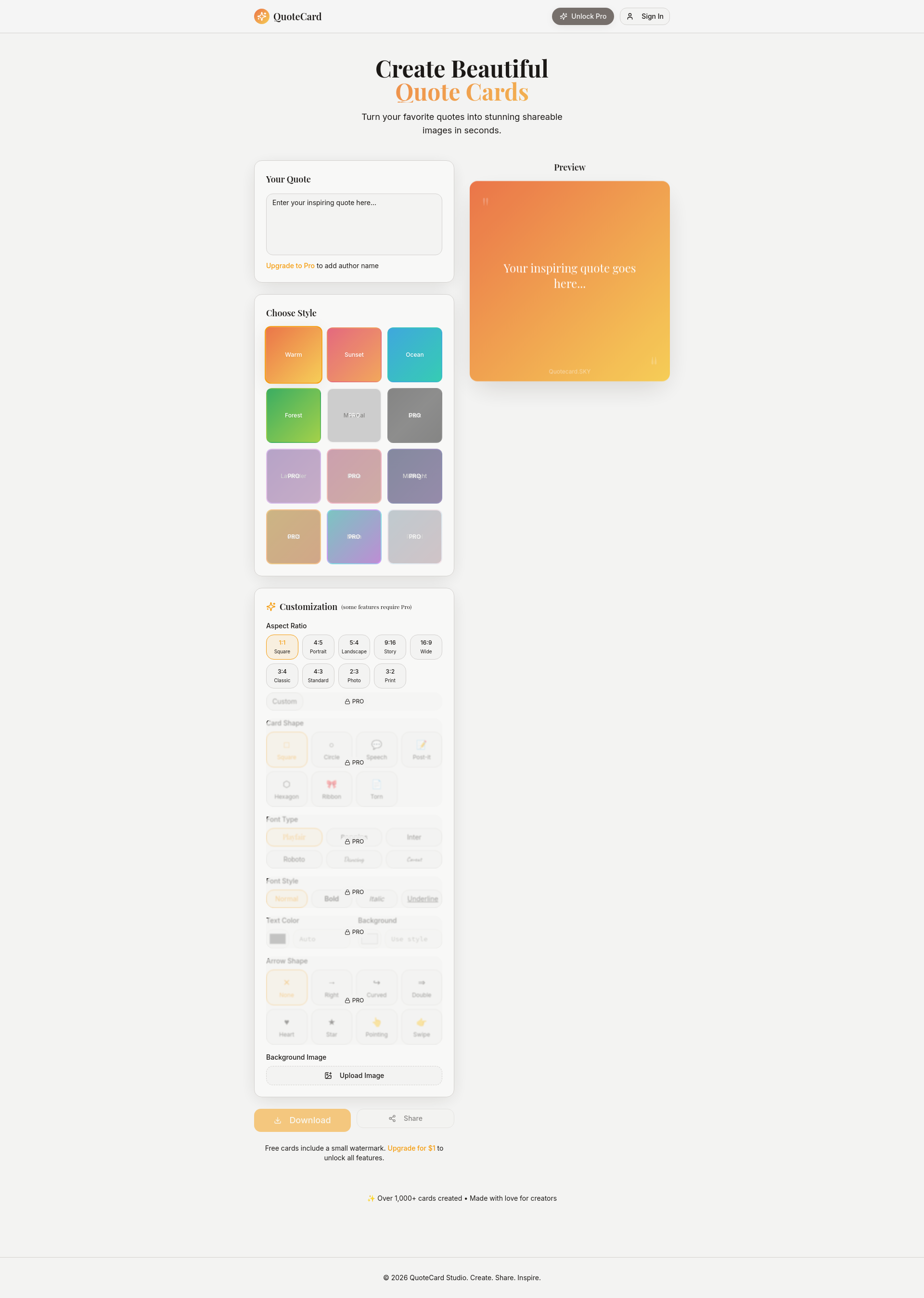
QuoteCard is a dedicated design studio for transforming quotes into visually engaging images. Unlike general graphic design tools, it focuses entirely on quote creation, offering a streamlined workflow for authors, content creators, and social media managers. The core value is speed: users input a line of text and instantly see a polished card, ready for sharing. It eliminates the need for complex software or design skills, making quote imagery accessible to everyone. The product lives at the intersection of simplicity and customization, providing just enough controls to personalize without overwhelming the user. This makes it ideal for anyone who regularly posts inspirational, motivational, or thought-provoking content on platforms like Instagram, Twitter, or Facebook.
The primary pain point QuoteCard solves is the friction of creating consistent, high-quality quote visuals without a design background. Many people want to share impactful sentences but end up with plain text posts or poorly formatted images that look unprofessional. QuoteCard removes this barrier by offering a purpose-built workflow: pick a quote, choose from curated style presets, and download in seconds. This matters because visual presentation directly affects engagement—a well-designed quote card can increase shares and saves. For businesses and influencers, branded quote cards reinforce identity; for individuals, they add a layer of polish that reflects care and thoughtfulness.
QuoteCard’s first major feature group is Style Presets. The interface lists eight preset themes: Warm, Sunset, Ocean, Forest, Minimal, Dark, Lavender, Rose, Midnight, Gold, Neon, and Pastel. These are not just color palettes but complete visual moods that adjust background gradients, text colors, and overall atmosphere. For example, selecting ‘Sunset’ applies a warm gradient and complimentary text color instantly. This matters because users can switch between styles with a single click, seeing a live preview of their quote in different contexts. It eliminates guesswork and speeds up creative iteration, allowing users to find the perfect look without manual tweaking.
A second key feature is the Aspect Ratio and Card Shape customization. QuoteCard offers ten aspect ratios: 1:1 Square, 4:5 Portrait, 5:4 Landscape, 9:16 Story, 16:9 Wide, 3:4 Classic, 4:3 Standard, 2:3 Photo, and 3:2 Print. Additionally, card shapes include Square, Circle, Speech bubble, Post-it note, Hexagon, Ribbon, and Torn edge. Pro users can also set a custom aspect ratio. This versatility ensures the output fits any platform—from Instagram Stories (9:16) to Twitter cards (16:9) or printed materials (3:2). The variety of shapes adds a creative dimension, making each quote feel unique and shareable beyond a simple rectangle.
admin
QuoteCard also includes advanced typography and text controls. Users can choose from font types like Classic (Playfair, Poppins, Inter, Roboto) and Handwritten (Dancing, Caveat, Homemade, Shadows, Kalam, Indie, Marker, Sacramento, Gloria, Architect). Font styles available are Normal, Bold, Italic, and Underline (Pro). Text alignment can be Left, Center, Right, or Justify. Pro users can change text color and background color individually. This depth allows precise alignment with brand guidelines or personal aesthetic. For instance, a motivational speaker might use a bold, handwritten font to convey warmth, while a business account opts for clean, classic sans-serif for professionalism.
The product’s workflow is straightforward: the user sees a blank canvas with placeholder text “Your inspiring quote goes here...” and a live preview. Clicking the menu icon reveals customization panels. All changes update in real time. The main actions are customizing the quote text, style, aspect ratio, shape, font, alignment, and background. Pro features unlock additional elements like AI Brand & Signature—allowing users to add a brand name, logo, signature text, or AI-generated handwritten signature. The system includes a tip that if no AI image is supplied, the signature renders in the chosen handwritten font. After designing, users can download the card or share it directly. Free cards include a small watermark, removable with a $1 upgrade.
Concrete use cases include a life coach preparing daily motivational posts for Instagram Stories using 9:16 aspect ratio and ‘Sunset’ style; a writer promoting a book by turning key insights into square cards for Twitter threads; a brand manager creating consistent quote cards for LinkedIn thought leadership using custom colors and logo; a teacher designing classroom posters with ‘Torn’ shape and handwritten fonts; and a podcast host creating shareable audiogram-style quotes with ‘Speech’ bubble shape and dynamic backgrounds. The outcomes are increased engagement, stronger brand recall, and a seamless content pipeline without outsourcing design.
QuoteCard targets content creators, social media managers, authors, speakers, marketers, educators, and anyone who regularly shares written wisdom. The free tier allows limited use with watermark; the Pro upgrade costs $1 to unlock all features including custom aspect ratios, advanced styling, and AI branding. It works as a web application, accessible from any browser, with no tech stack required. The platform is built with a responsive layout, adapting to mobile and desktop. The overall takeaway is that QuoteCard fills a specific niche—quote imagery—with an elegantly simple tool that saves time and elevates visual communication, all for a minimal investment.
Content creators who regularly share written wisdom on social media, including motivational speakers, life coaches, authors, and bloggers. Social media managers at companies looking to produce branded quote graphics without a design team. Educators and public speakers who need poster-style cards for presentations or classrooms. Marketers creating thought leadership content for LinkedIn. Small business owners who want to humanize their brand with custom quotes. Freelance designers seeking a quick tool for client projects involving quote imagery.