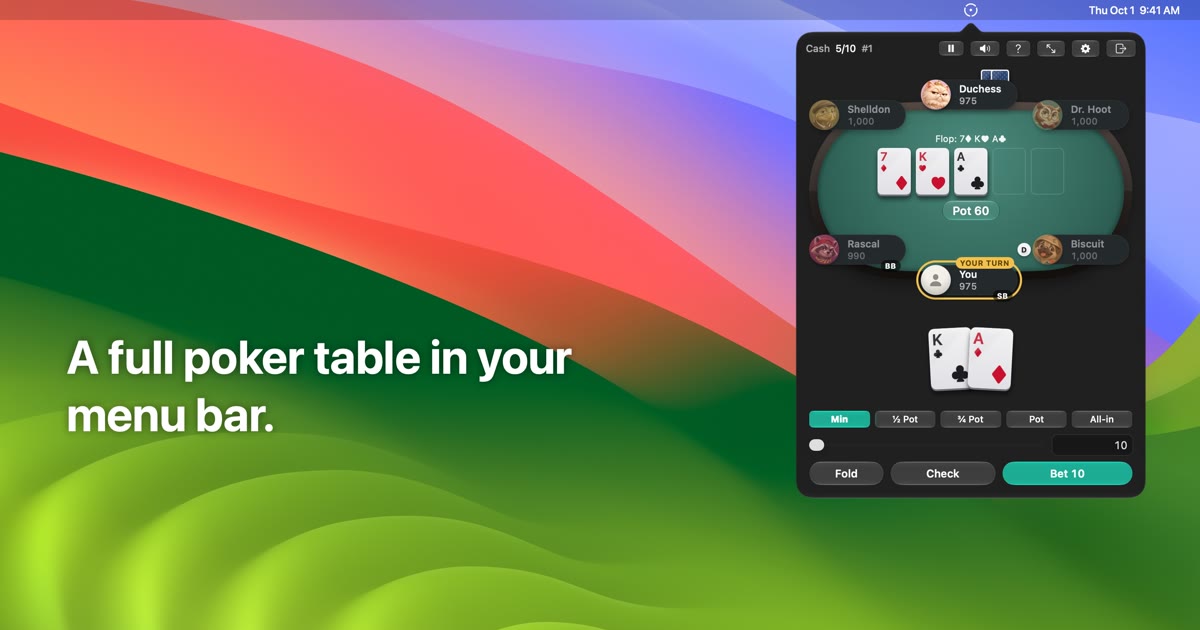
Pocket Poker is a free, native menu bar app for macOS that deals play-money No-Limit Texas Hold'em against twelve computer opponents. Click the chip in your menu bar and you are a couple of clicks from a hand against bots; close it and the game pauses exactly where you left off. The app gives you two views of the same game — a popover for quick hands and a full window when you want a bigger table — and the project page describes it as the same hand either way. It is built for Mac users who want a fast, self-contained poker table that lives in the menu bar rather than in a browser tab or a separate application window, and it is play-money only: nothing to buy, no real-money gambling, no accounts, no ads, and no tracking.
The project page frames Pocket Poker around small, interrupted moments rather than long sessions. Because the whole game lives behind a menu bar chip, a hand is always a couple of clicks away, and because the table pauses when you click away, stepping out of the game costs nothing. Persistence is treated as a core behaviour rather than an afterthought: quit mid-hand and the exact game comes back. The app carries no accounts, no advertising and no tracking, and the only thing it looks up online is whether a new version exists. It also includes a learning layer — a free practice hand with step-by-step explanations, a poker basics guide, a glossary, and a Learning mode that explains each showdown — so the table doubles as a place to pick up the game rather than only a place to play it.
There are three ways to play, each suited to a different amount of time and commitment. Quick Hand is heads-up and takes about a minute, which makes it the natural choice for a short break between other tasks. Cash Table seats between two and six players at your stakes, letting you choose the size of the table you want to sit at. Sit & Go Turbo puts six players at the table with rising blinds, adding the escalating pressure of a tournament structure. All three modes run inside the same app and behind the same menu bar chip, so switching between a one-minute heads-up hand and a fuller six-seat table does not mean switching tools or signing into anything.
Opponents are one of the app's defining features. Twelve bots fill the seats, spread across Easy, Medium and Hard difficulty, and each has its own personality. The project page names two examples: Goldie, who calls everything, and Rascal, who raises with anything. Those contrasting styles mean the table does not play the same way twice, and the difficulty tiers let you decide how much resistance you want before you sit down. Because the bots are characters rather than anonymous seats, the experience is designed to feel like a table of regulars rather than a faceless practice drill — while still remaining entirely play money.
Learning is built into the product rather than sold separately. A free practice hand walks through step-by-step explanations, so a new player can be taught the flow of a hand rather than simply watching one play out. A poker basics guide and a glossary cover the underlying terminology, and Learning mode explains each showdown — the screenshots show it naming the player's hand, Two Pair, beside their cards, and a showdown view where the winning hand is announced and the pot is awarded. For anyone who has wanted to learn No-Limit Hold'em but found real tables intimidating or existing apps cluttered, these pieces turn each session into something explainable rather than opaque.
Practical, everyday usability is covered as well. The app is keyboard-friendly, with F, C or Space, R, 1–4 raise presets, Return, and P to pause, plus an optional global hotkey so the table can be reached from anywhere. Accessibility support includes VoiceOver labels, Reduce Motion and Reduce Transparency support, and both light and dark appearances. The full-window table shows six players with the hand's action log in a sidebar, so you can review what has happened in the hand, while the Home screen presents the bankroll alongside the Quick Hand, Sit & Go and Cash Table options. These details matter for a menu bar app because the whole point is to be quick to enter, quick to read, and quick to leave.
Overall the product follows a menu bar first approach. Installing it means opening the DMG, dragging Pocket Poker onto Applications, and launching it, after which a chip appears in the menu bar. From there, clicking the chip opens the popover for quick hands, and a full window is available when you want a bigger table. The same hand is used in either view, and state is preserved so a game survives closing the popover or quitting the app. The only network lookup the app performs is a check for whether a new version exists, which keeps the experience local and free of accounts.
The benefits follow directly from those choices. You get a poker table that is always one click away in the menu bar, without accounts, ads or tracking to get through first. You get a game that waits for you rather than timing you out when you look away. You get opponents with identifiable personalities across three difficulty levels, so the table stays varied. And you get a learning layer — practice hand, basics guide, glossary, and explained showdowns — that makes the app useful to someone still learning the game as well as to someone who just wants a quick heads-up hand.
Concrete use cases line up with the modes the app provides. A short gap between meetings suits a Quick Hand: heads-up, about a minute, opened from the menu bar popover and closed again when the next call starts. A longer break suits a Cash Table with two to six seats at stakes you choose. Sit & Go Turbo with six players and rising blinds fits a session where you want tournament-style pressure rather than a fixed table. A beginner can work through the free practice hand with step-by-step explanations, consult the poker basics guide and glossary, then play with Learning mode explaining each showdown. And anyone interrupted mid-hand can quit and return to the exact same game later.
Pocket Poker is aimed at Mac users who want a quick, self-contained, play-money Hold'em table in the menu bar, including people learning the game who want explanations rather than just cards. Requirements are macOS 26 or later and Apple Silicon, and the app is described as free and play-money only. Version 1.0.2 was released November 8, 2026, with a published SHA-256 checksum for verifying the DMG. The page also states known limitations: it has been verified by hand on macOS 27 only, with macOS 26 checks pending; automatic updates start with 1.0.2, so anyone on 1.0.0 or 1.0.1 should download 1.0.2 from the page once; and rarely the popover may close right after starting a game from Home.
Pocket Poker's primary value proposition is stated plainly on its project page: play-money Texas Hold'em from your Mac's menu bar, against twelve bots with personalities, with no accounts, no ads and no tracking. It is a small, native utility that puts a hand a couple of clicks away, pauses when you look away, resumes exactly where you left off, and explains what happened along the way — with a learning mode for anyone who wants to get better rather than just play.
Publisher
A
admin
Launch Date2026-11-22
Platformdesktop
Pricingfree