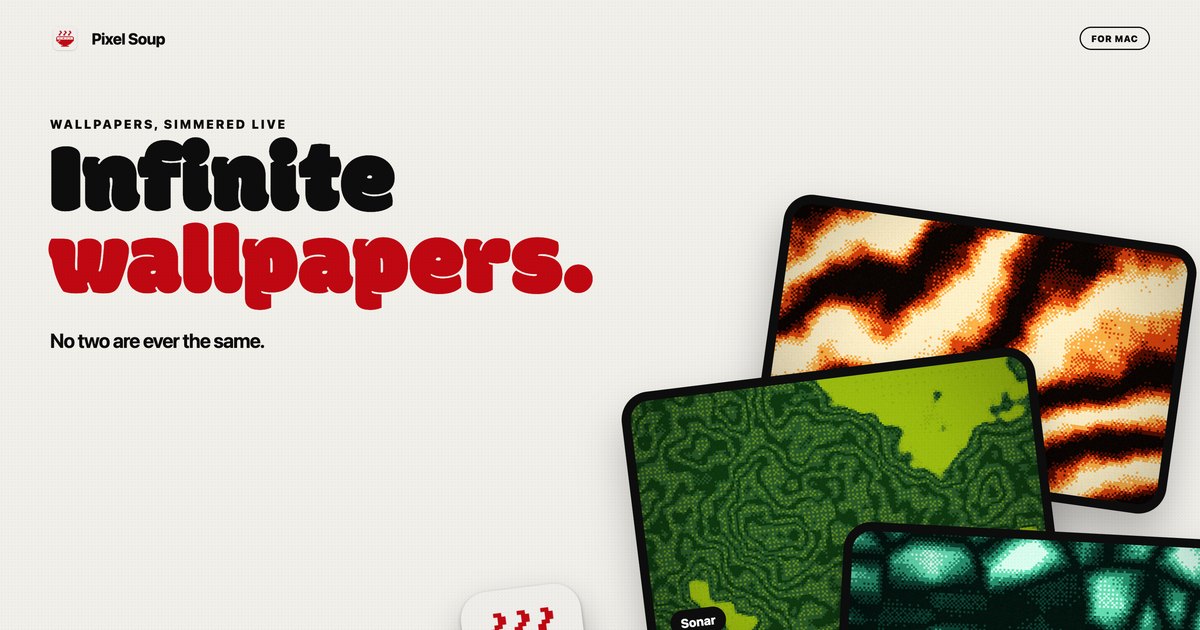
Pixel Soup is a Mac app that generates dithered wallpapers on your own GPU. Each wallpaper is made from a shape, a palette, a dither style and a seed, and it can sit still as your desktop picture or keep drifting gently behind your icons at a speed you choose. The app is for Mac users who want a desktop that looks distinctive without hunting for images elsewhere: Pixel Soup makes the wallpaper for you, in the style of dithering, and no two results are ever the same. A small handle sits on the edge of your screen, and clicking it opens the editor, so there is no Dock icon and no window in the way. You pick a shape, a palette and a dither, press Apply, and it becomes your desktop.
The thinking behind Pixel Soup is abundance plus ownership. Because every wallpaper is a shape, a palette, a dither and a seed, there are over a hundred thousand combinations before you touch a single dial, and every one of them keeps moving. Instead of a fixed library of static images that everyone else also has, the app can serve a fresh wallpaper every hour or every day if you like being surprised, and if you preferred the last one, Previous brings it back. Ownership is part of the pitch too: the app is a one-time purchase rather than a subscription, it requires no account, it makes no analytics calls, and nothing about you leaves your Mac.
The core of the app is its shape set. Pixel Soup ships with twelve shape tiles in the editor, among them Flow, Mesh, Plasma, Ripple, Aurora, Cells, Topo, Whorl, Sonar, Mosh and Weave, with a page on the site showing them all. A shape provides the underlying structure that the generator animates and dithers, so the same palette and the same dither choice will look entirely different depending on which shape is selected. Because a wallpaper is defined by shape, palette, dither and seed together, the number of possible results exceeds a hundred thousand before you adjust any sliders. If you cannot decide, a one-button shuffle produces a random new wallpaper, and you can keep shuffling until something stops you, then keep that one. The Fresh Bowl option serves a new wallpaper every hour or every day, for people who like being surprised.
Dithering is the visual signature of Pixel Soup, and the app provides ten dither styles: Smooth, Poster, Bayer 4, Bayer 8, Noise, Halftone, Lines, Diamond, ASCII and Benday dots. The site links to a reference page showing what each one looks like, which matters because dither styles change the character of an image dramatically, from clean gradients to hard-edged dot patterns reminiscent of print. Beyond picking a style, you set the pixel size the dither is applied at and how many colours the image is allowed to use. Those two dials control how coarse or how refined the result looks, so the same shape can read as a subtle gradient or as a chunky retro pattern. The dither layer is what turns a generated gradient into something that looks like it was printed rather than rendered.
Colour is handled through palettes. Pixel Soup includes twelve palettes, and you can build your own from up to five colours. If you would rather pull a palette out of something you already like, you can point the app at a photo and it will extract a palette for you. Photos also work as source material in their own right: drop in an image and Pixel Soup dithers that instead of a generated shape, applying the same dither styles, pixel size and colour controls to your own picture. The site dedicates a page to turning a photo into a dithered wallpaper, so this is a first-class workflow rather than an afterthought. Combined with palette extraction, it means you can produce a dithered version of a photograph that matches a colour scheme you have already chosen, or use colours from that photograph on generated shapes elsewhere.
Every wallpaper can be still or moving. Freeze any single frame as your desktop picture, or let it keep drifting behind your icons at a speed you choose. When you want to take a result elsewhere, you can export it as a PNG for this display, at 6K, at iPhone size, or as a 2048 square, and exported PNGs are yours to use anywhere, including commercially. Multi-display setups are supported: every display gets the wallpaper at its own resolution, and plugging a display in or out sorts itself out. Answers on the site address battery life directly: an animated wallpaper is drawn by the GPU at a low frame rate, pauses when windows cover the desktop, and slows down again in Low Power Mode, while a still wallpaper costs nothing once it is set.
Pixel Soup runs entirely on your Mac. It is sandboxed, requires no account, includes no analytics, and nothing about you leaves your machine. The editor lives behind a small handle on the edge of your screen, so the app stays out of the way with no Dock icon and no window competing with your work. The workflow is deliberately short: pick a shape, a palette and a dither, press Apply, and the wallpaper is your desktop. Generation happens live on the GPU rather than being downloaded, which is how the app can offer so many variations from a single install. The download is a notarized DMG that updates itself, and the full app is free to try for three days with no account and no card.
What you get out of Pixel Soup is a desktop that never looks like anyone else's, produced on your own machine in seconds. Because the app generates rather than downloads, there is no library to browse and no account to create; you shuffle until something stops you and apply it. Stills carry no ongoing cost, so freezing a frame is an option that costs nothing once it is set, and the animated mode is built to be polite about power by lowering its frame rate and pausing when the desktop is covered. Exporting PNGs means a result you like is not trapped inside the app and can be used anywhere, including commercially. And the purchase model is a single payment with updates included, not a subscription.
Concrete use cases come straight out of the app's own workflows. If you want a new look without deciding anything, hit the shuffle button for a random wallpaper, or turn on Fresh Bowl and let a new one arrive every hour or every day, using Previous to go back if you liked the last one better. If you have a photograph you love, drop it into Pixel Soup and dither it, optionally pulling a palette from it first so a generated shape elsewhere on your desktop matches. If you work across several monitors, each display receives the wallpaper at its own resolution and plugging a display in or out sorts itself out. If you make things, export a 6K, iPhone or 2048 square PNG and use it in other places. And if you simply want a moving desktop, choose a speed and let it drift.
Pixel Soup is for Mac users running macOS 14 Sonoma or later, on either Apple silicon or Intel; the app is a universal, notarized build. Pricing is a one-time payment: $4.99 during launch week, then $9.99, and the licence is good for up to 3 of your Macs. The download from the site is the full app, free for three days with no account and no card; if you want to keep it after that, you buy a licence, sold through Dodo Payments, who handle your receipt and any tax. A Mac App Store version is coming soon and will be the same app at the same price, without the trial. Refunds are available within 14 days, no questions asked.
Taken together, Pixel Soup is a small Mac utility with a narrow and clearly stated promise: your Mac makes its own dithered wallpapers, still or gently moving, and no two are ever the same. It does that on your own GPU, keeps everything on your machine, stays out of the way behind a handle on the edge of the screen, and asks for a single payment rather than a subscription. The free three-day trial means you can find out whether your desktop looks better dithered before you decide.
Publisher
A
admin
Launch Date2026-10-05
Platformdesktop
Pricingpaid