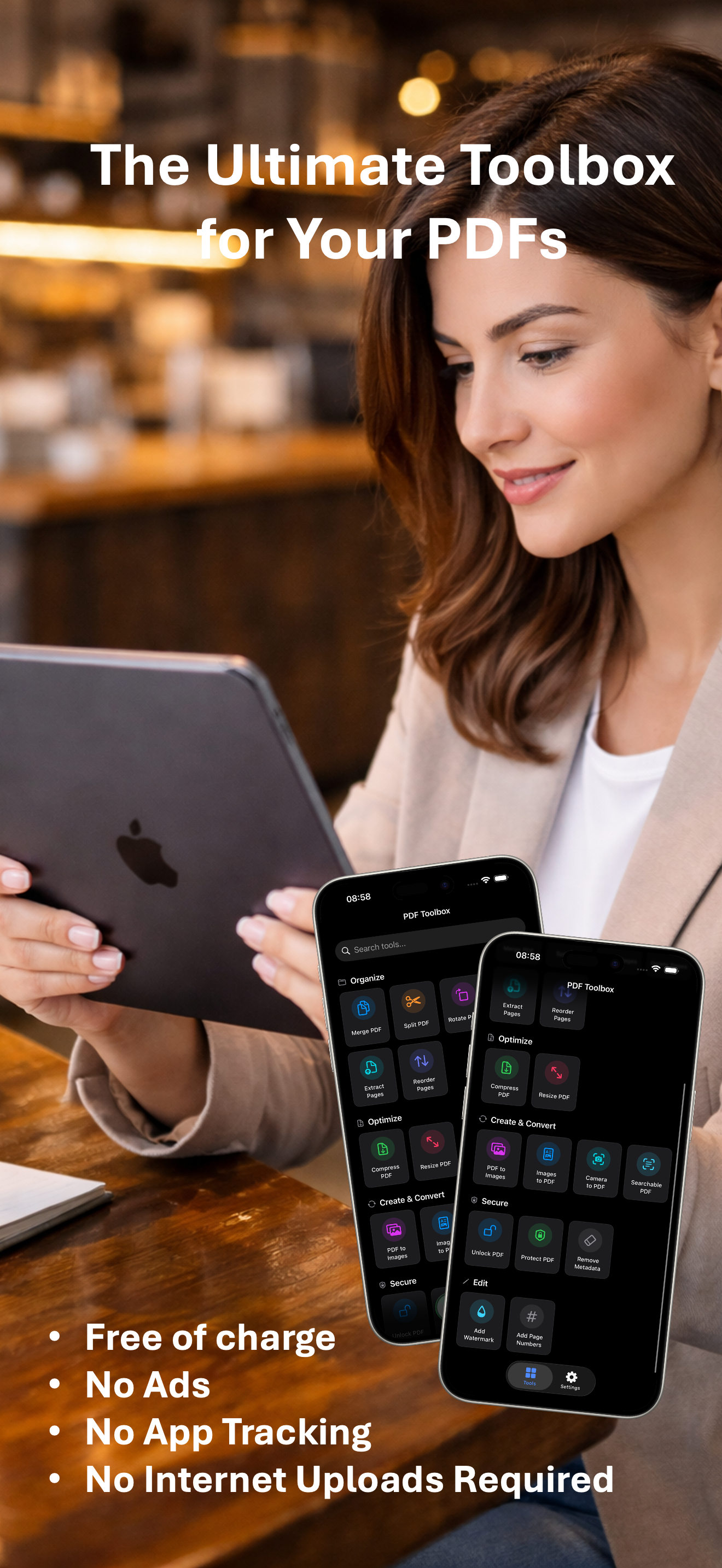
PDF Toolbox is a free, all-in-one offline PDF editor designed for iPhone, iPad, and Mac users who demand professional document tools without monthly subscriptions or cloud uploads. Categorized as a Productivity app, it delivers over 20 tools including merge, split, compress, OCR, sign, watermark, and redaction—all running 100% on-device using Apple's native PDFKit and CoreGraphics. Its core value is absolute privacy: no data collection, no tracking, and no internet required. Originally a rebuild of a PDF unlocker, the app now offers a comprehensive suite that handles everything from basic page organization to advanced security and conversion. Developed by Yung Kei Simon MA and available in 16 languages, the app is compact at only 13.3 MB and supports iOS 17.1+, iPadOS 17.1+, and macOS 15.1+.
Many users need to edit PDFs but hesitate to upload sensitive documents to third-party servers or pay for expensive subscriptions. PDF Toolbox eliminates these concerns by providing a complete offline solution: all processing happens locally using Apple's frameworks, so documents never leave the device. This is critical for legal contracts, medical records, financial statements, or any confidential information that must stay private. The app also solves the cost problem by being completely free—no subscriptions, no ads, and no in-app purchases required for functionality. Instead, it offers a voluntary tip jar for those who want to support development. Users can seamlessly merge invoices, split large reports, compress presentations for email, or add password protection without worrying about data leaks or monthly bills.
The first major feature group is the Organize suite, which includes Merge, Split, Rotate, Reorder, Extract, and Delete pages. Merge combines multiple PDFs into a single document, ideal for consolidating chapters, invoices, or scanned pages into one file. Split allows dividing a PDF by page range or extracting individual pages—perfect for breaking a large document into smaller sections. Rotate and Reorder let users fix page orientation and arrange pages in any sequence, while Extract creates a new PDF from selected pages and Delete removes unwanted content. These tools run locally using Apple's PDFKit, providing instant, offline processing without compromising document integrity or privacy.
The Optimize feature group focuses on reducing file size, adjusting dimensions, and repairing issues. The Compress tool reduces PDF size by optimizing images and content, making files suitable for email or storage-limited devices. Resize allows users to set page dimensions to standard sizes (e.g., Letter, A4) or custom values—useful for formatting documents for specific printers or submissions. The Flatten tool merges annotations, form fields, and comments into the page content, preventing further edits and ensuring a final, immutable version. A standout feature is Repair PDF (BETA), which uses tolerant parsing and Apple Core Graphics to reconstruct damaged PDFs from scratch, outputting a clean, well-formed document without relying on third-party libraries. Batch processing is supported for these tools, with detailed progress tracking for efficiency.
admin
The Security and Edit group offers comprehensive document protection and modification tools. Unlock removes passwords from protected PDFs, while Protect adds password-based encryption with customizable permissions (e.g., allowing printing but not editing). The Redaction tool permanently blackens sensitive information, ensuring it cannot be recovered—vital for legal or HR documents. Watermarks can overlay text or images for branding or confidentiality notices. Page numbers are inserted automatically with customizable formatting. The Sign tool supports drawing signatures with Apple Pencil or finger, typing text signatures, or importing an image; signatures can be saved for reuse across documents. Additionally, PDF/A Converter prepares files for long-term archiving, ensuring compatibility with preservation standards. All these operations are performed locally with no data leaving the device.
PDF Toolbox works entirely on-device using Apple's native PDFKit and CoreGraphics frameworks, with zero server uploads or third-party libraries. All processing occurs locally, guaranteeing that documents never leave the user's control. The app includes a built-in Internal PDF Viewer that supports form filling, annotations (highlight, underline, drawing, free text), printing, and search—allowing users to review and edit without leaving the app. A Document Manager offers a dedicated file browser with context menus for quick access to tools. Users can choose between local device storage or iCloud Drive for file management. Batch operations are supported for Compress, Flatten, Unlock, Protect, Remove Metadata, Watermark, OCR, and PDF/A Conversion, with detailed progress tracking. Metal 4 acceleration enhances performance on large documents. The app's workflow is simple: select a tool, choose files, and let the offline engine process instantly.
Concrete use cases showcase the app's versatility. A business professional merges scanned invoices from multiple vendors into a single PDF for accounting, streamlining expense reporting. A student splits a dense textbook chapter into smaller sections for focused study, then uses OCR to make the text searchable, enabling quick exam preparation. A lawyer redacts confidential client names from a court filing using the Redaction tool, ensuring privacy before electronic submission. An entrepreneur compresses a large product catalog to under 5 MB for email attachment, avoiding file size limits. A remote worker signs a rental agreement on their iPhone using a drawn signature, then protects the signed PDF with a password for secure transmission. Each scenario delivers fast, offline processing without compromising document security or incurring costs.
PDF Toolbox targets students, freelancers, small business owners, legal professionals, medical staff, and anyone who frequently works with PDFs on Apple devices. It runs on iPhone, iPad, and Mac, requiring iOS 17.1+, iPadOS 17.1+, or macOS 15.1+. The app is completely free to use with all 20+ tools accessible without payment; an optional tip jar supports development (coffee $0.99, meal $2.99, gift $4.99, super $9.99). It supports 16 languages including English, Arabic, Dutch, French, German, Hebrew, Hindi, Italian, Japanese, Korean, Polish, Portuguese, Simplified Chinese, Spanish, Traditional Chinese, and Turkish. The app's compact 13.3 MB size and 100% offline operation make it a lightweight yet powerful solution. The core takeaway: PDF Toolbox delivers professional document editing without subscriptions, ads, or cloud uploads, placing privacy and affordability first.
Students, freelancers, small business owners, legal professionals (lawyers, paralegals), medical staff (doctors, nurses, administrators), real estate agents, accountants, project managers, remote workers, educators creating course materials, HR professionals handling confidential documents, and any Apple device user who needs to edit PDFs offline without subscriptions or privacy risks. The app is designed for iPhone, iPad, and Mac users running iOS 17.1+, iPadOS 17.1+, or macOS 15.1+.