NotchX is a macOS app that turns the camera notch on a MacBook into a live hub for the things you check most often: what's playing, messages, incoming calls, your next meeting, connected AirPods, the weather, and the volume and brightness you adjust throughout the day. Instead of pulling information into the middle of the screen or sending you into separate apps and settings panels, NotchX puts it around the notch itself. Closed, it keeps two small icons either side of the camera; hover, and it opens straight down and never wider than it needs to be. It is built for people who spend their day on a MacBook Air or MacBook Pro and want status and controls within a glance rather than a detour.
macOS already tells you what is happening through notification banners, a large volume and brightness overlay in the centre of the display, and pop-ups from apps such as Music. NotchX starts from the notifications your Mac already shows and re-presents them in a strip of screen that is otherwise empty. The volume and brightness pop-up that normally covers the middle of your screen becomes a slim line under the notch. Checking whether your AirPods are connected no longer requires opening Bluetooth settings. Each glance becomes a smaller interruption, which matters on a laptop where screen space and attention are both limited.
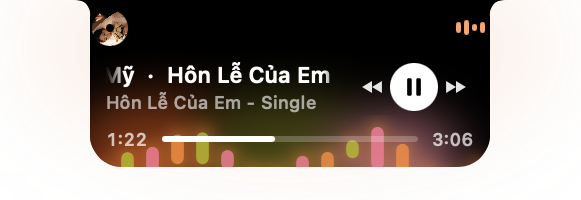
Music is the deepest part of NotchX. It shows the track title, the artist, play and pause, skip forward and back, and a progress bar you can drag, all beside the camera, and it works with Apple Music and Spotify. The player offers five looks — Aura, Cover Wash, Neon, Sunset and Spectrum — and thirty-five visualizers in total, seven per look. Each look has its own colours and its own animated icons beside the camera, and each song gets a different visualizer, so the notch changes character as your playlist moves on. Everything pauses with the music, so nothing keeps animating once playback stops.
Messages and calls arrive from the notification banners macOS already displays. When a message comes in from Messages, Slack, Teams, WhatsApp or another supported app, the sender's name appears beside the camera together with that app's real icon; clicking it opens the message in the app itself. Calls work the same way: if FaceTime, Slack, Teams or Zoom is ringing, the caller and a ringing phone appear beside the camera, and nothing drops down over your work. You can answer or decline from there. Once you are on the call, the notch shows just your microphone state and a timer, and hovering reveals who it is and how long you have been talking — there is nothing to press.
Meetings surface a few minutes ahead of time along with the icon of the app the meeting link opens in. One click joins the meeting, and a second option reminds you again in five minutes. AirPods appear beside the camera the moment they connect, with their name, so you can confirm the connection without opening Bluetooth settings. Weather is optional and off by default; turn it on with the Weather tile and, when nothing else is going on, the notch shows a live sky — sun, rain, thunder or snow — plus the temperature. Clicking it reveals today's high and low, the chance of rain and the forecast for the next five hours.
Volume and brightness are handled by replacing the large macOS pop-up in the middle of the screen with a slim line under the notch: drag the line or tap the icons. Everything else is controlled from a small menu that opens when you click NotchX in the menu bar. From there you switch individual features on or off, choose a music look, and decide how much of a message the notch reveals: the full message with sender and text, the sender only with a "New message" label, or just the app icon, which is handy when you are sharing your screen. The same menu holds Open at login and Quit.
NotchX works locally on your Mac and takes its information from what macOS already presents. It reads the message and call banners the system shows, which is why it asks for Accessibility access; the same permission lets it replace the volume and brightness pop-ups. Meetings ask for Calendar access instead. Music, weather and AirPods work without Accessibility permission. Everything stays on the machine: there is no account, no analytics and no message history, and nothing you read is sent anywhere. The app only goes online to check your licence, look for updates, and — if you have turned Weather on — to fetch a forecast for your approximate area.
The practical benefit is that information arrives where you are already looking rather than in the middle of your work. A ringing call shows who is calling and lets you decline without a full-screen interruption; a message shows its sender without you switching apps; the next meeting is one click away; AirPods confirm they are connected; the weather is there when nothing else is happening. Because the closed state is only two small icons either side of the camera, the feature set is available without permanently giving up screen space, and because the panel opens straight down and never wider than it needs to be, it does not cover the work behind it.
Typical use is a working day on a MacBook: music playing while you write, with the notch showing the track and a draggable progress bar; a Slack or Teams message sliding in with the sender's name beside the camera; a Zoom call arriving with the caller shown so you can answer or decline; the design review meeting appearing a few minutes early with a one-click join. If you share your screen often, setting messages to icon-only keeps content out of view. If you work away from a window, the Weather tile gives you the sky and the next five hours at a glance, and the slim volume line keeps adjustments out of the centre of the display.
NotchX is aimed at people using MacBooks with a notch — MacBook Air and MacBook Pro models from 2021 onward — running macOS 13 Ventura or later. On a Mac without a notch it sits at the top centre of the screen instead. It is a paid app with a 14-day free trial that unlocks every feature; after that a lifetime licence costs $9.99 as a one-time payment for one Mac, including all future updates. There is no subscription and no account, and it works offline once activated. The app is signed and notarized by Apple, checkout is handled by Lemon Squeezy, and the licence key arrives by email. A licence can be moved between Macs by choosing "Deactivate this Mac" on the old machine and entering the key on the new one. Updates arrive automatically or via Check for Updates.
In short, NotchX gives the notch something to do: a single, local, glanceable surface for music, messages, calls, meetings, AirPods, weather, volume and brightness, backed by a one-time $9.99 licence after a 14-day free trial, with no account, no subscription and nothing you read leaving your Mac.
Publisher
A
admin
Launch Date2026-11-09
Platformdesktop
Pricingpaid
Tech Stack
#macOS 13 Ventura or later