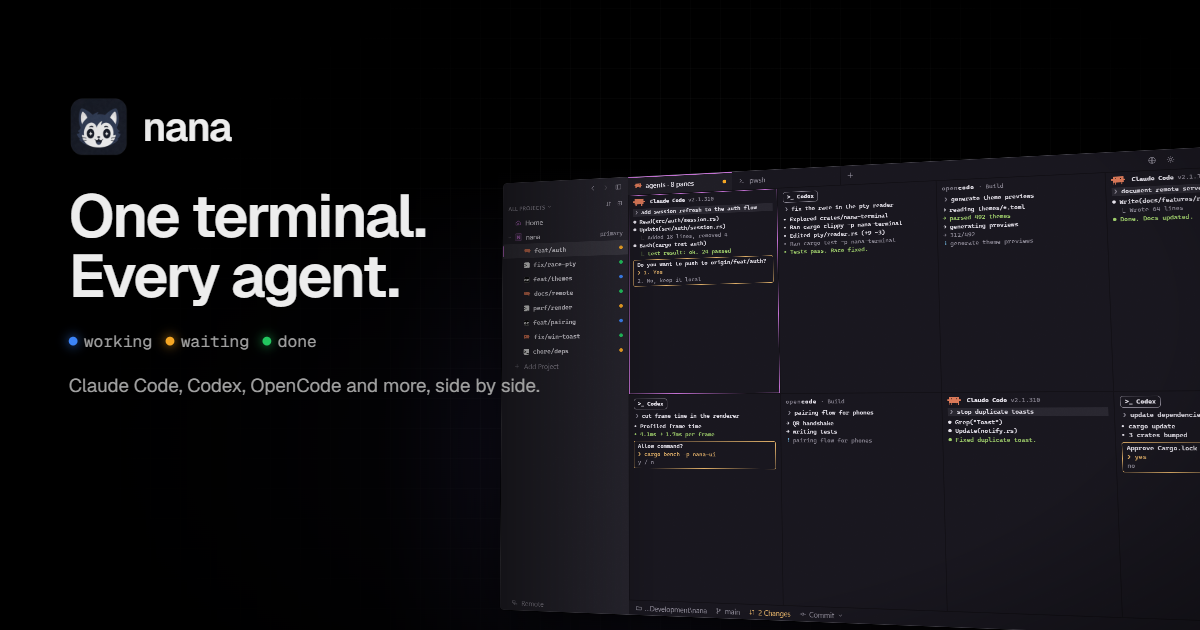
Nana is a native terminal multiplexer for Windows built for running multiple coding agents at the same time. Rather than keeping a single terminal tab on a single agent, nana lets you run Claude Code, Codex, OpenCode and other agents side by side, each one on its own git worktree, inside one fast native terminal. It is made for developers who already work with command-line coding agents and want to run several in parallel without losing track of what each one is doing. Nana is currently a free beta for Windows 10 and newer, needs no admin rights, can be installed from PowerShell with a single command, and is also available as a download with the source on GitHub.
Running more than one coding agent on the same repository quickly gets messy. Agents edit the same files, and without isolation they step on each other's work. Nana's answer is to give each agent its own git worktree and branch, so parallel sessions never collide. The second problem is visibility: once several agents are running in different tabs, it is hard to know which one is still thinking, which one has stopped to ask a question, and which one has finished. Nana is built for many agents, not one tab, and it reports the state of every agent — working, waiting or done — so you know where your attention is needed. A third problem is continuity: closing a terminal normally kills whatever was running inside it, which is painful when an agent is in the middle of a long task.
The core of the product is the worktree sidebar. Each agent gets its own worktree, and the sidebar shows the branch next to the agent using it — for example feat/auth next to Claude Code, or fix/race-pty next to Codex. From that sidebar you can switch between agents, merge their work, and clean up worktrees when you are done. Alongside it, nana detects the agents running inside your terminals and shows whether each one is working, waiting or done, with no hooks and no setup required. The status is descriptive rather than a bare spinner: it can show that Claude Code is waiting on a question such as whether to push, that Codex has finished with tests passing, or that OpenCode is still working through a task with progress like 312/492. Because state is shown per agent, you can leave several running, glance at the list, and jump only into the pane that actually needs you.
Nana also brings code review into the same window. You can review code right in Nana instead of switching to another tool: view Git diffs to see exactly what changed, browse older commits, and revisit previous changes without leaving the terminal. The review area separates current changes from commit history, so you can look at the working diff of an agent's branch and then step back through the commits that produced it. Diffs are displayed in a line-by-line format with added and removed lines marked, which makes it practical to check what an agent did before merging its worktree. Combined with the worktree sidebar, this turns nana into a place where parallel agent output can be inspected and accepted rather than a set of terminals you have to trust blindly.
Terminals in nana live in nana-server rather than in the window, so quitting the window does not stop your agents — they keep running in the background, and you can come back to find the work continued. The product surfaces this directly, for example with a nana-server panel showing three sessions running while updates and test commands continue in the background. Remote servers extend the same idea to other machines: you can open projects on Linux or macOS over SSH, and nana installs nana-server there. Because the terminals live on the remote server, remote sessions keep running even when you disconnect. The interface presents this as a normal machine entry — for example a local Windows nana alongside an ubuntu@build-box server running nana-server — so local and remote agents are managed from the same place.
Several smaller features round out the day-to-day workflow. The Composer lets you write long prompts with files and images attached and then send them to a single terminal or to every split pane at once, which is useful for instructions like asking the agents to run the tests and fix any failures. Themes make the terminal yours: nana ships with more than 490 terminal themes and a live preview, including well-known options such as Tokyo Night, Gruvbox Dark, Nord, Dracula, Solarized Dark and Catppuccin Mocha. Extensions let you build what you need — you can add tabs, panels, commands and status bar items using any web tooling, so the terminal can be shaped around how you actually work.
Underneath, nana is a native Rust application with GPU rendering and Ghostty's terminal engine, and it deliberately does not use Electron. That choice is what makes it fast and light on memory compared with running several heavyweight terminal windows. It also works with the agents you already use rather than locking you into one: Claude Code, Codex, OpenCode, Copilot, Cursor, Droid, Grok, Kiro, Pi, Oh My Pi, Antigravity and Xal are all listed as supported. The split is straightforward: the nana window is the interface you look at, while nana-server holds the terminals, so sessions can outlive the window and, when nana-server is installed on a remote machine, outlive your connection. Agent detection happens without hooks or configuration, which means an existing setup keeps working.
The practical benefit is parallelism without collisions. Instead of running one agent at a time, you can put several to work on separate branches of the same project and let them proceed independently. The status list tells you where to spend attention, so waiting agents get answered and finished agents get reviewed rather than forgotten. Reviews inside the terminal mean an agent's diff can be checked and merged on the spot. Background sessions and remote servers mean long-running work is not tied to a window being open or a connection being alive. And because the app is native, all of this runs in one fast, memory-light terminal rather than several heavy ones.
Typical scenarios follow the feature set. A developer might start Claude Code on a feature branch, Codex on a bug fix and OpenCode on a themes change, each in its own worktree, and watch the sidebar for whichever one needs input. Another might use the Composer to send the same instruction to every pane, then review each resulting diff from the commit history view before merging. Someone working with a Linux build box can open the project over SSH, let nana install nana-server there, and keep tests running after disconnecting. Others will simply close the nana window at the end of the day knowing the agents are still working in the background.
Nana is aimed at developers on Windows who use terminal-based coding agents and want to run more than one at a time. It requires Windows 10 or newer and no admin rights. The stack is Rust with GPUI for the interface, libghostty for the terminal engine, and WebView2 for extensions. It is currently free in beta, with an optional way to buy the developer a coffee. Mobile apps for iOS and Android are listed as coming soon; they will connect straight to your server, with no cloud and no account.
The takeaway is simple: nana treats coding agents as a fleet rather than a tab. One native Windows terminal, one worktree per agent, live status, in-place diffs, and sessions that survive closing the window or dropping a connection — free while in beta.
Publisher
A
admin
Launch Date2026-11-04
Platformdesktop
Pricingfree
Tech Stack
#Rust#GPUI#libghostty#WebView2