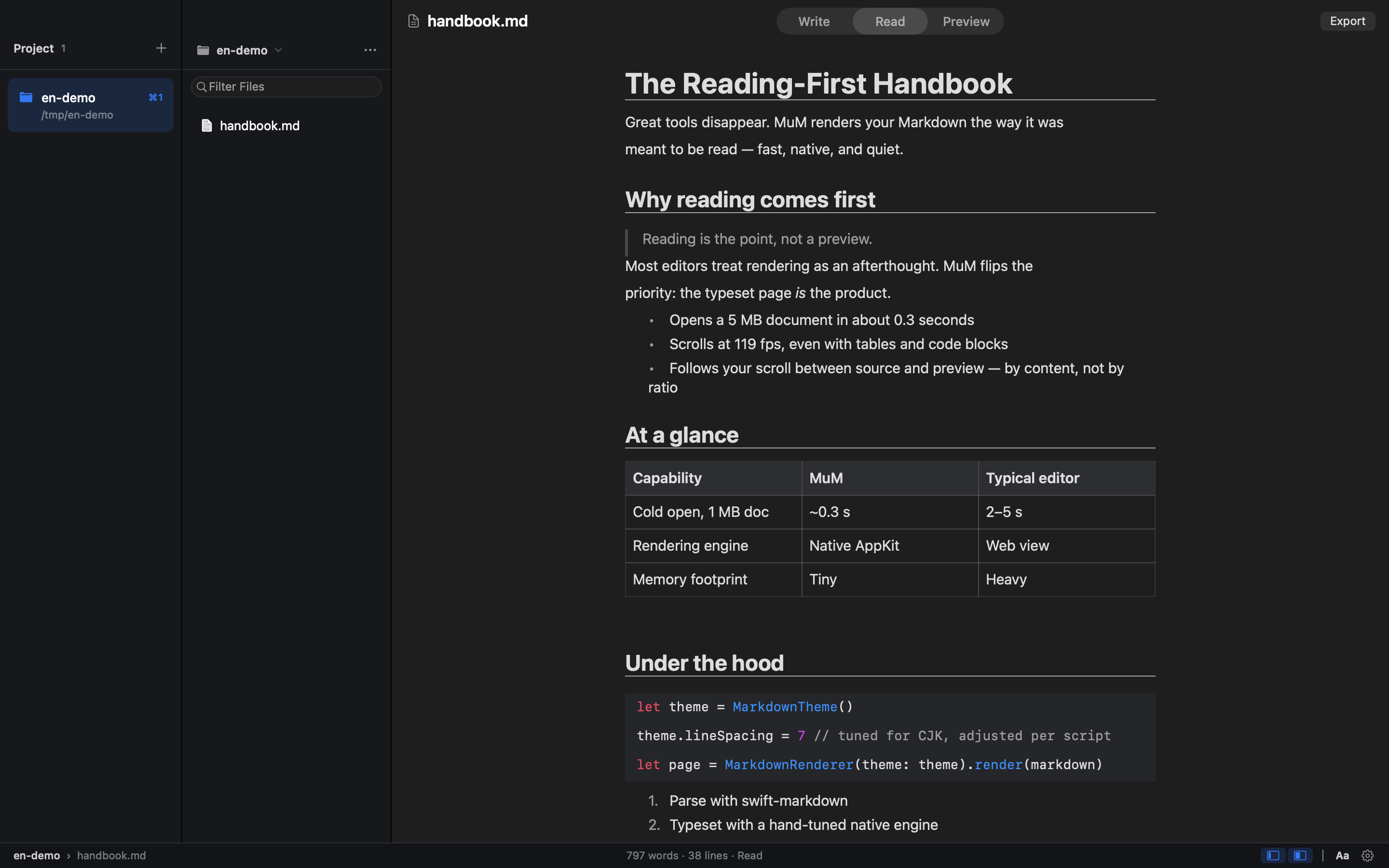
MuM is a reading-first Markdown engine for macOS, described by its makers as a native macOS reader with no web engine inside — everything is built with AppKit. Its og:description sums the product up as hand-built AppKit typesetting for humans and CLI rendering for agents. Instead of being a writing app with a preview pane, MuM is designed for people who already have Markdown scattered across many folders and who simply want to read one section. It opens several projects at once, each remembering where you stopped, and provides cross-project search plus typesetting tuned for CJK as well as Latin text. It is open source under the MIT license, and it also ships a command-line side that renders Markdown for agents.
The product's own framing states that your Markdown lives in a dozen folders, and that most of the time you do not want to write — you just want to read one section. Yet, according to MuM, every other Markdown tool is a writing app with a preview pane. That mismatch means readers are pushed into interfaces built around editing, with preview workflows and rendering stacks that add friction to what should be a simple act of reading. MuM addresses this gap by inverting the model: reading comes first, and authoring is not the point. It also targets the practical annoyance of juggling many separate documentation folders by treating each project as an answer to the question of where you are, so context is never lost when you move between documents or repositories.
MuM's core human-facing capability is multi-project reading. You can keep several projects open at the same time and switch between them with ⌘1 through ⌘9, and each project remembers where you stopped, so returning to a document resumes at the exact place you left off. The app is explicitly built for reading rather than authoring: ⌘F performs find within a document, ⌘⇧O opens an outline, and reading history is navigated with ⌘[ and ⌘]. Because each project preserves its own position, MuM's projects serve as landmarks that answer where you are, which matters when documentation is spread across many repositories and folders rather than living in one tidy workspace.
Finding content is handled by two dedicated shortcuts. ⌘P fuzzy-finds files by name, which is the fast path when you know roughly what a file is called but not which folder holds it. ⌘⇧F goes further, searching names and contents across every project and streaming results as they are found, so you are not limited to the project currently on screen. Together these two modes cover the two most common retrieval patterns — reaching for a known file and hunting for an unknown phrase — without leaving the reader or opening a separate search interface.
MuM's typesetting is tuned for CJK as well as Latin text. Line height, punctuation compression, and mixed-script spacing are measured rather than guessed, which is what allows documents that mix Chinese, Japanese, or Korean characters with Latin script to read cleanly instead of looking mechanically assembled. The rendering path is deliberately broad: MuM reads code with syntax highlighting, renders CSV and TSV as tables, and displays RTF, images, PDF, and srt/vtt subtitles. Office files get a page that points you to the default application. Markdown can also carry limited HTML — small, mark, and super/subscript tags render semantically while the tags themselves stay out of sight. Export is built in as well: ⌘⇧E turns the current document into a tall PNG or a paged PDF, and page-break hints written in the document become real page breaks in the output.
Day to day, MuM keeps the interface quiet. Double-clicking a lone file opens single-file mode: both sidebars fold away and you simply read, and the folder is not turned into a project, so your project list stays clean. File management lives in the file tree's menu and right-click menus, where ⌘N creates a new file and you can also create folders, rename items, or move them to Trash. One click opens a shell right at a deeply nested folder, auto-detecting Ghostty first, then iTerm, then Terminal.app. Updates are one-click too: a banner's Download update button downloads the DMG in-app, mounts it, and lets you drag MuM into Applications. The app is quiet in a broader sense as well — no accounts, no telemetry, no plugin store — on the principle that a tool shouldn't be louder than its content.
Structurally, MuM is the opposite of a writing app with a preview pane. The entire typesetting engine is hand-built and native, and the app contains zero web engines, so rendering happens directly rather than through an embedded browser. That same hand-built engine powers a windowless path for agents: a CLI renders Markdown straight to PNG or PDF with the same CJK spacing, code highlighting, and reading themes used inside the app. Commands such as mum render README.md --png cover.png and mum outline README.md --json let automated consumers get images or structured outlines, and outline, search, and check emit stable JSON with classified exit codes (0, 1, 2, 3, and 4), so agents never have to parse prose. This dual-surface approach — the same engine serving both a macOS window and the command line — is the product's central methodology.
The benefits follow from those design choices. Because MuM contains zero web engines, it starts cold to a window in about 0.3 seconds, ships as a 1.7 MB installer, and scrolls a 5 MB document at over 100 fps — figures the product itself publishes. Because projects remember reading positions and history is navigable with ⌘[ and ⌘], you spend less time reorienting and more time reading. Because search spans every project rather than one folder at a time, you are not forced to remember which repository contains a given phrase. And because there are no accounts, no telemetry, and no plugin store, nothing is running in the background or asking for attention beyond the document itself.
Concrete scenarios include keeping several documentation projects open at once and hopping between them with ⌘1 through ⌘9 while each holds its place; double-clicking a single Markdown file to read it in single-file mode without polluting your project list; pressing ⌘⇧F to find a phrase whose location you have forgotten across all your projects; exporting a document to a tall PNG for sharing or a paged PDF for printing, with document page-break hints becoming real breaks; reading a deeply nested folder and jumping straight into a shell there through Open in Terminal; and, on the agent side, running the CLI to render README.md to a PNG cover or to emit an outline as JSON so scripts and agents can consume structure rather than prose.
MuM is aimed at macOS users who read a lot of Markdown — its topics are Open Source, Developer Tools, and GitHub — and at agents that need rendered or structured output. The app is native, built with AppKit and containing no web engine, and it is open source under the MIT license, so no purchase is required. Integrations mentioned are practical rather than plugin-based: terminal emulators are auto-detected in the order Ghostty, then iTerm, then Terminal.app, and the CLI exposes mum render README.md --png cover.png and mum outline README.md --json, with outline, search, and check emitting stable JSON and classified exit codes (0/1/2/3/4) so that agents never parse prose.
MuM's value proposition is simple and self-declared: it is a reading-first Markdown engine. By building everything in AppKit, skipping web engines, remembering where you stopped across several projects, searching every project's file names and contents, tuning typesetting for CJK and Latin alike, exporting to PNG and PDF, and exposing the same engine to agents through a quiet CLI, MuM treats Markdown as something to be read — fast, native, quiet, and open source.
Publisher
A
admin
Launch Date2026-09-29
Platformdesktop
Pricingfree
Tech Stack
#AppKit