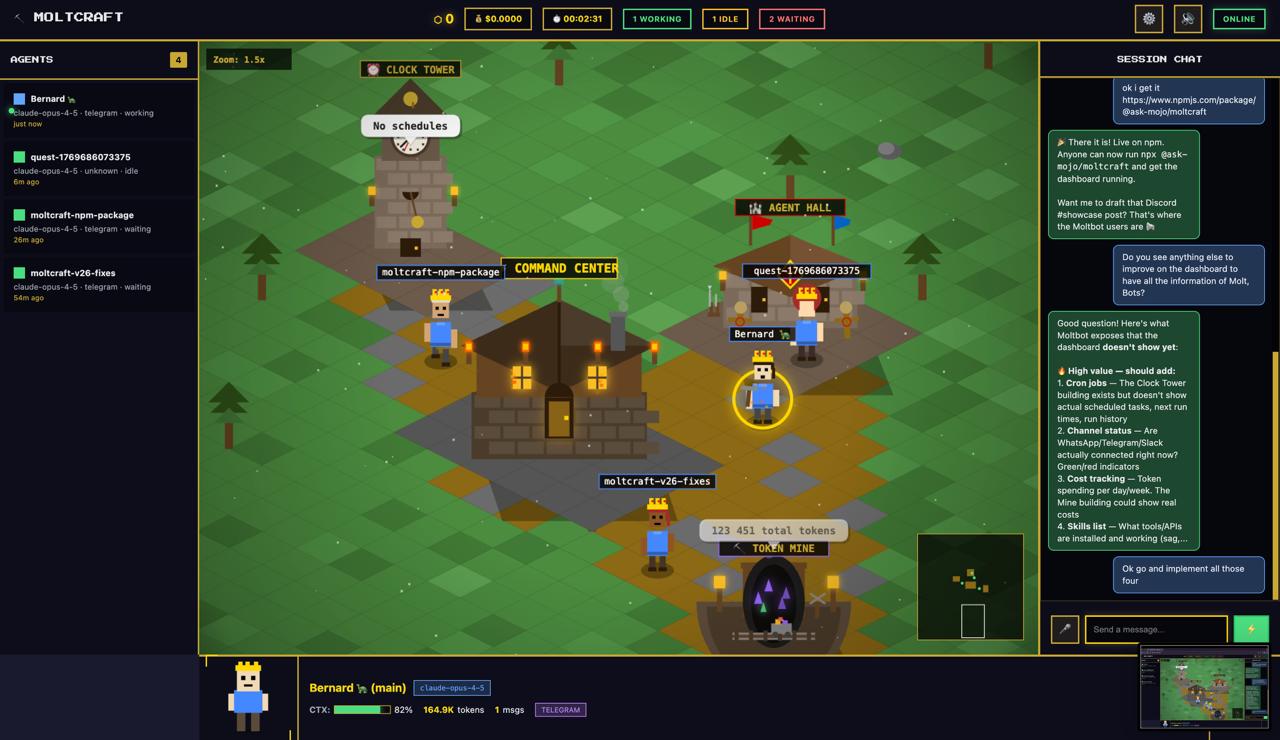
Moltcraft is an open-source isometric pixel dashboard that serves as the premier AI agent monitoring dashboard for Moltbot users. It replaces the tedious terminal-based workflow with a delightful, real-time pixel world where AI agents appear as animated characters walking through a vibrant landscape. Designed for developers and AI hobbyists, Moltcraft provides an at-a-glance view of every agent's activity, status, and interactions without requiring any log parsing. The tool's core value lies in transforming opaque backend processes into a transparent, engaging experience that you genuinely enjoy watching. By leveraging a simple, dependency-free architecture, it runs effortlessly on any machine—from a Raspberry Pi to a cloud server—making advanced agent visualization accessible to everyone.
Managing multiple AI agents traditionally means staring at half a dozen terminal windows filled with raw JSON streams, cryptic error messages, and continuous log output. This approach makes it nearly impossible to discern the overall health of your agent fleet at a quick glance. Context switching between tabs to check on different agents consumes mental bandwidth and increases the risk of missing critical events. The problem is especially acute when agents handle scheduled tasks like cron jobs, where any failure might go unnoticed until a downstream process breaks. Moltcraft addresses this by presenting all agents and their activities in a unified, visual environment. Instead of parsing lines of text, you see agents move toward buildings representing tasks, and you know instantly if everything is running smoothly. This shift from reading logs to observing behavior dramatically reduces cognitive load and speeds up troubleshooting.
The Living World feature is the heart of Moltcraft's visual approach. Every agent you have configured in Moltbot is represented as a pixel character that roams the screen in real time, reflecting its actual state and actions. When an agent becomes active, its character might start walking toward a specific building; when idle, it might pause or explore the map. This dynamic representation means that you can gauge activity levels with a single glance—no need to type 'status' commands or scroll through history. The benefit goes beyond aesthetics: by mapping agent behavior to recognizable sprites, your brain naturally tracks patterns and anomalies, just like noticing movement in a game. If an agent suddenly stops moving or heads to an unexpected location, you can investigate immediately. This feature turns the abstract concept of 'agent activity' into something tangible and immediately interpretable, making monitoring intuitive and proactive.
admin
The Multi-Agent View consolidates every agent under your management into a single dashboard, eliminating the need to switch between multiple terminal tabs or windows. From this unified interface, you can see each agent's name, current status (active, idle, error), token consumption, and a preview of its most recent conversation. A sidebar or overlay shows live metrics, so you can compare agents side by side without opening separate panels. This bird's-eye view is critical for users running dozens of agents performing disparate tasks—from code reviewers to customer support bots. When one agent spikes in token usage or enters an error state, the visual highlight immediately draws attention. By centralizing all agent information, the Multi-Agent View fosters better oversight and faster coordination, allowing you to spot trends and optimize your agent workforce without diving into individual contexts repeatedly.
Moltcraft integrates Live Chat and Voice I/O to let you interact with your agents directly from the dashboard. Clicking on any pixel character opens a chat panel where you can read the full conversation history, type new messages, and watch the agent's responses stream in near-real time. This eliminates the need to launch a separate chat client or remember complex CLI commands. The Voice I/O capability extends this convenience further: you can speak to your agents using your microphone and hear their spoken replies, enabling hands-free operation while you work on other tasks. These communication tools make ongoing conversations with AI assistants feel natural and immediate, whether you're debugging a script, brainstorming ideas, or guiding a multi-step workflow. By embedding chat and voice directly into the visual interface, Moltcraft ensures that interaction remains part of the same cohesive monitoring experience.
Getting Moltcraft up and running is designed to be painless, embodying its philosophy of zero dependencies and instant accessibility. The primary workflow begins with having a running Moltbot instance—the open-source personal AI assistant that orchestrates your agents. Once Moltbot is active, you launch Moltcraft using a single command: 'npx @ask-mojo/moltcraft'. This command automatically downloads the dashboard and runs it locally, immediately scanning for your Moltbot gateway. No build step, no configuration file, and no additional dependencies are required because the entire dashboard is built with pure HTML, CSS, and JavaScript, weighing in at approximately 2MB. The auto-discovery mechanism connects Moltcraft to your live agent environment, populating the pixel world with your existing agents. The streamlined setup means you can go from installation to a fully animated agent landscape in under sixty seconds, making it suitable for rapid prototyping, demos, and daily use.
A typical use case is a solo developer running a set of cron-job agents that perform nightly database backups, log cleanups, and error monitoring. With Moltcraft, they see each agent as a character visiting a 'Backup' building or a 'Log Check' hut, and clicking those buildings reveals the last run time, success status, and token consumption. Instead of tails of log files, they spot a missed job instantly if an agent fails to move. Another scenario involves a remote team using Moltbot agents for collaborative coding: team members open the dashboard to watch agent conversations about pull request reviews, stepping in via live chat to provide additional context without ever leaving the visual interface. Voice I/O enables a developer to dictate feedback to an agent while keeping their hands on the keyboard, streamlining the review process. Hobbyists running Moltbot on a Raspberry Pi as a home automation hub can place agents representing smart lights or sensors on the pixel map, turning a mundane configuration into an interactive smart-home control panel.
Moltcraft is built for developers, AI tinkerers, DevOps professionals, and open-source advocates who already use or are exploring Moltbot. Its technical stack—pure vanilla web technologies with no frameworks—makes it lightweight enough to run on a Raspberry Pi, a VPS, or any laptop, and its MIT licensing means it can be freely modified and even commercially deployed. The current version is completely free and open source, with an optional cloud-based offering on the horizon for those who prefer zero-install convenience. By combining an isometric pixel world with practical monitoring features, Moltcraft redefines what an AI agent dashboard can be. It transforms the drudgery of log inspection into an engaging, game-like experience that brings transparency and joy to the management of intelligent agents, ultimately making AI personal assistants more accessible and fun to use.
Moltcraft is designed for developers and operators who run Moltbot AI agents and seek a more intuitive monitoring solution. It serves DevOps engineers managing scheduled cron tasks, AI enthusiasts experimenting with multi-agent systems, and team leads overseeing collaborative agent workflows. It’s also ideal for hobbyists running lightweight home-automation agents on devices like the Raspberry Pi, and for open-source contributors who want to extend agent visualization. Anyone frustrated by terminal-based log inspection and looking for a real-time, visual dashboard to manage their AI assistants will find Moltcraft indispensable.