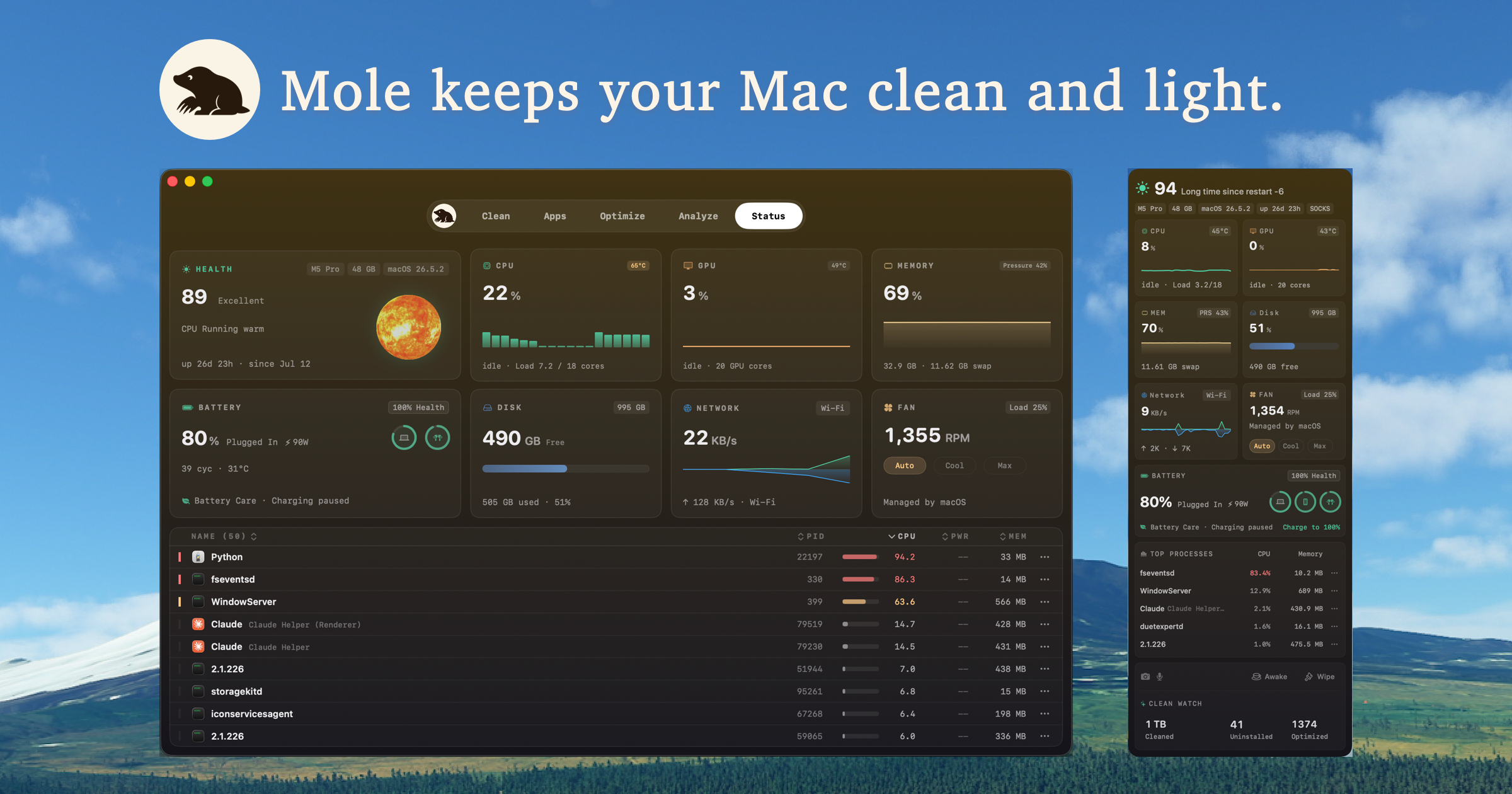
Mole is a native Mac app that combines five tools in one: Clean, Software, Optimize, Analyze, and Status, plus a menu bar HUD, privacy alerts, Battery Care, fan control, Keep Screen On, and Clean Screen. It is designed for Mac users, developers, and power users who want a single utility for cleaning caches, managing apps, maintaining the system, analyzing disk space, and checking live system metrics. The app is presented through a planet-themed interface where each planet has one job and says up front what it checks and what it may change.
Macs accumulate caches, app leftovers, temporary files, and other junk over time, which can slow down the system and fill up expensive storage. Many users rely on multiple separate tools such as CleanMyMac, AppCleaner, DaisyDisk, and iStat Menus to handle different maintenance tasks. Mole addresses this by consolidating these capabilities into one native app while emphasizing transparency: it previews paths and sizes before cleanup, keeps scans local, and moves recoverable removals to Trash. This approach gives users confidence about what will change on their system before anything is removed.
The Clean tool, represented by Earth, offers ten cleanup categories with safer regenerable caches listed first. Users can review every item and then select, skip, or protect it before cleaning. Caches can be deleted directly or sent to Trash for extra safety. Scans and cleanup stay entirely on the Mac, and files and results are never uploaded, which addresses privacy concerns that users may have with cloud-connected cleaners.
The Software tool, represented by Mars, helps manage applications. It checks for updates from Sparkle, App Store, Homebrew, and other supported sources. Users can uninstall apps and review related leftovers together, manage supported login and background items on the same page, and see app and leftover sizes before removing anything. This makes it easy to keep software up to date, remove unwanted apps completely, and control what launches at startup.
The Optimize tool, represented by Mercury, maintains system components such as Quick Look, caches, metadata, and common macOS services in one run. Admin tasks share a single authorization instead of prompting one by one. Tasks that are unsafe or not applicable are skipped with a reason, and the result shows what ran and why anything was skipped. This gives users a clear, low-risk way to perform routine macOS maintenance.
The Analyze tool, represented by Jupiter, provides a whole-disk treemap that makes the largest files and folders easy to spot. Users can drill into any folder and jump back from the path bar. Items can be opened in Finder or moved to Trash from the context menu. System folders stay view-only, and moving anything to Trash always asks for confirmation, protecting important system data from accidental deletion.
The Status tool, represented by the Sun, offers live CPU, memory, GPU, disk, network, temperature, and fan metrics. It shows battery status for the Mac, paired iPhone or iPad, and Bluetooth accessories. Users can sort or pin processes and open a plain-language explanation for each one. The metrics users choose can be placed in the menu bar HUD, which also displays a runner animation, live metrics, privacy activity, Keep Screen On, hardware tiles, and top processes.
Mole's unique approach is built around the idea of five planets, each keeping to one small job and stating up front what it checks and what it may change. Before cleaning, Mole shows paths and sizes so users know exactly what will be removed. Recoverable removals are moved to Trash, and scans remain local. The app also has a companion open-source CLI, with commands such as `brew install tw93/tap/mole` and `mo clean`, which is popular among developers and terminal users.
Users have reported significant benefits, including freeing 15 GB, 23 GB, 40 GB, 50 GB, 100 GB, 142.97 GB, and even 200 GB of space. Many say Mole replaced CleanMyMac, AppCleaner, DaisyDisk, and iStat Menus, and that it found items other cleaners missed. The UI has been praised for being beautiful, fast, and easy to use, while the CLI is appreciated by developers who prefer the terminal.
Concrete use cases from the content include cleaning developer build caches such as Xcode derived data, refreshing older Macs that feel slow, freeing space on Macs with small or expensive storage, uninstalling apps along with hidden leftovers, managing startup and background items, monitoring system health and battery status, and checking live CPU, memory, GPU, disk, network, temperature, and fan metrics. The menu bar HUD is useful for quick glances at system status without opening the main app.
Mole targets developers and power users who use macOS and often work in the terminal, as well as everyday Mac users who want a simpler way to maintain their computer. The open-source CLI is free and can be installed with Homebrew, while the Mac app is a paid product described as pay once with lifetime updates. Some users mentioned a 14-day refund guarantee and a license covering two Macs. The app integrates with Sparkle, App Store, and Homebrew for update checks, and it manages login and background items.
Overall, Mole's value proposition is a transparent, native Mac maintenance app that shows before it cleans, keeps scans local, and safely moves recoverable items to Trash. By combining cleanup, software management, optimization, disk analysis, and live status monitoring into one polished app, it offers a practical alternative to multiple separate utilities for keeping a Mac fast, clean, and healthy.
Publisher
A
admin
Launch Date2026-08-30
Platformdesktop
Pricingpaid