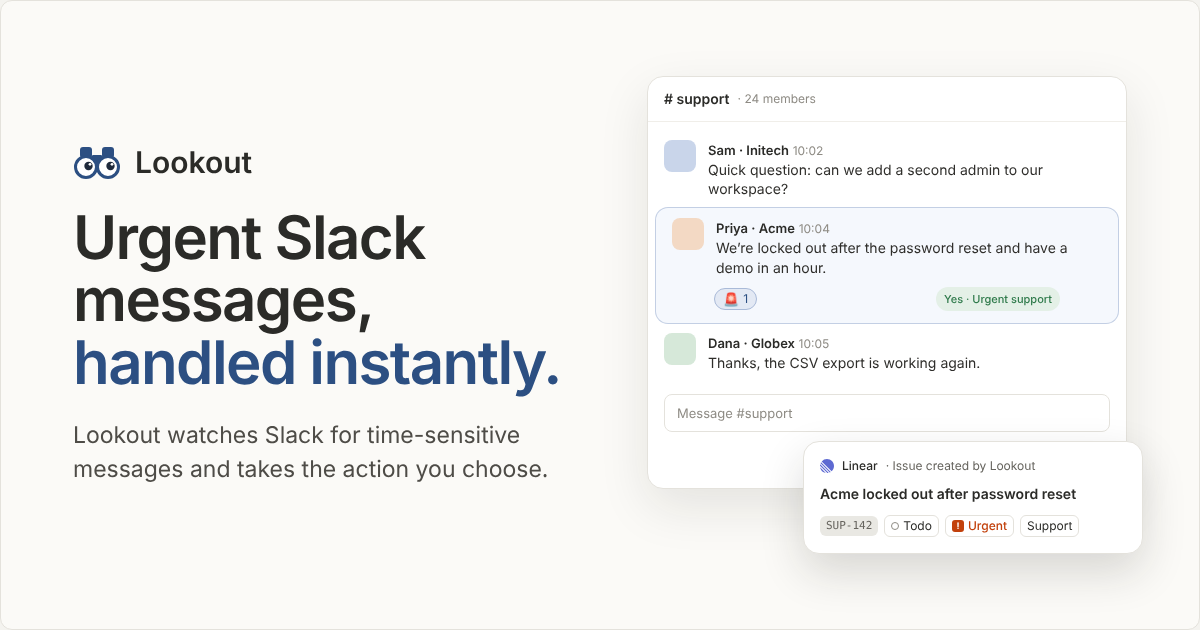
Lookout is a Slack app that watches Slack for time-sensitive messages and takes the action you choose. Powered by Jev from TypeSafe, it is built for teams whose Slack channels function as the live feed of their company — the place where a customer reports being locked out, where a production error surfaces, or where a large signup arrives. Rather than relying on someone to notice an urgent message among everyday chatter, Lookout monitors the channels you select and responds the moment a matching message appears. You describe what matters in plain words, choose where Lookout should look, and decide what should happen when it finds a match. The product is free during beta and is installed directly into Slack.
The problem Lookout addresses is the mismatch between how quickly urgent requests arrive and how slowly a team can notice and act on them. The site's own illustration makes this concrete: Priya from Acme writes that the team is locked out after a password reset and has a demo in an hour, while other messages in the same #support channel ask about adding a second admin and thank the team because a CSV export is working again. Only one of those messages is time-sensitive, and missing it has real consequences. Slack is described as "the live feed of your company," which means urgent signals arrive continuously but are mixed with routine conversation. Lookout is designed to act on that feed as it happens, instead of depending on a person to watch it.
Setting up a lookout starts with describing, in plain words, what Lookout should watch for. The site's example is a sentence rather than a query: "A customer is blocked from logging in or using the product." In the described flow there is no rule syntax to learn; you state the condition in ordinary language and Lookout uses it to check incoming messages. Next, you pick the channels where Lookout should look, with #support, #help-desk, and #customer-success shown as examples and an option to add more. Scope is deliberately under your control: Lookout only looks at the channels you pick. That keeps both noise and exposure down, because channels unrelated to support, engineering alerts, or sales never enter the picture.
The third step is choosing what happens when Lookout finds a match. The setup flow shows two action types — a reaction (👀) and a DM — and the examples show how these play out. When Lookout spots an urgent support message such as a customer saying nobody on their team can log in since the morning and they present to their board at 2, the chosen action is to DM the on-call person. When it spots a specific error message, such as a TypeError in checkout-api reporting 142 events in the last five minutes in #alerts-prod, the chosen action is to create a Linear issue. When it spots a signup over $100 — Northwind Co. on the Team plan at $480/month in #signups — the action is to add a 💰 reaction. In every case, you choose the action and Lookout takes it instantly.
The examples section shows that the same mechanism spans very different kinds of time-sensitive events. For engineering, Lookout can watch for specific error messages; the sample is a TypeError in checkout-api with a count of 142 events in the last five minutes, surfaced in #alerts-prod and turned into a Linear issue. For customer support, it can watch for urgent support messages; the sample is a customer locked out ahead of a board presentation, escalated by DM to the on-call person. For sales, it can watch for signups over $100; the sample is a $480/month Team plan subscription, acknowledged with a 💰 reaction. Because the condition is described in plain words, the same product covers monitoring, triage, and notification without a separate tool for each job.
In operation, Lookout checks messages as they arrive: message text is sent to Jev (TypeSafe) to check each message, under TypeSafe's terms. The site states that Lookout never trains on your messages and that messages are cleared from Lookout after processing. Two controls reinforce this — you choose every action, and only the channels you pick are monitored. The site also discloses that visible app content may appear in session recordings retained for 30 days. The positioning is "real-time intelligence": the system acts on Slack as it happens rather than through a periodic digest or a manual review queue.
The practical benefit is that urgent messages get handled instantly instead of waiting for someone to be at their desk, watching the right channel, and recognizing the signal. A lockout with a demo in an hour gets escalated to the on-call person right away; a production error becomes a Linear issue while the alert is still fresh; a significant signup gets acknowledged with a reaction. Because the action is chosen in advance, the response is consistent and does not depend on who happens to see the message. And because Lookout only looks at the channels you pick and clears messages after processing, teams can automate vigilance in sensitive channels without opening up every conversation in the workspace.
The described scenarios map to concrete workflows. A support team could run a lookout over #support, #help-desk, and #customer-success for messages describing a customer blocked from logging in or using the product, with the action set to DM the on-call person. An engineering team could watch #alerts-prod for specific error messages and create a Linear issue automatically, as in the checkout-api TypeError example. A sales or growth team could watch #signups for signups over $100 and add a 💰 reaction to flag the subscription. The same pattern extends to any channel where a described condition should trigger a reaction or a DM.
Lookout is aimed at teams that live in Slack and depend on it for time-sensitive signals: support organizations triaging customer issues, developers and on-call engineers watching production alerts, and sales teams tracking signups. Product Hunt lists it under Slack, Sales, and Developer Tools. Setup happens through Slack itself — "Add to Slack" installs it, and existing users sign in — and the product is free during beta. The three configuration steps and the resulting actions all live in Slack, where the messages themselves arrive.
Lookout's value proposition is narrow and clear: Slack is the live feed of your company, and Lookout acts on it as it happens. By letting you describe what matters in plain words, limiting monitoring to the channels you choose, and taking the action you pick — a reaction, a DM, or a Linear issue — it turns passive monitoring into an instant, consistent response. It is free during beta and installs directly into Slack.
Publisher
A
admin
Launch Date2026-10-20
Platformweb
Pricingfree
Tech Stack
#Jev#TypeSafe#Slack