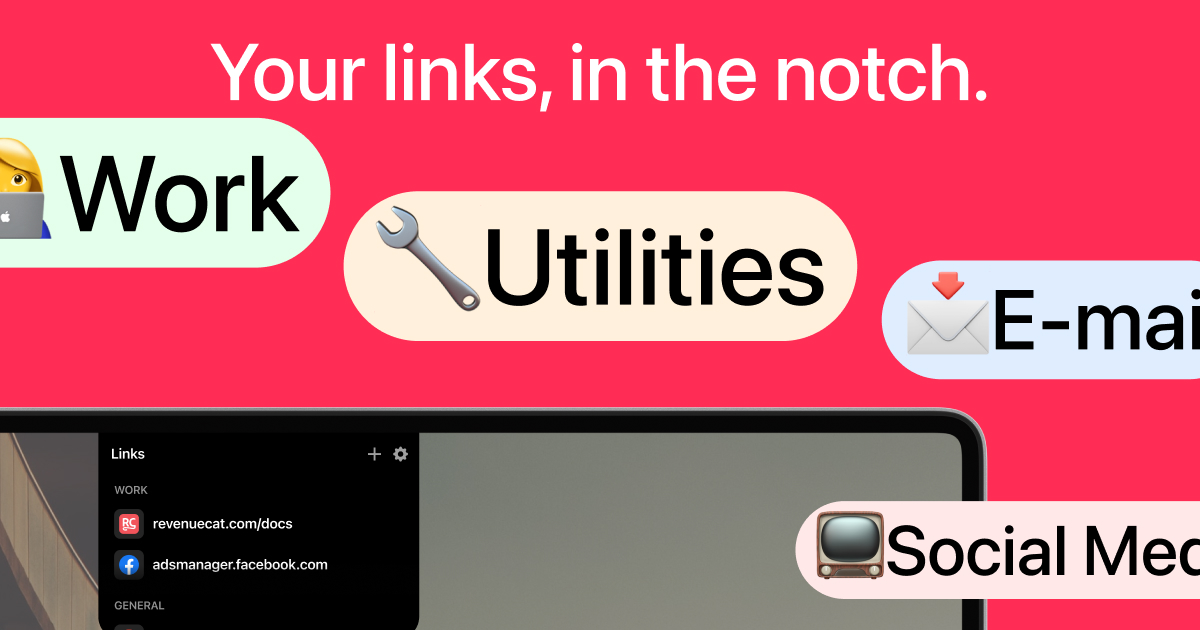
LinkNotch is a macOS utility that transforms your MacBook’s hardware notch into an always-accessible dock for your most frequently visited links. Designed for professionals who rely on quick access to web resources, it turns an often overlooked screen feature into a productivity booster. The core value is instant link opening without the friction of digging through bookmarks or typing URLs. By placing your essential links right on the notch, LinkNotch saves seconds each time you need a specific page. The app exemplifies this with categories like WORK, featuring links such as revenuecat.com/docs and adsmanager.facebook.com, and GENERAL, with google.com. This targeted approach reduces cumulative time waste and keeps you focused on your tasks.
The primary problem LinkNotch addresses is the time and cognitive cost of locating frequently needed web pages. Users often leave multiple browser tabs open or rely on bookmark menus, both of which create clutter and slow down navigation. Every time a developer needs to check API documentation or a marketer needs to open an ad dashboard, they must search through tabs, type partial URLs, or traverse bookmark folders. This constant context switching breaks flow and reduces overall productivity. LinkNotch eliminates these steps by making links instantly available with a simple hover or click on the notch, directly from any application, without leaving your current workspace. The result is a seamless, nearly instantaneous access to your most important online resources.
LinkNotch’s primary interaction model is built around the notch’s unique position on the MacBook screen. Users can simply hover their cursor over the notch to reveal a dropdown menu of their configured links, or click the notch to instantly open that link. The hover action acts as a preview, letting you see your links without opening anything, while clicking fires the link immediately. This dual-mode interaction is designed for speed: hovering is perfect when you want to visually confirm which link you need, and clicking bypasses the preview entirely for your most used link. The system is context-aware, showing only the links relevant to your current category (WORK or GENERAL). This feature cuts link access time to under one second, as advertised, boosting productivity by eliminating unnecessary mouse movements and clicks.
LinkNotch provides a simple yet powerful organization system through customizable categories. The default setup includes two categories: WORK and GENERAL. Under WORK, users can group professional links such as documentation sites, analytics dashboards, or CRM systems. The example configuration shows revenuecat.com/docs for developers and adsmanager.facebook.com for marketers. The GENERAL category holds personal or everyday links like google.com. Users can add, edit, or remove links via the settings menu, accessible from the notch’s interface. The app remembers your layout, so your link groups are always one hover away. This categorization prevents visual clutter and ensures that when you need a work link, you only see work links, reducing decision time. The ability to tailor categories to your own workflow makes LinkNotch adaptable to various roles from engineering to sales.
admin
Each link in LinkNotch is represented by its website’s favicon, enabling rapid visual recognition. For example, the RevenueCat link shows its distinctive logo, Facebook Ads Manager shows the Facebook icon, and Google displays the Chrome favicon. This icon-based display means you can identify a link without reading text, speeding up selection. Combined with the one-second access promise, the visual cues reduce the time from intention to action. The notch interface also shows system app icons like Finder, Reminders, and Notes in the dock area, though the link list is separate. The overall design is minimal and unobtrusive, appearing only when you interact with the notch. This integration leverages muscle memory: once you configure your links, opening them becomes as natural as checking the time.
Using LinkNotch begins with downloading the app from the Mac App Store and granting necessary permissions. After installation, the app sits in the background, monitoring the notch area. Users open the settings panel to add their first links, typing or pasting URLs into designated fields. They then assign each link to a category (WORK or GENERAL) via a dropdown. The app automatically fetches and displays the favicon for each URL. Once configured, the user returns to their normal workflow. Whenever they need a link, they hover over the notch – a subtle animation shows the link list – or click to open the top link. The list stays open as long as the cursor is in the notch area, then hides when moved away. This low-friction workflow minimises disruption while offering immediate access.
Consider a developer working in Xcode who frequently needs to consult RevenueCat’s documentation. Without LinkNotch, they would switch to Safari, locate the bookmark, or type the URL. With LinkNotch, they hover the notch, see the RevenueCat icon, and click to open the page – all in under a second. Similarly, a digital marketer who manages Facebook ads can access adsmanager.facebook.com instantly without hunting through browser tabs. For general web use, opening Google for a quick search becomes a single click. Over a workday, these micro-optimizations save minutes of wasted time and reduce the cognitive load of remembering URLs. Users report feeling more in control and less distracted, as the notch serves as a dedicated launchpad for their most important online destinations. The outcome is a smoother, more focused work session.
LinkNotch is built exclusively for macOS, targeting MacBook users who have a notch in their display (M1, M2, M3, and M4 MacBook Pro and Air models). The primary audience includes developers, marketers, project managers, and any knowledge worker who routinely accesses a set of core web resources. The app is free to download from the App Store, though no pricing tiers are explicitly mentioned in the provided content. It requires minimal setup and no complex configuration. By harnessing the notch as a functional space, LinkNotch offers a unique solution to the common problem of link disorganization. In summary, LinkNotch reimagines a hardware feature as a productivity enhancer, making it the ultimate notch link launcher for Mac users who value speed and simplicity.
LinkNotch is designed for MacBook users who own a model with a notch (MacBook Pro and MacBook Air from 2021 onwards). It is particularly valuable for knowledge workers such as software developers, digital marketers, project managers, customer support agents, and researchers who frequently access a consistent set of web resources. The app also benefits power users who value efficiency and want to minimize context switching. Additionally, anyone who finds themselves digging through browser tabs or bookmark menus multiple times per hour will appreciate LinkNotch’s instant access. The tool is especially useful for those who work in fast-paced environments where every second counts, such as tech startups, marketing agencies, and remote teams. It assumes a basic comfort with macOS and configuration, but requires no technical expertise to set up.