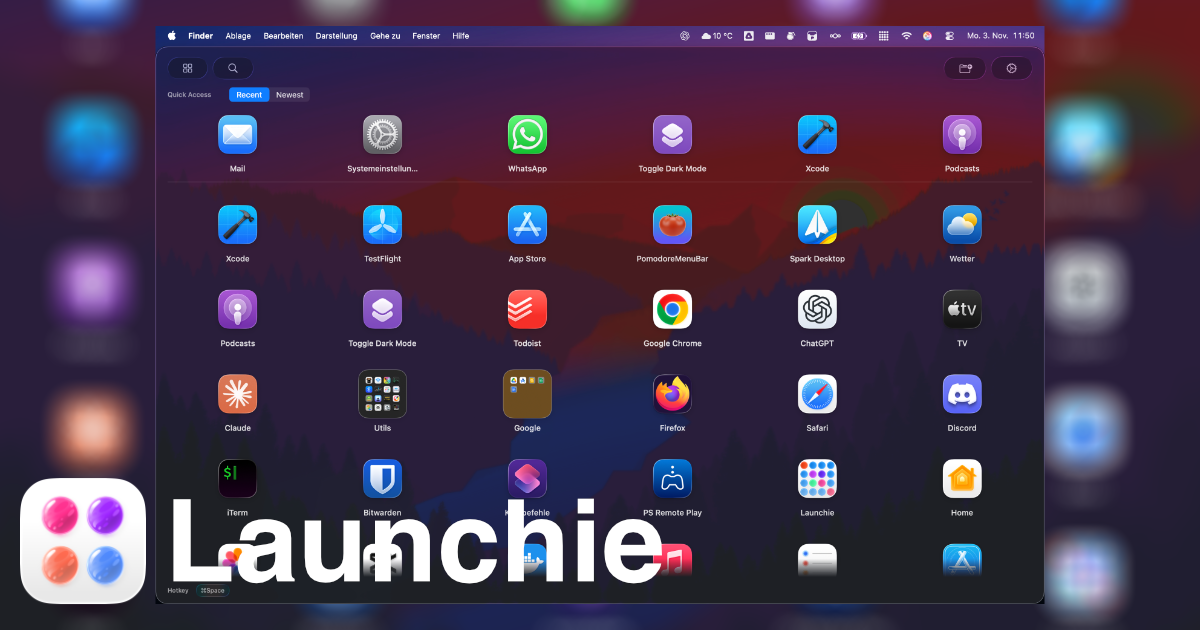
Launchie is a macOS application that brings a fullscreen, visual app launcher back to Macs running macOS 26 Tahoe and macOS 27 Golden Gate. It displays installed applications as a grid of icons that the user arranges themselves, with drag-and-drop ordering that sticks, unlimited folders, separate Spaces for different groups of apps, and instant search. Launchie is a replacement for people who browse their apps by eye instead of typing a name into a keyboard launcher, and it is positioned as the visual launcher macOS 26 removed: your app grid, your folders, your layout. It is available on the Mac App Store and can also be installed through Homebrew. Launchie is free to use, with a Pro tier offered as a one-time purchase.
The product exists because Apple removed Launchpad in macOS 26 and kept it out of macOS 27. As the site puts it, macOS 26 broke the classic Launchpad. According to the feature comparison on the site, macOS 26's Launchpad offered no icon rearranging, so apps were stuck in alphabetical order; no custom folders, so users could not organize their workflow; a fixed grid layout that fits nobody; no customization at all; no backup options, so a setup was lost on new devices; and no smart features beyond a basic grid. Launchie is presented as the recommended alternative, offering drag-and-drop reordering, custom folders, flexible layouts, full customization of hotkeys, themes and icons, backup and restore, and Smart Lists. User reviews on the site echo the same story: reviewers describe losing a curated launcher when upgrading to Tahoe, and then finding that Launchie did everything the old Launcher did, and more, with one calling it the perfect un-Sherlock'ing of Launchpad.
Launchie's core is the grid. Every app appears in a fullscreen grid that the user arranges themselves, and because drag-and-drop ordering sticks, the layout stays where it is put rather than snapping back to an alphabetical list. Spaces extend this by splitting the launcher into separate sections, each holding its own apps and folders, so a large library stops being one long wall of icons; users can keep work apps in one Space and everything else in another. The site notes that the old Launchpad never had Spaces. Screenshots on the site show the app grid, Spaces, search, organizing apps, quick access and appearance settings, alongside a live demo video of Launchie 1.6.1 running on macOS 27 and macOS 26.
Folders and search handle organization and retrieval. Users can make as many folders as they like and drop apps into them to group what belongs together, and search finds and launches any app in seconds. Apps that are never opened can be hidden to keep the launcher clean. A backup and restore feature saves the whole Launchie setup so that a new Mac starts where the last one left off.
Launchie is also designed to be opened and closed quickly. It can be opened with Command-K or with a custom keyboard shortcut chosen by the user, and it can also be launched through Hot Corner activation. Pressing Esc instantly returns the user to what they were doing, and clicking outside the launcher closes it as well. A quick access section uses Smart Lists to surface recently used, most used or newest apps at the top. Customization is a major part of the app: the look can be adjusted to the user's needs, and there is a choice between a modern Liquid Glass UI or a traditional sheet look. All of this is framed as everything that was loved about the classic Launchpad, plus modern enhancements.
The overall approach is deliberately visual and spatial rather than keyboard-first. Launchie opens as a fullscreen overlay on the Mac desktop, showing the app grid, folders and Spaces, and then closes again with Esc or a click outside so the user returns to whatever they were doing. Because ordering, folders, Spaces, hidden apps and the rest of the configuration are part of the setup, the launcher becomes a curated, persistent layout rather than a flat list of every installed application. The site contrasts this with keyboard productivity tools such as Raycast, noting that keyboard productivity and visual app launching solve different Mac workflow problems.
For users, the benefit is getting a familiar visual browsing workflow back after upgrading to macOS 26 or macOS 27, and then getting more than the original offered: drag-and-drop reordering, custom folders, flexible layouts, hotkeys, themes and icons, backup and restore, and Smart Lists. Reviewers quoted on the site describe it as fast, elegantly designed, thoroughly customizable and actively developed, with one noting that they have hundreds of apps installed and that quickly finding and opening the ones they need is no trivial task, a problem Launchie's search and Smart Lists address. Another reviewer says the app includes so many more features than Launchpad ever did that they no longer miss it. The app holds a 4.6 out of 5 rating from 141 ratings on the Mac App Store.
Launchie's use cases follow directly from its features. Someone who upgrades to macOS 26 Tahoe, discovers the launcher is gone, and wants a familiar fullscreen grid back can install Launchie and arrange apps the way they had them before. A user with hundreds of installed apps can rely on search and Smart Lists to find and open what they need quickly. A person who wants to keep work and personal apps apart can place them in separate Spaces, each with its own apps and folders. Someone who has carefully curated a layout can back it up and restore it on a new Mac so the setup carries over. Users who browse by eye rather than typing an app name get a grid organized around how they remember their apps. The site also provides guide pages aimed at people searching for a missing Launchpad on macOS Tahoe, the best macOS Launchpad replacement, or a Launchpad replacement for macOS 27 Golden Gate.
Launchie is aimed at Mac users on macOS 26 Tahoe and macOS 27 Golden Gate, particularly those who valued Launchpad's visual browsing, folders and spatial memory. It requires macOS 26 Tahoe and is distributed through the Mac App Store and via Homebrew with the command brew install --cask launchie, with other installation options listed on the site. Pricing is free to use, with Pro available as a one-time purchase. The site reports its Mac App Store rating and press coverage from iDownloadBlog, Mac & i 6/2025 and MacGadget, and it also hosts comparison pages against LaunchOS, AppGrid and Raycast, along with guides, blog posts and a newsletter for release notes and launchpad replacement guides.
Launchie's primary value proposition is simple: it restores the visual, customizable app launcher that macOS 26 removed, and it does so with drag-and-drop ordering, folders, Spaces, search, hidden apps, Smart Lists, backup and restore, and appearance options that go beyond the original Launchpad, in a package that is free to use with a one-time Pro purchase.
Publisher
A
admin
Launch Date2026-09-21
Platformdesktop
Pricingfreemium