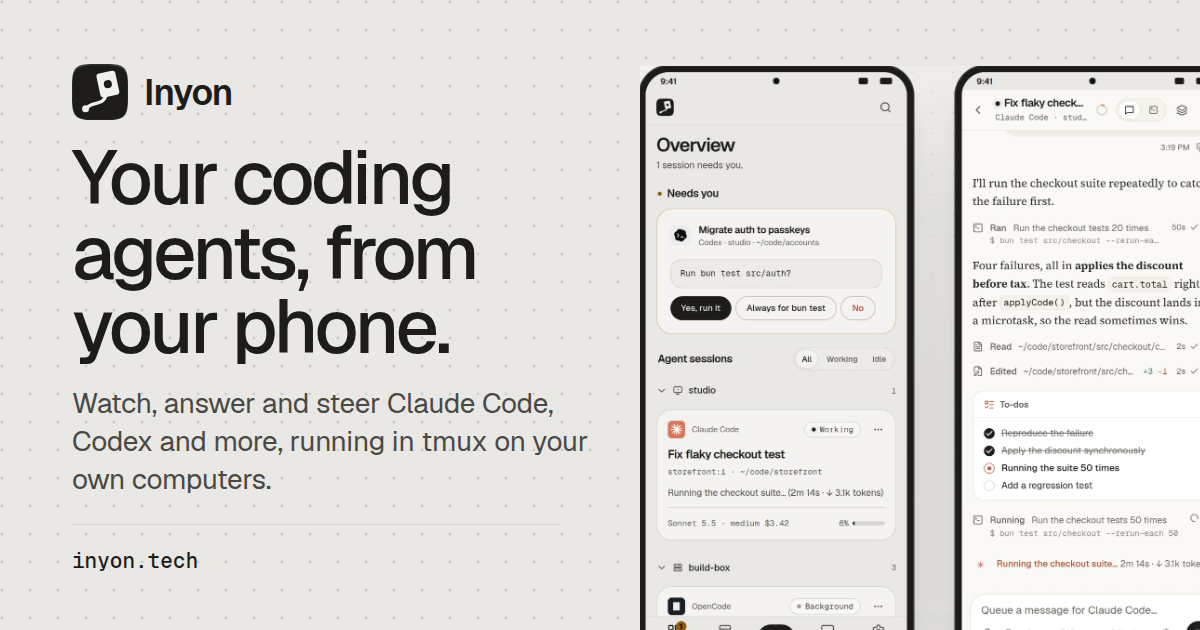
Inyon is an app and web interface that shows the coding agents already running in tmux on your own computers as chats on your phone or in a browser. It works with Claude Code, Codex, Gemini CLI, OpenCode, GitHub Copilot and Antigravity CLI. Rather than replacing your terminal setup, Inyon sits alongside it: each agent keeps its own account, and nothing changes at the keyboard. You watch a session, answer the question an agent is waiting on, steer the model or permission mode, review the diff and send the next instruction — all from a phone, tablet or desktop browser — then sit back down to find the same session exactly where you left it. It is built for developers who run agents on their own machines and want to stay in the loop when they are away from the desk.
Terminal coding agents are useful precisely because they run on your own hardware, inside tmux, with your own credentials and your own repositories. But that arrangement ties you to the keyboard. Agents pause constantly: a permission request before running a test command, a question about which file to touch, a menu, a sign-in link. Until someone answers, the session simply waits. Inyon was built for that gap. Instead of moving your work to a hosted environment, it surfaces the sessions that are already running and turns each pending question into buttons you can tap from your phone. The answer is typed into the same pane, so the workflow is unchanged when you return to the keyboard. Inyon is free, open source and MIT licensed, with no account required and nothing to host.
There are three ways to connect, and you can mix them per machine. In the paired setup, you run inyon on the computer and scan the QR code it prints; the computer reaches your phone through a free encrypted tunnel or your own VPN, so there is no hub and no open ports. In the hub setup, a small server on one machine that stays on serves the web app to any browser, other machines join it, and your phone pairs with it by QR code. In the direct setup, the Android app or a hub reaches a server over SSH, so a locked-down box needs nothing installed beyond tmux and your agents. A laptop can pair straight with your phone while a server joins a hub, and a machine that cannot be touched can be reached over SSH.
Sessions are presented as chats. Replies, tool calls, diffs, plans and to-dos appear in the conversation, with the real terminal one tap away whenever you want the raw pane. On a tablet, sessions sit in a tree by machine, so you can see what is running where; ending a session shows a confirmation that states exactly what closes, and then a Session ended toast confirms it. When an agent asks something — a permission request, a question, a menu or a sign-in link — the question arrives in the overview as buttons. Tap one and the agent carries on, exactly as if you had typed the answer yourself.
Steering goes beyond answering yes or no. From the app you can switch the model, the effort level and the permission mode, set a goal for the agent, compact or clear the context, rewind, or go back to a past conversation. Typing works the way it does in the terminal: slash commands, @ file search, ! shell commands and images are all supported, and drafts mirror into the terminal so nothing is lost between the phone and the keyboard. This means an instruction composed on a phone is not a reduced version of the one you would have typed at the desk — it uses the same commands and the same files.
While agents run, Inyon keeps the numbers in view: model, context, cost and lines changed, plus the 5-hour and weekly plan limits. Notifications arrive when an agent needs you or finishes, and when a machine drops off or comes back. Background work is followed too — queued messages, subagents and background shells appear with live output and a real Stop button. This is the difference between checking in on a session and actually supervising it: you can see whether an agent is waiting, working or finished without opening a terminal.
Review is built in. You can browse the session's files, look at the git working tree, comment on diff lines, commit and push, or fork a conversation to take it in another direction. Plans, mockups and progress boards that agents build show up under Pages, sandboxed, on both phone and desktop. In practice this means a code review can happen on a phone: read the change, watch the tests pass, leave a comment on a line, commit, and send the next instruction — with the terminal still there one tap away if you need it.
Setup is deliberately small. Install the Android app from the APK — later versions install over it and the app tells you when one is out — then run one line on each computer: on macOS or Linux, curl -fsSL https://inyon.tech/get.sh | sh; on Windows in PowerShell, irm https://inyon.tech/get.ps1 | iex. The command prints a QR code; in the app you tap Add a computer and scan it. From the app, Inyon checks for tmux and each agent, installs what is missing and opens sign-in. A hub is installed with the same script plus the --hub flag. The current build is Inyon 0.20.2, 2.9 MB, open source under MIT.
Security follows the same minimal approach. Pairing happens over a QR code, and the paired connection runs through a free encrypted tunnel or your VPN without opening ports. There is no account and nothing to host. Each agent keeps its own account, so Inyon never becomes the place your credentials live. Companion apps such as Legato can see your sessions, answer a question and send an instruction, with four permissions and nothing more. Being MIT licensed and open source, the client and the setup scripts can be inspected.
Typical use looks like this: an agent asks before running bun test src/auth, and you tap "Yes, run it" from the overview, then watch the results come in. A Claude Code session fixing a flaky checkout test opens as a chat on a phone, the edit expands into a diff, the suite passes, and you send the next instruction. On a tablet you see the session tree by machine and end a session that has finished. From a desktop browser served by a hub you get the same overview. And when you are away from all of it, notifications bring you back only when an agent actually needs you.
Inyon's value proposition is narrow and specific: keep the terminal workflow you already have, and remove the requirement to be at the keyboard when an agent pauses. It does not host your code, replace your agents or ask for an account. It shows what is already running in tmux on your machines, turns pending questions into taps, and types the answer into the same pane — so nothing changes when you sit back down.
Publisher
A
admin
Launch Date2026-10-24
Platformmobile
Pricingfree
Tech Stack
#tmux#SSH#Android#QR pairing#encrypted tunnel