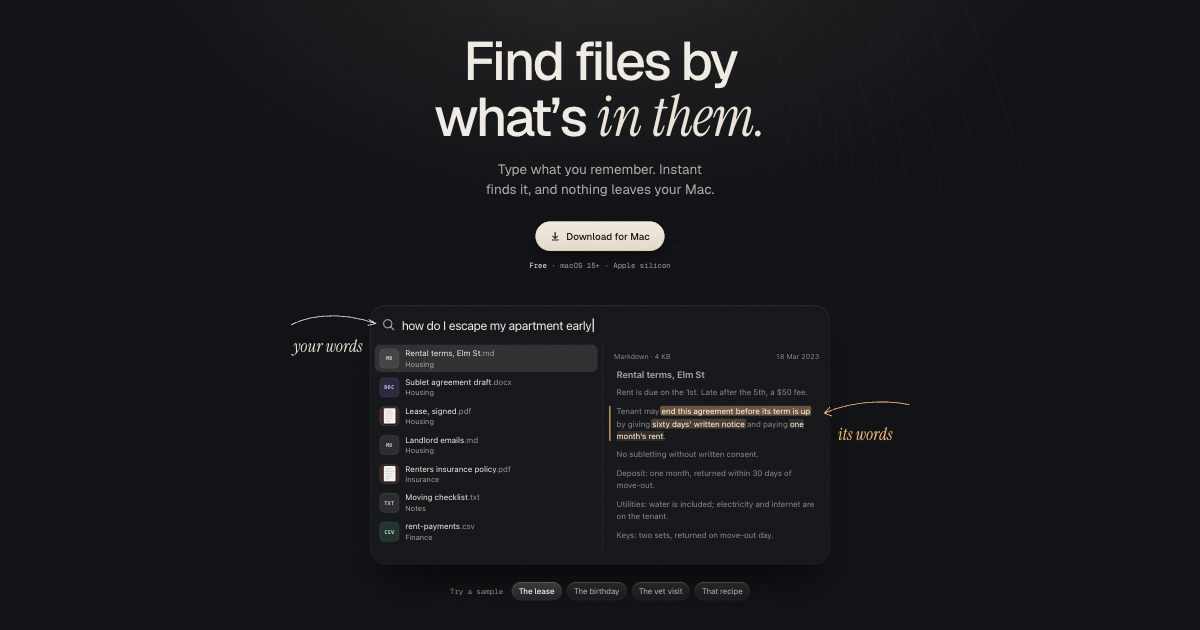
Instant is a file search app for macOS that lets you find documents, notes, photos, and scans by describing what is inside them rather than remembering their names. You type what you remember — a phrase like “how do I escape my apartment early” or “what the vet said about the cat’s diet” — and Instant locates the file, then highlights the passage that matches your words. It is built for Mac users who keep their own material in ordinary folders: leases, notes, recipes, receipts, clinic PDFs, photos, and source code. The promise on the website is simple: you remember what a file was about, and that should be enough to find it.
Most file search still works on names. If you cannot remember whether the document was called Lease, Rental terms, or Elm St, you are left scrolling through folders and opening files one at a time until the right paragraph appears. The Instant FAQ addresses this directly: Spotlight is described as simple title keyword search that does not understand the context of your files, while Instant is built to understand the semantics of what is inside them. The site also explains why asking an AI chatbot is not the same thing: a chatbot would need your file contents sent to remote servers, and answering well would require consuming millions of tokens. Instant takes the opposite route, keeping both the files and the matching on the Mac.
The core of the product is searching by gist. Instant compares your description with the meaning of what is written in your files, so a search for “how do I escape my apartment early” surfaces a Markdown note called Rental terms, Elm St and highlights the sentence “end this agreement before its term is up.” Other examples on the site work the same way: “birthday present idea I wrote down” finds a note named People to shop for and highlights “Maya turns 30 … green ceramic lamp,” “what the vet said about the cat’s diet” finds a clinic PDF and highlights “smaller portions, twice a day, and no more tuna,” and “that recipe with too much garlic” finds a recipe note and highlights “twelve cloves … don’t apologise.” Each result is shown with the exact passage pulled forward, so you can confirm the match without opening the file, and each answer arrives with the file’s context, such as its type, size, and date.
Instant reads PDF, scanned PDF, DOCX, RTF, ODT, Markdown, text and source code. That coverage matters because personal and working material rarely lives in one format: a lease may be a PDF, household notes may be Markdown, a form letter may be DOCX or ODT, and scripts may be plain text or code. Because the app indexes what is inside these files rather than just their names, the same kind of search works across all of them — you describe the content and Instant returns the file with the relevant line highlighted. The site’s demo result lists also show ordinary notes, CSV files and Word drafts appearing alongside each other in a single result set, which is the point: one search box over the folders you actually use.
Photos and scans are treated as searchable content too. On the website, a search for “standing stones with the sun breaking through” returns a HEIC photo, and the product reads scans with no text layer — the example given is a receipt for a standing desk, from which the merchant, date, line item and total are surfaced. Instant supports HEIC, JPEG, PNG, WebP, GIF and TIFF images. The site’s shorthand is “Photos, no tags needed”: you do not have to label or organise pictures first, you describe what is in them. This extends the same behaviour you get for text to the parts of a folder that keyword search normally cannot reach, so a photo library and a document folder can be searched the same way.
Instant is designed to be summoned rather than opened. Press ⌥ Space over any app, or choose any combo you like, and the search field appears; results change with every key you type. Because it is a system-level shortcut, it works while you are in another application, so a lookup does not interrupt what you were doing. The site frames this as “two keys away, from anywhere.” The interface is deliberately spare: a query line, a list of candidate files with their type and folder or tag labels, and a preview showing the matching passage and its context.
The first index is the only slow part. The FAQ says it takes minutes for an average document collection and hours for a big photo library, and after that only changed files are reindexed, so searches stay current without rescanning everything. Disk usage is stated plainly: the local search model takes about 1 GB, downloaded once. Instant runs on macOS 15 and later and is optimized for Apple silicon. You choose the folders it searches, which is the difference the site highlights against Photos, which only searches the Photos library, whereas Instant searches every folder you pick.
Privacy is the product’s framing, not an add-on. There is no account and no cloud; your files and searches never leave your Mac. The page lists what runs where: the search engine runs offline, the search model is downloaded once, update checks happen, and anonymous usage counts can be turned off in Settings. The phrase used repeatedly is “nothing leaves your Mac.” For people whose folders hold leases, medical notes, financial records, or client work, this means the convenience of describing a file instead of naming it does not require uploading that file anywhere.
The outcome Instant promises is speed plus precision: the fastest, most precise local AI search for your files, with the Product Hunt description claiming a 95% hit rate. In practice that means fewer dead ends — you do not need the filename, the folder, or the exact keyword, only a description of the contents — and the highlighted passage tells you immediately whether the result is right. Because the index updates incrementally and the shortcut is available in any app, the cost of a lookup is low enough to use constantly. And because the model and the index are local, results do not depend on a network connection.
The site’s own examples sketch the use cases: retrieving a clause from a rental agreement before its term is up, finding a gift idea you wrote down months earlier, recalling what a vet said about a pet’s diet, and pulling up a recipe by a detail you remember rather than its title. Beyond those, the format list supports searching scanned receipts and invoices, notes in Markdown, Word drafts, and source code by content. The photo examples cover searching a personal library by what is in the picture — standing stones with the sun breaking through — without tagging anything first.
Instant is aimed at Mac users who keep a large personal or working file collection and want to search it privately. It requires macOS 15 or later and is Apple silicon-optimized. It is free to download and use, and the site notes that people interested in private search for their company can reach out about Enterprise. Support is available at support@perillalabs.com. The site describes the local search model and the Product Hunt listing mentions the latest embedding models; further technical details are not published on the website.
Overall, Instant is a privacy-first search layer for a Mac’s own folders. You describe what you remember, it finds the file by its meaning, and it shows you the exact line that matched — with no account, no upload, and no cloud in the loop.
Publisher
A
admin
Launch Date2026-10-24
Platformdesktop
Pricingfree