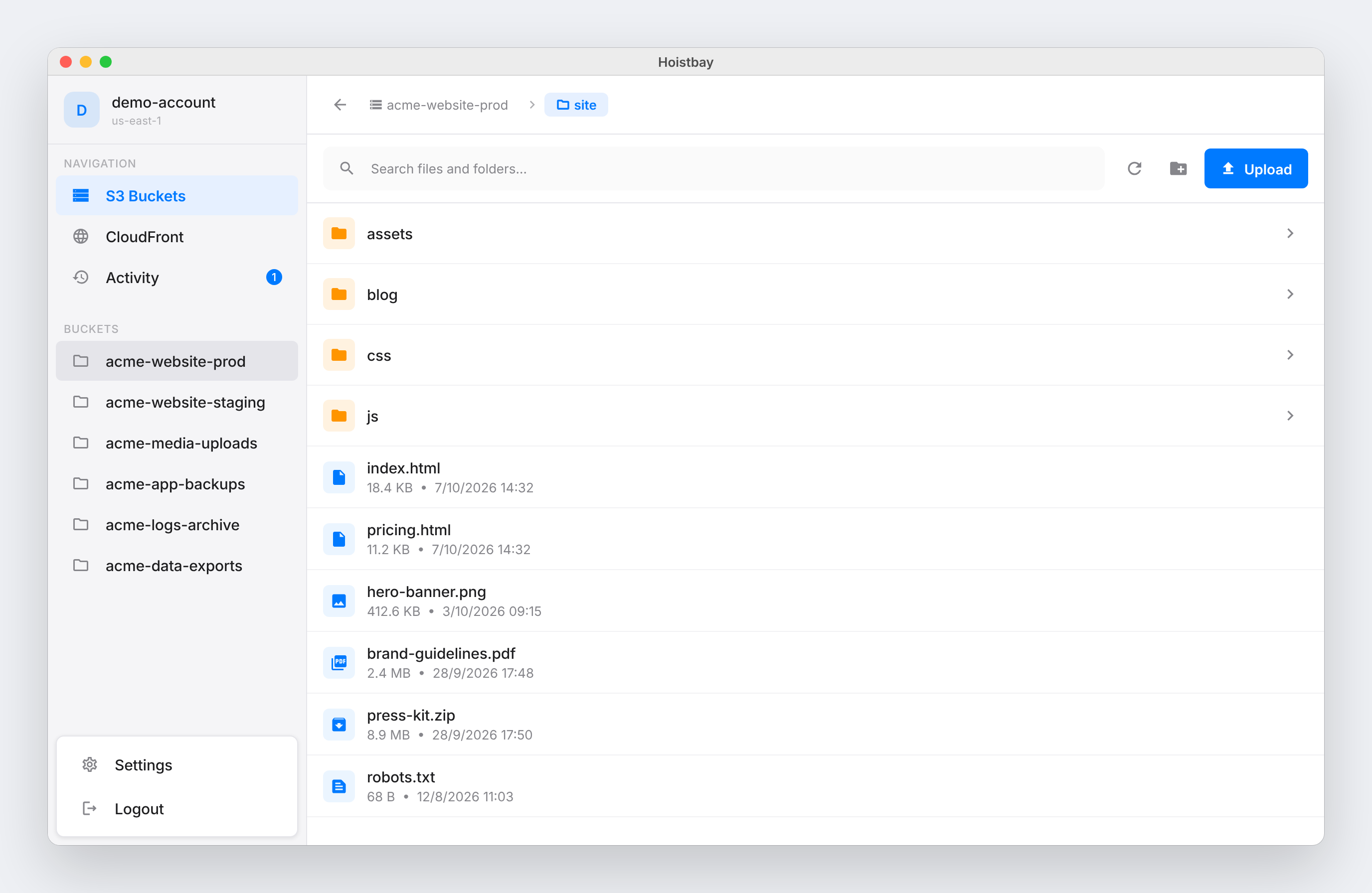
Hoistbay is a free, open-source desktop application for macOS and Windows built to manage Amazon S3 storage and CloudFront delivery without going through the AWS Console. It is aimed squarely at deploy workflows: you point the app at a bucket, drop in a build folder, and Hoistbay uploads the files with the correct headers already applied. From the same window you can browse bucket contents, inspect and fix object metadata, clear a CloudFront cache after a release, and move between saved AWS accounts and regions with a single click. The product describes itself as covering everything between your build folder and your CDN, meaning the repetitive S3 and CloudFront jobs that follow every deployment.
The problem Hoistbay addresses is the manual, error-prone work that surrounds each release. After every build you typically need to upload files, set Cache-Control, Content-Type and Content-Encoding headers, and invalidate the CDN cache — jobs the site describes as requiring you to click through the AWS Console or remember CLI flags. Getting headers wrong means re-uploading an entire build, and switching between AWS accounts and regions can produce errors such as SignatureDoesNotMatch. Hoistbay packages those recurring tasks into one fast desktop client so the same sequence happens consistently after every release, without console navigation or flag memorization.
The core feature is header rules applied on every upload. Per-bucket rules are configured once, and Hoistbay applies them automatically to each upload. The site gives the example of *.js and *.css files receiving Cache-Control: max-age=31536000 while *.html files receive no-cache. Content-Type and Content-Encoding can likewise be driven by file pattern. This removes the most common cause of a re-upload, namely a build shipping with the wrong headers, and makes caching behavior predictable without repeating manual configuration each time.
File management is handled with drag-and-drop. You can drag in files or several folders at once and the folder structure is kept intact. Single objects or whole folders can be downloaded. Multi-select operations allow renaming, moving, copying across buckets and regions, and deleting, with folders included. Because these bulk actions happen inside the app rather than through a web console, organizing a bucket after a release — moving assets, cleaning old builds, copying between environments — stays in one place.
CloudFront work sits alongside the S3 view. Distributions are shown next to your buckets, so you can invalidate /* or specific paths after a deploy and then watch the invalidation until it reports Cache cleared. For storage, a details pane exposes an object's properties, HTTP headers, tags and versions. Content-Type, Content-Encoding or x-amz-meta-* values can be corrected in place without re-uploading the file, which is useful when a single asset ships with bad metadata.
A single Activity panel consolidates uploads, downloads, deletes and cache clears, showing live progress along with start and finish times and a clear success or failure status. The app is also built to tolerate unreliable connections: network hiccups are retried automatically up to three times, and anything that still fails is reported per object rather than failing silently. The site also lists specific S3 errors the app fixes — keys containing spaces or special characters work through custom Signature V4 signing, bulk deletes send the required Content-MD5, and folders with 1,000+ objects are fully paginated.
On trust, Hoistbay is explicit: it has no servers of its own. Credentials are encrypted at rest using flutter_secure_storage, which leverages each platform's native keystore — the macOS Keychain and Windows Credential Manager — and keys are only read when the app calls AWS. There is no middleman backend and no analytics or telemetry; the app calls official AWS regional endpoints over HTTPS using the aws_s3_api SDK and nothing else. Every line is on GitHub under the MIT license, and the README lists the exact IAM permissions each feature needs for teams that prefer least privilege. Profiles are saved per account and region and can be switched instantly, session tokens work for temporary credentials, and bucket regions are detected automatically.
The practical benefits follow from those design choices. Header rules eliminate the re-upload cycle caused by incorrect caching headers. Automatic region detection and saved profiles remove the account-switching friction and the SignatureDoesNotMatch class of errors that comes with mismatched regions. One-click invalidation means a deploy is finished when the cache clears, not when the upload ends. In-place metadata edits avoid re-uploading assets just to fix a content type. The Activity panel plus per-object failure reporting means you know exactly what succeeded rather than guessing. And storing credentials in the OS keychain with no backend means adopting a new tool that asks for AWS keys does not require trusting a third-party server.
Typical use cases map directly to release workflows. A front-end deploy: drop the build folder, let *.js and *.css receive long-lived cache headers while *.html is set to no-cache, then invalidate /* on the distribution and watch it clear. Multi-environment work: keep prod-infrastructure in us-west-2, dev-sandbox in us-east-1 and staging-testing in eu-central-1 as saved profiles and switch instantly. Asset maintenance: download a whole folder, rename or move objects across buckets and regions, or delete stale builds in bulk. Metadata repair: open an object's details, correct Content-Type, Content-Encoding or x-amz-meta-* values in place. Temporary credentials: use session tokens where short-lived access is required.
Hoistbay targets developers and teams who deploy static sites and assets to S3 behind CloudFront and who do that repeatedly. It ships as a macOS client for Apple Silicon and Intel (macOS 12+, v1.1.1) and a Windows client for Windows 10/11 x64 (v1.1.1); a Linux client is listed as coming soon. It is free and open source, and can also be built from source with Flutter by cloning the repository, running flutter pub get, and launching or building the desktop target. Because the macOS build is not notarized by Apple, first launch requires right-clicking the app and choosing Open, or using Open Anyway in Privacy & Security; on Windows, SmartScreen requires More info then Run anyway. An interactive browser demo replicates the app so you can open folders, drop a file to see header rules applied and follow the Activity panel without touching AWS.
In short, Hoistbay's value proposition is a focused, trustworthy desktop client for the S3 and CloudFront chores that repeat after every release: correct headers on every upload, cache invalidation in seconds, quick object management, and credentials that never leave your machine.
Publisher
A
admin
Launch Date2026-10-21
Platformdesktop
Pricingfree
Tech Stack
#Flutter#aws_s3_api#flutter_secure_storage