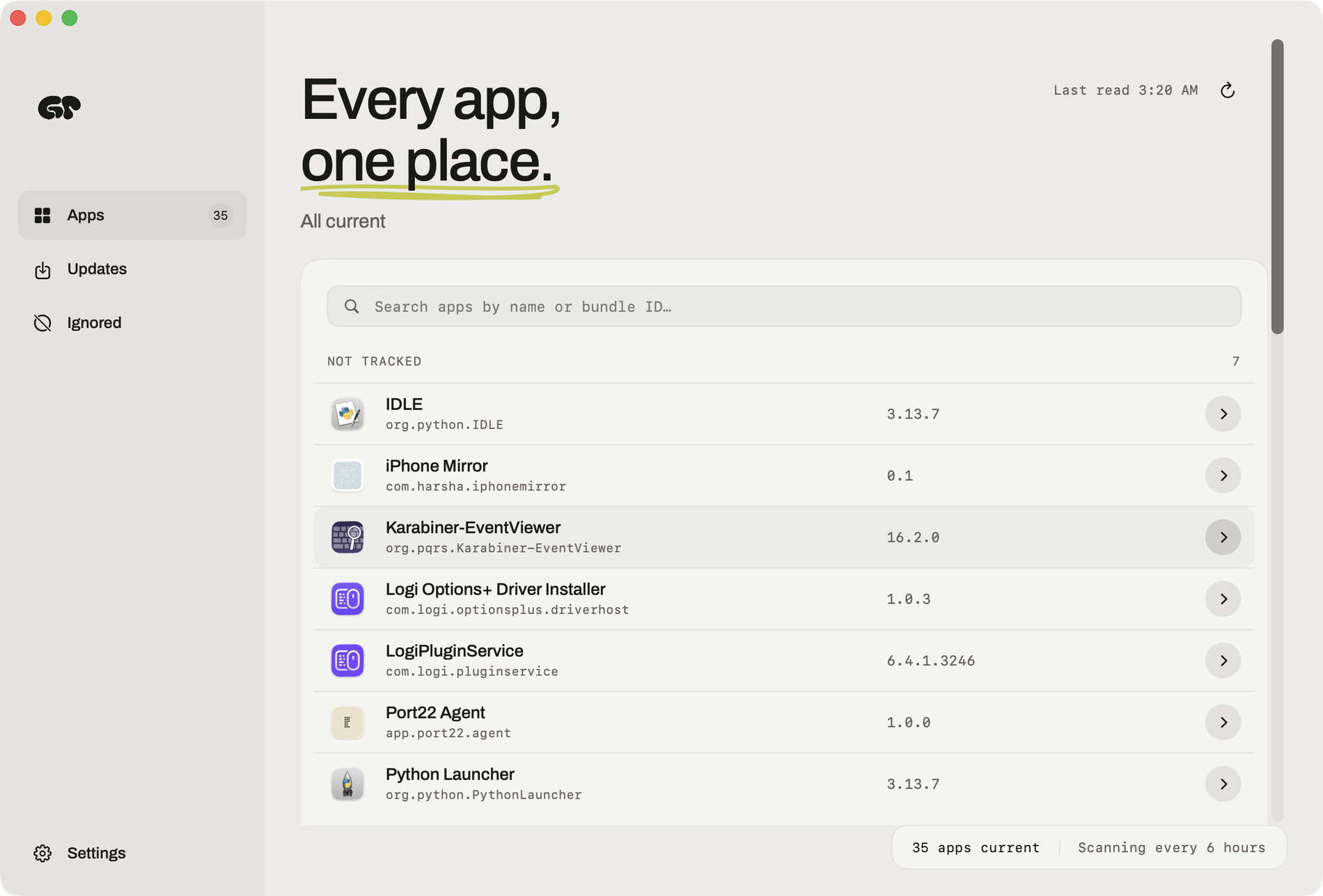
Greypaint is a Mac app updater built for macOS that finds and installs updates for the apps already on your Mac. It checks Sparkle, Homebrew, GitHub, and the App Store, and answers in one list. Instead of chasing each app's own update mechanism separately, Greypaint presents a single, searchable inventory of installed Mac apps with their versions and update status, so you can see what is behind at a glance and update it in one click.
The problem it targets is simple: on a modern Mac, updates arrive through many different channels, and it is easy to miss one. Indie apps publish Sparkle appcasts, tools and desktop apps arrive through Homebrew, some apps ship straight from a GitHub repository, and the Mac App Store handles the rest. Each of those speaks in its own way, and many only mention a new version when you happen to open the app. Greypaint's opening line captures the intent exactly — "You didn't notice. Greypaint did." It checks for Mac app updates with the window closed, so nothing quietly falls out of date while you are working.
Greypaint reads the updater each app already has. Sparkle appcasts, described as the feed most indie Mac apps already publish, are checked so the current version sits next to the available one — an appcast moving from 1.13.7 to 1.14.0, for example. Homebrew casks are covered too, so whatever you installed with brew can be updated without a terminal, with versions such as 3.0.14 moving to 3.0.15. GitHub releases are checked for the apps that ship straight from a repository, where tags move from v26.2 to v26.6. For the Mac App Store, updates are counted in Greypaint's list and then opened where macOS insists, pairing App Store tracking with everything else in one place.
Autopilot and scheduling decide how far Greypaint goes on its own. Autopilot offers three explicit choices: "Nothing without me," "Security fixes only," and "Everything quietly." With security fixes selected, security fixes install quietly while everything else waits for you, or nothing does. Checks can run on your schedule — hourly, every six hours, daily — or never, unless you ask. Because Greypaint checks for updates while its window is closed, the work happens quietly in the background on whatever cadence you choose, and you can change that cadence whenever you like.
It tells you before it touches anything: what changed, what could break, and what it won't do. Big jumps are flagged, so a new major version — 5.4 to 6.0, say — is marked and never installs on its own. You can skip one version, setting a release aside while the next one shows up as usual. If an update is missing, Greypaint says why: when a release needs a newer Mac or a newer macOS, such as one requiring macOS 28, you hear about it rather than wondering why nothing appeared. Old apps are called out as well, including apps still on Rosetta and apps their developer stopped making, shown as discontinued.
Rollback is the safety net behind every install. If you didn't like the new version, Greypaint puts the previous one back — the undo button in its tagline, turning a move to 6.0 back into 5.4. Beyond graphical apps, it covers your command-line tools too: Homebrew formulae and npm packages are listed and are never updated without you. The interface keeps your hands on the keyboard, and every shortcut can be changed in Settings — switch appearance (⌘D), check for updates (⌘U), update selected apps (⇧⌘U), and find an app (⌘F). The sidebar separates Apps, Updates, and Ignored, alongside a searchable, filtered inventory of installed Mac apps with versions and update status.
The approach behind Greypaint is to reuse what each app already provides rather than replacing it. It reads the updater each app already has — Sparkle, Homebrew, GitHub, and the App Store — and checks every update before it lands. Nothing is invented or routed through a proprietary channel; Greypaint interprets the appcasts, casks, release tags, and receipts that developers already publish. That is why a cask shows one version becoming the next, a GitHub tag moves forward, and the Mac App Store receipt is counted in the same list as the rest, and why the update decision stays in one place rather than scattered across separate tools.
The outcome for users is a Mac that stays current without constant attention. You see every app that needs attention, make one decision, and update in one click. Security fixes can be absorbed automatically while riskier changes wait for you. You are told in advance what counts as a big jump, what needs newer hardware or a newer macOS, and what has been abandoned by its developer. Old apps on Rosetta and discontinued apps are surfaced rather than discovered at the worst moment. And when an update does cause trouble, rollback removes the fear from clicking update in the first place.
Concrete scenarios follow from those pieces. Someone running a Mac full of indie apps that publish Sparkle appcasts can see every available release in one pass instead of opening each app. A developer whose tools ship from GitHub, or who installed software with brew, gets casks, release tags, Homebrew formulae, and npm packages in the same window and never has them updated without consent. Anyone who wants the Mac App Store counted alongside the rest gets App Store updates listed with everything else. And when a new version goes wrong, rollback restores the previous one. The heading "Find out what's behind, once" sums up the audit-style workflow: one searchable, filtered inventory answering what is out of date.
Greypaint can be downloaded for free and tried for 14 days. After that it is $6.49 for a lifetime license, one payment with updates included and no subscription. It requires macOS 26.2 or later, and the download is a macOS disk image. Purchases are activated with the email from checkout and the license key you receive; Greypaint also emails those activation details, which are shown on a purchase-complete screen with a copy button.
Taken together, Greypaint replaces a scattered set of updaters with one quiet Mac app updater: Sparkle, Homebrew, GitHub releases, and the App Store in a single list, checks that run with the window closed, autopilot you can tune, flags for big jumps and missing updates, and a rollback when something goes wrong — all for a one-time $6.49 lifetime license.
Publisher
A
admin
Launch Date2026-09-28
Platformdesktop
Pricingpaid