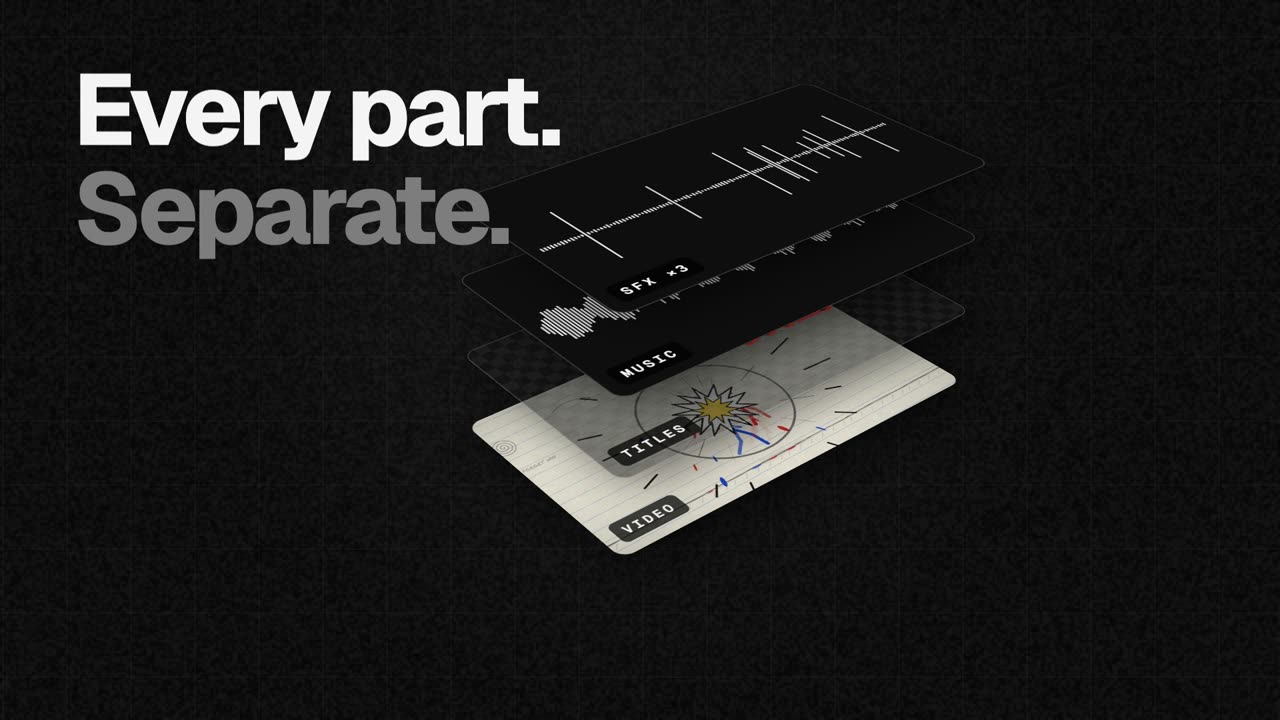
EasyCut is a free video editor that runs entirely in your browser and is built specifically to finish motion videos made by Claude. When Claude designs, animates and scores a video — its own motion, music and sound effects — EasyCut opens it as one project in which the video, the titles, the music and each individual sound effect sit on their own track, lined up and labelled. The tool is for anyone who wants the creative reach of an AI video generator but still needs a real editing timeline to trim scenes, swap music, add captions, adjust timing, add their own brand, and export the finished film in whatever shape a platform needs.
The problem EasyCut addresses is that an AI-generated video normally arrives as one finished, flattened file. If you want a different music bed, a shorter title card, a quieter sound effect or a cut that lands half a second earlier, there is often no practical way to change just that element — the usual answer is to regenerate the whole video and hope the new version keeps everything else you liked. EasyCut's answer is to keep every part of the Claude-made video separate. Because each title, scene, image, sound and element is preserved on its own track, you can select anything and ask Claude to change just that part without rebuilding the whole video. That turns an AI video from a fixed output into a starting point you can actually edit.
The editing core is a full timeline rather than a trimmed-down AI toy. EasyCut describes itself as a real editor with a magnetic timeline, frame-exact cuts, J/K/L keyboard controls, markers and undo for everything. You can cut, trim and split clips by dragging edges, split at the playhead, and reorder clips by dragging them, with transitions added in one click. Pauses can be removed in one go, or you can cut words by crossing them out directly in the transcript. Auto captions are generated word by word, written on your own computer, and can be saved out as SRT or VTT files for use elsewhere.
Audio work is handled with the same level of control. Music can be fitted to the video's length, cut on the beat with its real ending, and there are free music and effects libraries built in, with ducking so music sits under voices automatically. You can record your screen, your camera, or both together with your voice, straight onto the timeline. A Layers panel lists every clip of a Claude video in one place, so you can find all the whooshes and mute or delete them at once, and speed ramps let you slow one moment down or speed it up with easing that moves smoothly in and out of the change.
Visual and AI features are included as well. Colour looks, green screen, split screen, blur boxes, shapes and stickers are available to make footage look good, while voice clean-up, background removal and an AI voice all run on your device without uploading anything. Export covers MP4 up to 4K and 60 fps, produced as wide, tall and square versions in one go, plus GIF and audio-only exports. Projects save automatically in your browser as you work and can be moved anywhere as a single file, and a brand area keeps your logo, colours and fonts in one place for every video — a set Claude can use too.
EasyCut's distinctive approach is how the Claude connection works. Setting it up takes about one minute, once. You add the EasyCut connector to Claude, and from then on Claude can open the videos it makes straight in EasyCut with every part on its own track. There are two routes. With Claude Desktop you download the EasyCut extension — a 170 KB .mcpb file for macOS and Windows — and press Install when Claude asks to install it, since Claude already has everything it needs to run it. With Claude Code you run one terminal command: claude mcp add easycut -- npx -y easycut-connector@latest. Then you open EasyCut, press Claude at the top, turn it on and choose Allow if the browser asks to let it reach apps on this device. If you are using claude.ai in the browser instead, you ask for the parts as downloads and open them from EasyCut's Claude panel. Claude Code needs Node.js 18 or newer.
The practical benefit is that a finished AI video becomes a controllable edit rather than a fixed result: you trim a scene, mute a whoosh, drop in your own track or move the titles, and if you want something changed that only Claude can produce, you select one clip and ask for just that. Everything can then be exported in the shapes different platforms need. EasyCut is free with no trial, no watermark and no account, and nothing is uploaded: cutting, the AI features and the export all happen in your browser on your computer. The only downloads are the AI models, fetched once the first time you use a feature, and anything you choose from the free music and photo libraries. It is deliberately calm by design, with big buttons, plain words and tips everywhere, so there is nothing to learn first.
Concrete workflows follow the three steps EasyCut describes. First, you ask Claude for a video — for example, a dynamic 40-second launch video for an app with bold type, smooth camera moves, great music and sound effects, opened in EasyCut. Second, every part lands on its own track: the video, the titles, the music and each sound effect open as one project, lined up, labelled and ready. Third, you finish it your way — trim a scene, mute a whoosh, drop in your own track, move the titles, or select one clip and ask Claude to change just that — and then export in every shape you need. EasyCut is not limited to Claude output either: it is a full editor, so you can add your own videos, photos and music, or record your screen and camera.
EasyCut is made for computers; on a phone the screen is too small for a timeline, so it is not a mobile editing app. Browser support is broad but tiered: Google Chrome and Microsoft Edge do everything, including export, while Safari 16.4+ and Firefox 130+ can edit too. Its Claude integration is the headline connection, available through Claude Desktop and Claude Code, with a fallback for claude.ai in the browser. Pricing is simply free — no trial, no watermark and no account — and the site positions it as a finishing editor for AI video rather than a video generator, with the tagline that Claude makes it and you finish it.
EasyCut's value proposition is narrow and clear: it is the finishing editor for AI video. Claude makes the whole video — motion, music, sound effects — and EasyCut opens every part on its own track so you can trim it, swap the music and export it, free, right in your browser, with your footage never leaving your computer.
Publisher
A
admin
Launch Date2026-10-07
Platformweb
Pricingfree