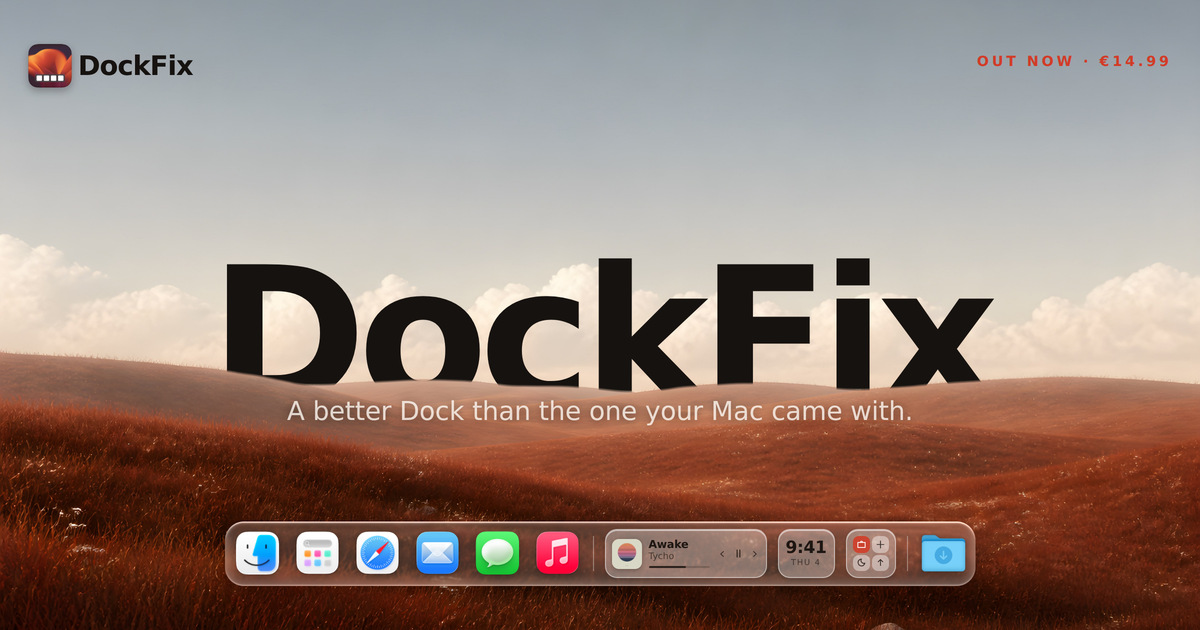
The macOS Dock does very little, and you cannot personalise any of it. DockFix replaces it with a dock you control completely, adding colours, opacity, size, position, animations, custom app icons, folders, website shortcuts, presets, a file shelf, widgets and window previews. It is built for macOS users who want their Dock to feel personal while still looking and behaving like it came with the Mac, and it runs on macOS 14 or later on both Apple silicon and Intel machines.
DockFix exists for one reason, as founder Gustav Lübker of AppVerge puts it: the Dock that comes with your Mac is not yours. Apple designed it to be fast and reliable and then closed it, so you cannot personalise its colour, its icons, its animations, or much of what sits inside it. DockFix was built to hand all of that back to the user. The hard part, according to the founder, is that a dock you have made your own is only worth having if it still feels like part of macOS — the magnification has to carry the right weight, a window has to fold toward the corner it came from, and an icon has to appear the instant the app does. Miss any of that and people feel it straight away, even when they could not tell you what is wrong.
Customisation is the core of the product. Colours, opacity, size, position, animations and icons can all be configured to your likings, so the dock can match a wallpaper, a workflow or a mood. DockFix also supports folders, website shortcuts and presets, meaning items can be grouped, a site can be pinned to the dock, and a complete configuration can be saved and reapplied. Community presets take this further: a theme can be applied instantly with one click, and the site points to a Community Docks gallery at dockfix.app/discover where users share the setups they have built.
Custom app icons let you apply your own artwork to any app on the system, including the native apps macOS will not otherwise let you touch. That means Finder, Launchpad, Safari, Mail and the rest can be redrawn to match a theme rather than being locked to Apple's originals. For anyone who cares about visual consistency across the desktop, this removes the last element that Apple's closed Dock design left unchangeable, and it works app by app rather than as an all-or-nothing switch.
Widgets place useful information and quick controls directly in the dock itself. The site names media playback, the clock and shortcuts as examples, so a now-playing panel, a time display and quick actions can live in the same strip as your apps and folders, available wherever you are. Because they sit in the dock rather than in a separate window or the menu bar, they stay within reach without adding another place to look, and they are described as useful information and quick controls in one place.
Window previews are billed as the most requested feature. Hovering over an app shows its open windows live, and you can jump straight to the one you want instead of cycling through them one by one. That turns the dock into a way of navigating open work rather than only launching it. The rebuild also delivered a completely new interface, designed from the ground up to be modern and intuitive, alongside a new engine. DockFix's custom dock is built to look and animate exactly like the system dock straight out of the box, with the same magnification and true liquid glass, so customisation does not come at the cost of the feel people expect from macOS.
The current release is a ground-up rebuild rather than an update layered on the old app. Every part of DockFix was rebuilt: a new engine, a new interface, and a dock that looks and behaves like it came with your Mac, with every bit of customisation that existed before still present and a great deal more added. The founder notes that the team stopped adding to what they had and rebuilt the app from nothing, with no line of the old code left in place, because a rewrite is not something you can do halfway. The result is a dock that moves like Apple's and then does what Apple's will not, without any of it feeling bolted on.
Performance is treated as a feature rather than an afterthought: the new version uses under one percent CPU on average, and it runs on both Apple silicon and Intel Macs running macOS 14 or later. DockFix requires no special permissions and never asks you to disable System Integrity Protection. While it runs it hides the system Dock and restores it when you quit, so nothing on the system is changed permanently. On privacy, the site states plainly that there is no tracking and no usage collection of any kind; the only data stored is your email address, kept to manage your licence and answer support requests.
The outcome for users is a dock that feels personal without feeling foreign — Apple's speed and polish, but configured however you like, with the features Apple never added. Because DockFix keeps the same magnification and liquid glass appearance as the system dock, switching is not jarring; because it stays under one percent CPU on average, it is not something you have to worry about leaving running. Existing owners get the rebuilt version free, with the licence carrying over automatically and nothing to move or reactivate, so upgrading carries no risk, no extra cost and no configuration work.
In practice, DockFix suits a range of everyday workflows. A user who wants a dock that matches a wallpaper or a desktop theme can set colours, opacity, size and position, then apply a community preset in one click rather than rebuilding the look by hand. Someone working with many open windows can hover over an app, see those windows live and jump straight to the one they need. Anyone who keeps media playing can leave playback controls and the clock in the dock itself. Users who dislike Apple's default icons can apply their own artwork to the native apps macOS usually locks down, and people who keep files or links close at hand can use the file shelf, folders and website shortcuts. Students get 30% off, and anyone with an older licence simply updates to the new version at no cost.
DockFix is aimed at macOS users on macOS 14 or later, on Apple silicon and Intel machines, who want to personalise the Dock beyond what Apple allows. It is a paid desktop app priced at €14.99, paid once and used forever, with no subscription. Every purchase comes with a seven-day free trial with every feature unlocked and no card required, and settings carry over if you buy during or after the trial. There is a 30% discount for enrolled students. Support is available through the support page and a Discord server, where the site says most questions are answered within a day, and a lost licence key can be recovered from inside the app. The new version is free for anyone who already owns DockFix.
Taken together, DockFix is a macOS Dock replacement built around one idea: the dock that ships with your Mac is not yours, and it should be. By rebuilding the app from nothing — new engine, new interface — AppVerge delivered a dock that looks and animates like Apple's, keeps the magnification and liquid glass feel intact, and then adds everything Apple's Dock will not do: window previews, widgets, custom icons, folders, presets and the file shelf. For €14.99 once, with a free seven-day trial and a free upgrade for existing owners, it offers a fully customisable dock that stays light, safe and private.
Publisher
A
admin
Launch Date2026-09-13
Platformdesktop
Pricingpaid