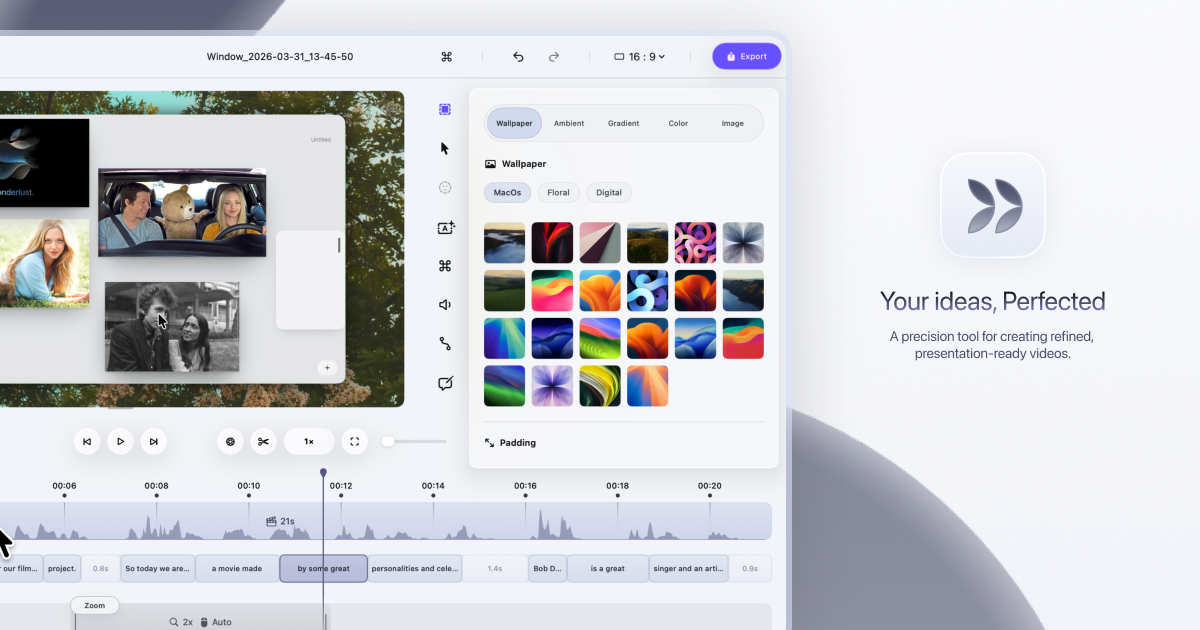
Dina is a screen recorder built exclusively for macOS that turns raw screen captures into polished, presentation-ready videos. It records your screen, audio, camera, cursor, and keystrokes in one take, then refines the result — with motion, zoom, and clarity handled for you — so every recording feels ready to present. The tool is made for people who need to explain something on screen clearly and beautifully, from product demos and tutorials to courses and social media videos. Dina's stated goal is to make every video worth watching, so what your audience sees is as clear as what you imagined.
Screen recordings are the fastest way to show rather than tell, but the result rarely matches what the creator pictured. Key interactions get lost when the viewer cannot tell where to look, and motion can feel less intentional than intended. Dina's approach is to handle the refinement automatically: it records your screen and refines it automatically, and according to the product, demos and tutorials made with it feel clearer, more engaging, and effortless to watch because automatic zoom keeps the audience focused on what matters. Dina also positions itself as an alternative to tools such as Screen Studio, Loom, and Tella, standing apart by adding cinematic zoom, smooth animations, and AI-powered features to recordings so they feel polished without manual editing.
Capture everything that matters, all in one take. Dina records screen, audio, camera, cursor, and keystrokes together, and you can capture your screen, a window, or a selected area with camera, mic, and system audio in high quality from the same recording panel. Scheduled Recording lets you set a time and let Dina handle the rest, so a recording can start without you being there, while Pause Recording lets you pause and resume whenever you need to so you can record at your own pace. Because capture happens in one place in one take, there is no need to assemble separate tracks afterwards.
Automatic zoom is at the heart of the experience. Dina automatically zooms into key interactions, helping your audience stay focused without distraction, and you can switch to precise manual zoom control when you want to highlight something specific. Smooth, intentional zoom animations guide the audience through every important detail. A new dimension of depth comes from subtle 3D camera movement added to your recording, so scenes feel more cinematic and alive. You set the perspective with presets that range from a gentle angle to a dynamic top-down shot, then fine-tune camera position, distance, roll, and depth blur so each move feels exactly right. Cursor movement is gently refined so motion feels steady and intentional, and cursor size, variant, and highlight effects can be customized to match your brand. Keyframes provide smooth, natural transitions that highlight important moments and guide the viewer's attention.
Complete layouts bring titles, slides, images, and video together into cohesive scenes that feel balanced, intentional, and ready to present. Mask Layout hides sensitive information with flexible, multi-region masking exactly where you need it. Slide Layout adds slides directly into your recording and gives you control over their color, timing, and animation so they feel like part of the video rather than an overlay. Text Layout adds text with solid or gradient fills and refined animations timed to appear and exit naturally as the recording progresses. Annotations guide attention exactly where it matters: arrows, highlights, shapes, and callouts are added directly into the video. Callouts provide contextual notes with customizable text, colors, and timing, Highlights draw the viewer's eye to key moments, and Shapes & Arrows frame, point, and guide with precision. Background and spacing can be adjusted to frame content clearly and consistently.
Dina is built for presence, recording your webcam, microphone, and captions together so your message comes through naturally without extra setup. The webcam can be adjusted for size, shape, roundness, and position to place your camera exactly where it belongs in the frame. Voiceovers can be recorded directly in the timeline, so narration can be added, edited, and refined without breaking your flow. Editable captions generate transcripts automatically and let you fine-tune words, timing, and phrasing so captions read clearly and accurately. AI transcript editing turns speech into edits: your recording appears as text, so you can edit your video by editing the transcript while AI removes fillers and silence automatically. AI voiceovers turn text into natural-sounding narration instantly, generating voiceovers from text using efficient on-device models.
Dina puts control at your fingertips so you can customize shortcuts and edit your video with speed and precision without slowing down. Visual keyboard overlays show every key as it is pressed so your audience can follow along, and the shortcut display itself can be customized to match your brand and improve clarity. Output is studio-quality and ready instantly, with 4K output, multiple formats, and fast rendering. Native resolution exports preserve the original resolution without quality loss, which is useful for high-quality demos and tutorials. Shareable video links let anyone watch, review, and collaborate on a recording without needing an account, and Layer Export lets you export videos in layers to preserve quality and flexibility for professional editing workflows.
Dina also handles iPhone recordings. Beautiful iOS Recordings capture your iPhone in original resolution and enhance it with smooth motion and refined presentation, designed to make every recording look polished. A range of iPhone variants and device mockups let you present your recordings inside device mockups. Easy iOS device recording works by connecting your iPhone with a USB cable or by choosing the iPhone mirroring window, and then starting the recording.
Under the hood, Dina is designed exclusively for macOS, using modern Apple technologies to deliver native performance. The interface is crafted with SwiftUI for fluid animations, precise interactions, and a clean macOS-native experience. Metal taps directly into the GPU to power smooth motion, real-time visual effects, and high-quality video processing. On-device Core ML models run intelligent features, from transcript generation to voice synthesis, with full privacy and zero cloud latency. Dina runs natively on Macs powered by Apple Silicon and requires macOS Sequoia or later; there is no Windows version, and the app is built exclusively for macOS to take full advantage of Apple Silicon and Metal.
Privacy is a core part of the product. All recordings are saved locally on your Mac, Dina works completely offline, and it does not require any account or cloud connection, so your data stays on your device, private and secure. The AI features, including transcript generation and voice synthesis, run on-device via Core ML, so nothing needs to leave the machine. The practical outcome is a fast, private workflow where polished videos are produced without manual editing, without subscriptions, and without depending on an internet connection.
Typical uses include product demo videos that show a feature in action, video tutorials and courses that walk through a process step by step, and social media video content intended for quick sharing. Mask Layout is useful when a recording contains sensitive information that should not be shown, and Scheduled Recording helps capture sessions that happen at a fixed time without the creator being present. Layer Export serves professional editing workflows where further work happens in another editor, while shareable links support review and collaboration, since anyone can watch, review, and collaborate on a video without an account.
Dina is trusted by professionals at companies including FloraAI, Sketch, Windsurf, and Typeform. It is distributed as a Mac licence: a native macOS app sold as a one-time purchase rather than a subscription. The licence costs $58 per device and includes lifetime updates, with an option to choose one device or three devices. Buyers get a lifetime license, free updates forever, files saved locally, full offline operation, and all features unlocked. Dina also maintains a Slack community for new features and tips, and an X/Twitter account for release updates.
In short, Dina is a native macOS screen recorder that makes recordings look intentional without manual editing. It captures screen, audio, camera, cursor, and keystrokes in one take, then applies automatic zoom, 3D camera motion, smooth cursor movement, layouts, annotations, captions, and transcript-based AI editing to produce studio-quality video. For Mac users who need demos, tutorials, courses, or social videos that look polished and stay private, Dina combines speed, cinematic presentation, and one-time pricing in a single offline app.
Publisher
A
admin
Launch Date2026-09-29
Platformdesktop
Pricingpaid
Tech Stack
#SwiftUI#Metal#Core ML#Apple Silicon#macOS