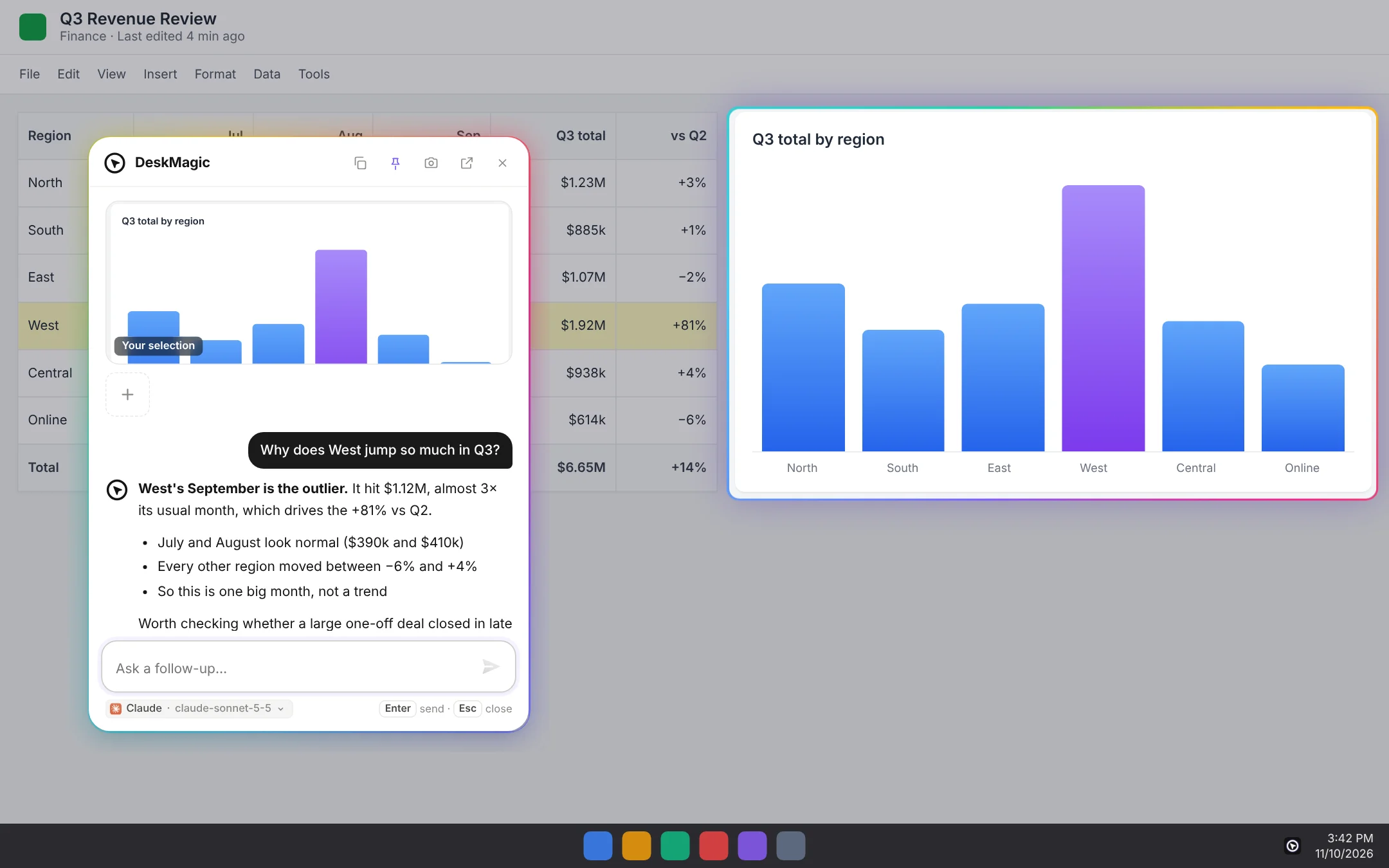
DeskMagic is a Windows app that puts AI right next to whatever you are looking at. You shake your mouse to summon a rainbow ring, drag a box around text, charts, code, UI elements, or images, or click to grab what is under your cursor, then ask a question. The answer streams in beside the selection. It is built for Windows users who want to ask Claude, ChatGPT, or Gemini about on-screen content without leaving the app they are working in. DeskMagic uses your own API key, has no account or sign-up, and saves history only on your PC.
The product addresses the friction of moving between the screen you are looking at and a separate AI chat. Instead of taking a screenshot, opening another tab, pasting content, and losing the original context, DeskMagic lets you point at the exact area you want to understand. The site describes use cases such as explaining charts and tables in spreadsheets, finding the cause of a stack trace, drafting an email reply in the right tone, and translating a headline, menu, or whole page without leaving it. It only captures the screen at the moment you summon it, and only sends the area or highlighted text you pick.
The primary interaction is built around three moves: shake, drag, and ask. Shaking the mouse brings up a rainbow ring where you are looking. Users who prefer keys can press Ctrl + Shift + Space, and the app also supports summoning with the mouse wheel or a side button. Ctrl + Alt + Space skips selection entirely for the whole screen, and an optional sparkle sound can be added. After summoning, users drag around content or click to grab what is under the cursor. Highlighted text is read straight away without dragging, which the site says is about 10× cheaper than a screenshot. Users can tap a quick action or type a question, and then keep asking follow-up questions.
DeskMagic works with the AI providers users already use: Claude from Anthropic, ChatGPT from OpenAI, and Gemini from Google. The free version uses one AI at a time and lets users change which one in Settings. Pro connects all three and lets users switch right inside the chat. The app shows one recommended model for each provider, and users can pick a fast and cheap model for quick questions or a bigger model when it matters. Setup links users straight to the right page to paste a key, and the key is checked instantly. According to the site, most questions cost a fraction of a cent because users pay their AI provider only for what they use.
The answer card floats over other apps and is designed to get out of the way. It offers one-tap quick actions, can be pinned on top, and supports copying answers and code. It works in light and dark modes. One click expands the chat into a big window for long answers, and clicking again tucks it away. Users can add whatever is on their clipboard to a question in one tap. Pro adds voice input: tapping the mic lets users speak a question, and DeskMagic types it and sends it. Speaking a question uses an OpenAI or Gemini key to turn speech into text because Claude cannot hear audio yet. Listen reads any answer aloud using the PC's built-in voices, so it works offline and is free.
The app also includes history and personalization features. Every answer is saved on the PC so users can find it later. Free users see the latest 25 answers in history; Pro adds unlimited history, search, and export. Hovering an answer and choosing Continue chat reopens the chat with the original screenshot or text so the user can keep asking. Pro includes Brain memory, where a user can say something like 'remember I work in finance' once and every answer fits them from then on. Pro also adds custom quick actions: one-tap buttons with a user-chosen icon and color, such as 'Rewrite in my tone'. Multiple selections can be included in one question. The Home screen shows usage at a glance, the shortcut in use, and a one-click test. The Models screen is where users connect Claude, ChatGPT, or Gemini.
DeskMagic is designed as a quiet tray app that starts with Windows and stays ready. It pauses shake activation in full-screen games and any app the user picks, with one-tap presets. It updates itself quietly in the background and installs updates the next time it starts, so users do not need to re-download it. The installer runs with one click, opens to a welcome screen, and guides users through picking an AI, pasting a key, and shaking the mouse to try it. The site says setup takes about a minute. When Windows SmartScreen shows a 'protected my PC' message, the site explains that this is SmartScreen being cautious with newer apps and instructs users to click More info, then Run anyway.
Privacy is a core part of the product's approach. DeskMagic waits quietly in the tray for a shake, but it only captures the screen at the moment it is summoned and only sends the area or highlighted text the user picks. There are no DeskMagic servers in between the PC and the AI provider. The API key is encrypted with Windows' own protection. There is no account, no sign-up, no tracking, no analytics, and no ads. History never leaves the PC. These choices are presented as a way to keep the user's screen and data under their control while still making AI available right next to the content.
The benefits described on the site are practical and immediate. Users can make sense of numbers when charts and tables are explained in plain English, including what looks off. They can drag around a stack trace and get the cause plus a fix they can copy. They can select a message and get a reply in the right tone, ready to paste. They can read any language by translating a headline, a menu, or a whole page without leaving it. They can highlight text, shake, and ask, skipping the screenshot step. Because history and memory are local, users can pick up old chats and continue with the original selection.
DeskMagic is currently for Windows 10 and 11. A Mac version is described as on the way, with a Get notified option. Pricing is simple and has no subscription. Free costs $0 and includes unlimited questions forever, summoning by shake, shortcut, or mouse button, the whole-screen shortcut, one AI from Claude, ChatGPT, or Gemini, 6 built-in quick actions, asking about highlighted text, and the latest 25 answers in history. Pro is a lifetime license priced at $29 once during a Black Friday 40% off promotion, reduced from $48. It works on 3 devices and includes everything in Free plus all three AIs with mid-chat switching, custom quick actions, multiple selections in one question, voice ask and read aloud, Brain memory, unlimited history with search and export, lifetime license and updates, and a 14-day money-back guarantee. Checkout is handled by Creem, and Pro is unlocked with a license key from the receipt.
In summary, DeskMagic's primary value proposition is that users can stop wondering and just ask. It removes the need to leave the current screen or manually copy content into a separate AI chat. By combining a shake-to-summon interaction, precise screen selection, support for the user's own Claude, ChatGPT, or Gemini key, a floating answer card, local history, and privacy-conscious design, DeskMagic makes AI assistance feel native to the Windows desktop. The free tier offers unlimited questions, while the lifetime Pro license adds power tools for users who want multiple AIs, voice, memory, custom actions, and unlimited history.
Publisher
A
admin
Launch Date2026-11-24
Platformdesktop
Pricingfreemium