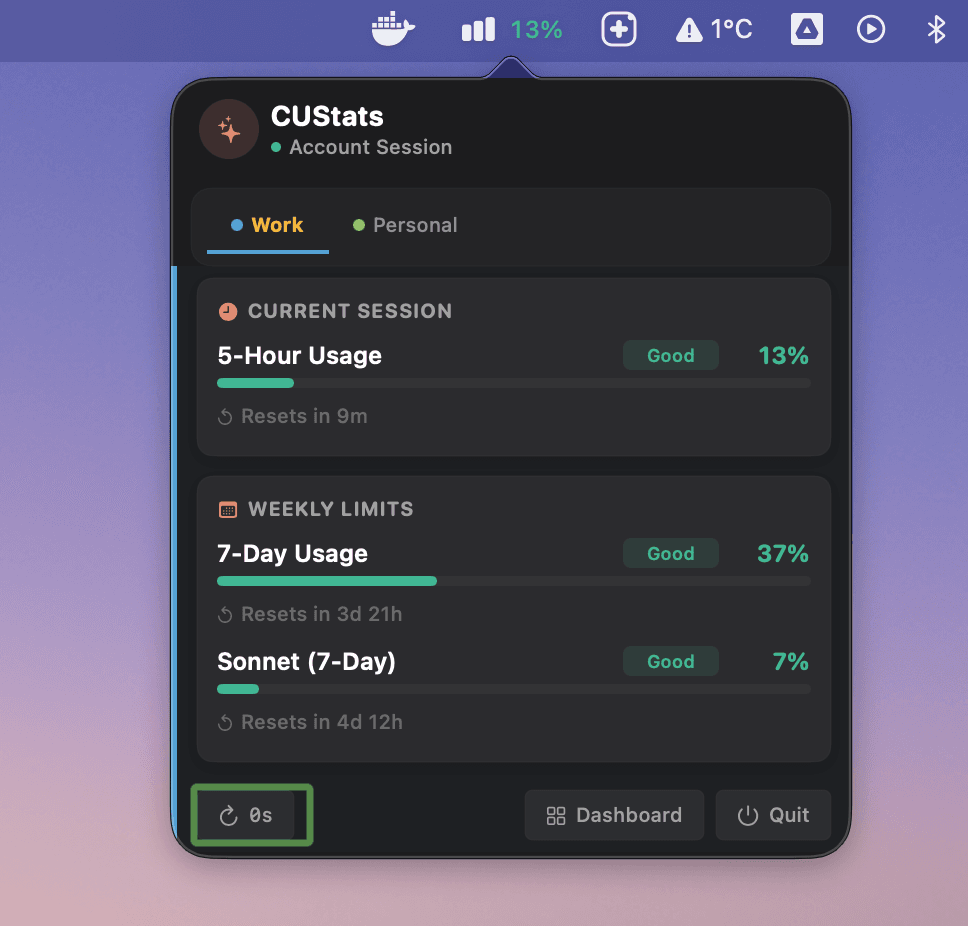
CUStats is a native macOS and iOS application that acts as an indispensable Claude usage tracker for anyone using Claude or OpenAI Codex. It sits quietly in the macOS menu bar, providing real-time updates on your 5-hour and 7-day usage limits so you never have to guess how much capacity remains. Designed for developers who rely on AI coding assistants daily, it solves the core problem of sudden rate limits that interrupt flow and destroy context. The app supports both Claude Pro/Max plans and OpenAI Codex usage, and its one-time purchase model means no recurring fees. Setup takes under two minutes by pasting a session token, and the data is encrypted locally for maximum privacy. This combination of simplicity, visibility, and value makes CUStats a must-have for anyone serious about AI-assisted development.
The primary pain point CUStats addresses is the constant anxiety of not knowing when you'll hit a usage limit during a critical coding session. Without a tracking tool, developers must stop their work, navigate to the Claude or Codex interface, and manually check how much usage remains—a process that breaks concentration and wastes time. For those juggling work and personal accounts, the confusion multiplies as they try to remember which account still has capacity. This problem is especially acute for users on Claude Pro or Max plans, where the 5-hour and 7-day limits can be depleted quickly during heavy use. CUStats eliminates this guesswork by displaying clear, color-coded progress bars and countdown timers directly in the menu bar or via iOS widgets. Users can instantly see whether their current session is healthy, risky, or over its limit, allowing them to pace themselves and avoid interruptions.
The first major feature set is real-time usage tracking with detailed visual indicators. CUStats displays Claude's 5-hour and 7-day limits plus OpenAI Codex usage as color-coded progress bars, along with live countdown timers showing exactly when the next reset occurs. The menu bar icon changes color based on your weekly usage level—green indicates healthy, yellow is risky, and red means you're over—providing at-a-glance status without opening the app. Additionally, the app tracks extra usage or overage for paid plans, so you know exactly how much additional capacity you've consumed beyond your base limit. This feature is useful because it proactively alerts you before you hit a wall, letting you adjust your pace or switch accounts. The weekly projection feature goes a step further by estimating end-of-week consumption based on current trends.
admin
The second major feature group is comprehensive multi-account support. CUStats allows you to manage up to 10 Claude and OpenAI Codex accounts on macOS and up to 5 on iOS through CUStats Go. The All Accounts Dashboard provides a unified view with service health badges per account, making it easy to see at a glance which accounts are operational and how much usage each has left. Staggered API refresh ensures that refreshing one account doesn't hit rate limits for others. Per-type notification controls let you set alerts for specific thresholds, service status changes, or reset reminders. For teams or individuals using separate accounts for work and personal projects, this feature eliminates the hassle of switching between tabs and profiles. All data remains encrypted locally with AES-GCM and never leaves your device.
The third feature group includes the iOS companion app CUStats Go and its smart widgets. Available for iOS 16+, CUStats Go offers home screen widgets in three sizes that display pace prediction, multi-account usage, and 2x promotion badges. Though iOS background refresh limits prevent real-time updates, widgets auto-refresh roughly every 15 minutes, giving a good approximation of current status. The app also provides session-level trend charts with 7-day data, per-session tracking, and prediction lines for future usage. Codex reset credit tracking is included, showing live how many manual resets remain for Codex accounts and sending notifications when limits reset. This mobile extension ensures that even away from the Mac, users can monitor their AI usage and plan accordingly. All data is stored in secure Keychain storage with zero telemetry.
The overall workflow of CUStats is designed for maximum simplicity. After downloading from the App Store, users copy a single session token from their browser's developer tools (for Claude) or log in with Codex credentials, and paste it into CUStats. The token is encrypted locally with AES-GCM and is only sent to Claude or OpenAI for authentication—never to any third party. Once configured, the menu bar immediately shows current usage, and the dashboard provides full history with Day, Week, and Month views featuring GitHub-style activity charts. The all-accounts dashboard refreshes automatically on a staggered schedule to avoid triggering API limits. Users can also check their peak usage windows, average consumption, and session-level trends. The privacy-first approach means no telemetry, no analytics, and no data leaving the device. This straightforward setup, combined with powerful visuals, makes monitoring effortless.
Concrete use cases include a developer deep in a debugging session with Claude who needs to know if they have enough capacity to finish. With CUStats, a glance at the menu bar tells them they're in the yellow zone, so they can decide to take a break or switch to a second account. Teams managing multiple accounts for different clients can assign each account to a distinct project, tracking usage separately and avoiding cross-contamination. Power users on Claude Max plans can monitor overage consumption and pace themselves to stay within budget. On iOS, a user can check their widget before starting a mobile coding session to ensure they won't hit a limit halfway through. The outcome is consistently avoiding surprise rate limits, preserving concentration, and maximizing productive time with AI assistants.
CUStats is built for developers using Claude Pro, Claude Max, or OpenAI Codex, as well as teams that need to manage multiple accounts efficiently. The macOS version requires macOS 13 Ventura or later, while the iOS version requires iOS 16 or later. Android support is coming soon. Pricing is a one-time purchase: $9.99 for macOS and $8.99 for iOS, with no subscriptions or in-app purchases. The app has over 279 paid users and consistently receives 5-star reviews on the App Store. In summary, CUStats provides the peace of mind that comes from always knowing your AI usage limits, preventing interruptions and allowing you to focus on what matters most—your code. Its privacy-first design and native performance make it a reliable tool for any AI-assisted developer.
Developers and power users who rely on Claude Pro, Claude Max, or OpenAI Codex for daily coding tasks. Teams managing multiple AI assistant accounts across work and personal use. Individuals who frequently hit usage limits and need proactive alerts to avoid interruptions. Mobile users who want to check their AI usage on the go via iOS widgets. Professionals who value privacy and prefer a one-time purchase over a subscription. The app is specifically designed for macOS 13+ and iOS 16+ users, with Android support coming soon.