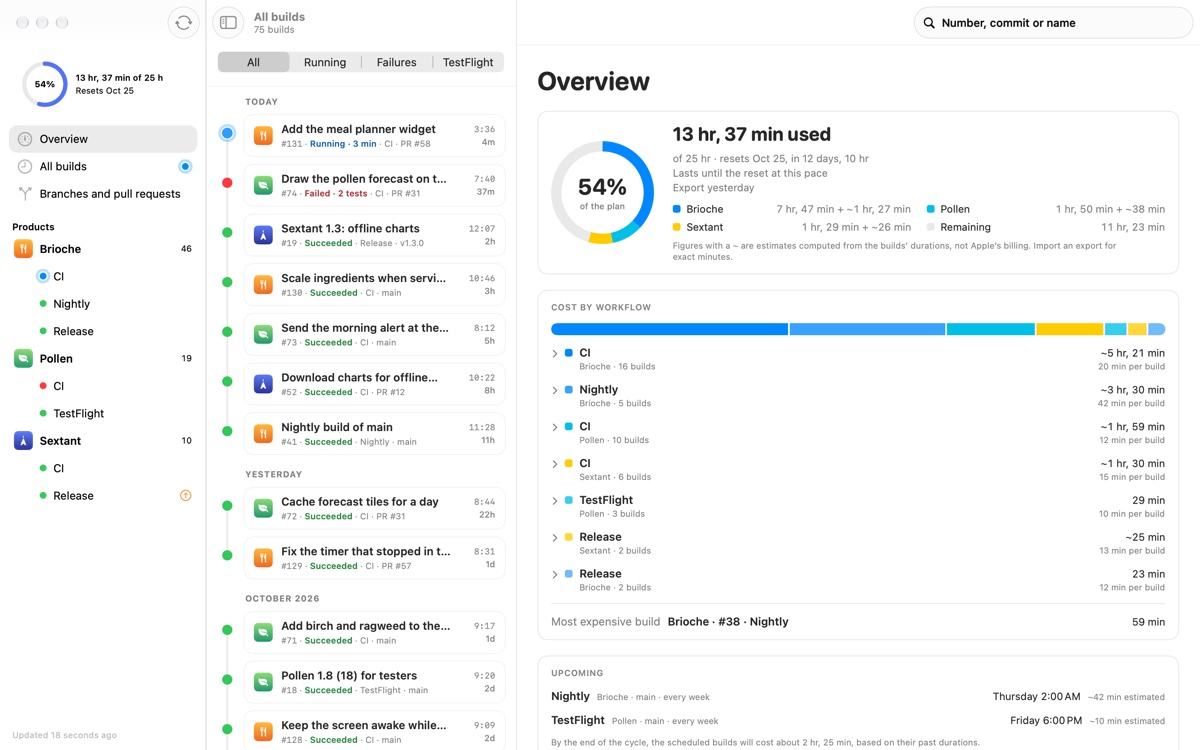
Cumulus is a Mac menu bar app that keeps Xcode Cloud visible without opening App Store Connect. It follows your builds, counts the minutes your plan consumes, explains why builds fail, and lets a coding agent ask the same questions through a CLI and an MCP server. The menu shows the build running now and when it ends, the five latest builds, the cycle's usage, and the detail per app. A cloud and a dot tell you the state at a glance: blue while a build runs, red when one breaks. Cumulus is aimed at Apple developers and teams who build with Xcode Cloud and want a lightweight, always-present view of build activity, plan consumption and failures. It is free on the Mac App Store, open source, and requires macOS 26 or later.
Xcode Cloud runs builds and tests for Apple platforms, but checking it means leaving your work to open App Store Connect. That context switch makes it easy to miss a finished build, a stuck one, or a failure that needs attention. Apple's API does not expose how many minutes each workflow consumes, so understanding which workflow eats your plan is difficult. A generic “Failed” status also does not say which tests broke, which issues are new, or which commits to compare. Cumulus addresses these gaps by keeping build status in the menu bar, by working out minutes machine by machine, and by comparing a failed build with the last successful build of the same workflow. The result is that the information you need is visible continuously, in the place where you already work.
The menu bar is the primary surface. A cloud and a colored dot summarize state: blue while a build runs, red when one breaks. Opening the menu lists the five latest builds, the cycle's usage and the detail per app; clicking a build opens its sheet. It behaves like a real Mac menu, with submenus, keyboard shortcuts, and light and dark appearances. A notification tells you when a build finishes or gets stuck, so you do not have to watch the menu. Because the menu is always present, you can glance at it between edits and see whether a build is still running, whether it ended, and whether something broke, without switching apps or opening a browser. The detail per app and the cycle usage in the same menu give a quick sense of where the plan is going.
Minutes are a central feature. Apple's API does not provide the figure of how much of your plan each workflow consumes, so Cumulus works it out machine by machine. It marks the result with a “~” while it is an estimate, making clear that the number is not an official Apple figure. When you import the export from App Store Connect, Cumulus replaces the estimate with the billed minutes. The app shows cost per workflow, for example CI, Nightly and TestFlight entries with build counts and estimated hours, and a total such as 13 h 37 used of 25 h. Alerts fire at 75% and 90% of the plan, and also when the pace will not last until the reset. This matters because minutes are a finite plan resource; knowing which workflow eats the plan, and whether the current pace will exhaust it before reset, lets you adjust before you run out.
Failures get a more useful treatment than a single word. When a build fails, Cumulus compares it with the last successful build of the same workflow. It shows the tests this build broke, the new issues, and the two commits to compare. Logs open in one click, and the failing file opens in Xcode at the right line. Over time, Cumulus also surfaces the flaky tests and the slowest tests of each workflow. The comparison against the last successful build narrows the search: instead of reading an entire log, you see what changed and which tests were affected. Opening the failing file at the right line removes a manual step between noticing a failure and starting to fix it. The historical view of flaky and slow tests helps you understand patterns rather than isolated failures, which is useful for maintaining a reliable test suite over many builds.
Cumulus also lets you act, with three gestures and not one more. Each action asks you to confirm. You can start or re-run a build on a branch, a tag, or an open pull request of the repository. You can pause a workflow and resume it, without going through App Store Connect. You can edit a workflow: its name, its clean build, its Xcode version. Cumulus points out workflows left on an outdated Xcode version. If you set the API key to “Read only”, Cumulus writes nothing at Apple, so watching remains possible without granting write access. The confirmation step and the read-only option are trust measures: actions are deliberate, and you can choose a mode where the app cannot change anything. This keeps routine actions close at hand while preserving control over what the app is allowed to do.
For agents, Cumulus provides a `cumulus` command and an MCP server for Claude Code, Codex, Xcode and Claude Desktop. The output is JSON in a pipe and a table in a terminal. The agents read the app's cache: no network, no access to your key. An example command, `cumulus usage`, reports the cycle dates, used minutes with billed and estimated parts, remaining and projected minutes at reset, and the costliest build. Because the agent reads the cache rather than the network or the key, it can answer questions about builds, minutes and failures with the same information you see, without additional credentials or server infrastructure. This extends the menu bar's visibility into the tools where you already work, so an agent can read the build with you. JSON output makes the data usable in scripts and pipes, while the table suits a terminal.
Overall, Cumulus follows a simple model: authenticate with your own API key, keep the key in the macOS Keychain, and talk only to Apple. There is no account, no server, and no trackers or third-party SDKs. The app is sandboxed and requires macOS 26 or later. It reads Xcode Cloud data through Apple's API, derives minutes machine by machine, and stores what it needs in a local cache that the CLI and MCP server read. Notifications, menu state, failure comparisons and workflow actions all build on that data. The design keeps data flow narrow: network traffic goes to Apple and nobody else, and the key stays in the Keychain. That narrow design is what allows the app to be free and open source while still offering detailed build, minute and failure information.
The benefits follow from keeping build information visible. You do not open App Store Connect to see whether a build is running, when it ends, why the last one failed, or how many minutes are left in the plan. Notifications cover finished and stuck builds. The minute calculation, marked as an estimate until billed minutes are imported, shows which workflow eats the plan, and alerts at 75% and 90% plus the pace warning give early notice that the plan may not last until reset. Failure comparison saves reading time by showing broken tests, new issues and the two commits to compare, and opening the failing file in Xcode at the right line removes a manual step. The read-only key option and the confirmation on every action keep the app's write footprint under your control.
Concrete workflows follow the features. During a coding session, you glance at the menu to see the build running now and when it ends, and a notification tells you when it finishes or gets stuck. When a build fails, you open its sheet, see the tests broken since the last successful build, the new issues and the two commits, then open the failing file in Xcode at the right line. When you want to know which workflow consumes the plan, you read the cost per workflow and the cycle usage, import the App Store Connect export to replace estimates with billed minutes, and watch for the 75% and 90% alerts or the pace warning. When you need to act, you start or re-run a build on a branch, tag or open pull request, pause or resume a workflow, or edit a workflow's name, clean build or Xcode version. When an agent is part of your workflow, it reads the same data through the CLI or MCP server.
Cumulus is built for Apple developers and teams using Xcode Cloud, and for anyone who wants build status, minutes and failures in the Mac menu bar. It integrates with Xcode Cloud through your own API key, with the Mac App Store and Homebrew for installation, and with Claude Code, Codex, Xcode and Claude Desktop through the CLI and MCP server. The key lives in the macOS Keychain; there is no account and no server. The app is sandboxed, requires macOS 26 or later, and is free on the Mac App Store. The code is open source on GitHub. A spec sheet lists no trackers and no third-party SDKs, and network access goes to Apple and nobody else. Pricing is free, with Homebrew available via brew install --cask guikbsx/tap/cumulus.
Cumulus takes Xcode Cloud out of a browser tab and puts it where you already look: the Mac menu bar. It shows the build running now, counts the minutes your plan consumes, explains failures by comparison with the last successful build, and offers a small set of confirmed actions. A CLI and MCP server let coding agents ask the same questions from the local cache. Free, open source, no server, own API key in the Keychain: the primary value is continuous, low-friction visibility into Xcode Cloud builds and minutes.
Publisher
A
admin
Launch Date2026-11-19
Platformdesktop
Pricingfree
Tech Stack
#macOS#Xcode Cloud#MCP#CLI