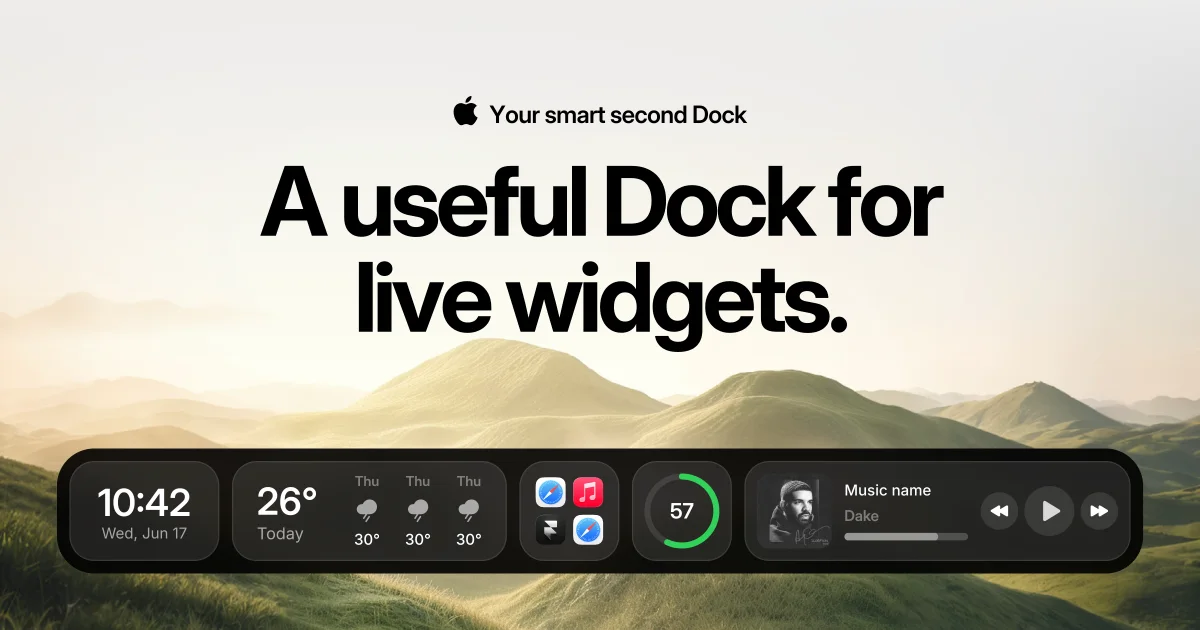
CoolDock is a native Mac app that adds a second, fully customizable Dock beside your original macOS Dock and fills it with live widgets, quick actions, apps, folders and useful everyday information. As the website puts it, CoolDock brings music, todos, events, weather, search, stats, quick actions, and more useful widgets into one beautiful live dock beside your original Mac Dock. It is built for Mac users who want their Dock to do more than launch apps, and its stated purpose is simple: make your Mac Dock more useful. Importantly, CoolDock does not replace the original Dock — it works beside it, so you can keep your existing Dock exactly as it is, or combine CoolDock with macOS Dock auto-hide if you prefer a cleaner setup.
The default Mac Dock is a launcher: it shows app icons and little else. The information people check throughout the day — what is next on the calendar, which reminders are still open, the current temperature, how much memory the machine is using, what is playing — normally lives inside separate apps or in desktop widgets that sit away from where the pointer already is. CoolDock's answer is to move that information into a second Dock that stays in the same predictable place. One testimonial quoted on the site captures the tension the product is aimed at: “Usually you have to choose between functional, fast, or sexy. With CoolDock, it's all three — AND customizable.” Another early user writes that they have replaced their default dock entirely, calling it “the kind of dock Apple should have built.”
The Apps, Files & Quick Access group is about reaching things fast. It includes Apps & Folders, so you can pin favorite apps and organize apps into folders; Bookmarks for saving useful links; File Shelf for holding temporary files while you work; Files & Downloads for getting to downloads quickly; Search for finding files; an App Switcher for moving between open apps; and a Dropbox widget. Together these cover the bread-and-butter of dock usage — launching, switching and finding — but extended with folders, saved links and a temporary holding area. Because they sit in the same second Dock as everything else, the workflow stays in one place instead of spreading across Finder windows, browser tabs and separate utilities.
The Productivity & Daily Focus set is the day-planning half of CoolDock. It includes a Pomodoro timer, a Drink Water hydration reminder, Calendar & Meetings, Reminders & Todos, a Progress widget, Time Widgets, Notes and Mail. The intent, as described on the site, is to help you stay on top of your day with todos, reminders, Pomodoro timers, hydration reminders, calendar events, meetings, progress trackers, clocks and quick notes. Each of these is an at-a-glance widget rather than a full application: a Pomodoro timer visible without opening a timer app, a calendar event sitting next to the apps you are launching, a todo list you can glance at between tasks. For anyone who works from a Mac all day, this group turns the Dock into a lightweight daily dashboard.
The Mac Controls & System Tools group covers the machine itself. It includes System Stats, Quick Toggles, Audio Controls, Clipboard, Screenshots, Voice Memo, Emoji, Weather, Photos and Now Playing. The site summarizes the benefit as controlling your Mac faster with live system stats, quick toggles, audio controls, clipboard access, screenshots, voice memos, emoji, weather, photos and media controls. In practice that means checking resource usage, flipping a toggle, looking at what is on the clipboard, taking a screenshot or capturing a quick voice memo without hunting through menus or opening separate apps. Weather and Now Playing round the group out with ambient information — temperature and what is currently playing — that many people check repeatedly during the day.
Creator & Utility Widgets collect small, frequently needed tools: a Color Picker, a Converter, Bookmarks, Notes, Clipboard and Screenshots. The stated aim is to let you pick colors, convert currencies and units, calculate values, save useful links, capture ideas, and reuse everyday tools without opening extra apps. These are exactly the utilities that normally interrupt a workflow — grabbing a color value, converting a currency or a unit, jotting down an idea — because they require leaving whatever you were doing. Placing them in the second Dock means the interruption costs a glance and a click instead of an app switch. For designers the Color Picker is the obvious anchor; for everyone else the Converter and Notes widgets cover the small calculations and quick captures that come up constantly.
Two groups are aimed specifically at people who run or build products. Founder & Business Widgets let you track revenue, sales, followers, website analytics, link performance, email activity, payments, and ecommerce metrics from one beautiful Dock, and include Revenue, Social Followers, Website Analytics, Shopify, Resend, Dub, Dodo Payments, Polar, Plausible and DataFast. Developer & Startup Widgets are for monitoring tools, projects, databases, issues, deployments and backend services, and include GitHub, Linear, Supabase, Dropbox, Resend, Dub and Website Analytics. The distinction is worth noting: the founder set is oriented around commercial metrics and payments, while the developer set is oriented around project and infrastructure status. Both turn the second Dock into a small live operations panel that is visible while you work, rather than another dashboard tab you have to remember to open.
CoolDock is built as a native Mac app, and the site describes it as local first and privacy first. Local widgets work on your Mac, while connected widgets only use the access needed for that specific feature — a calendar widget needs Calendar access, a reminders widget needs Reminders access, and so on. CoolDock asks for permissions only when a feature needs them; the permissions named on the site include Calendar, Reminders, Contacts, Photos, Microphone, Accessibility and Automation. The second Dock itself is customizable: you can change widgets, apps, folders, layout, sizes and appearance. A customization overview video also covers profiles, wallpapers, floating layouts and appearance settings. CoolDock is designed for modern Mac setups including external displays, and it requires macOS Sonoma 14.0 or later.
The outcomes CoolDock promises are practical rather than abstract. Information you would otherwise go looking for — the next meeting, an open reminder, system stats, the weather, what is playing — is already visible in the second Dock. Actions you would otherwise take through menus, such as quick toggles, screenshots or clipboard access, are a click away. The site reinforces this with user testimonials: one early user says they have replaced their default dock entirely, and another calls it beautiful and functional and says it gives them superpowers on their Mac. CoolDock is also positioned as a one-time purchase with no subscription and no automatic renewal, which the pricing section states explicitly, and every plan carries a 14-day money-back guarantee.
Concrete workflows follow directly from the widget groups. A designer can keep the Color Picker, Screenshots, Clipboard and File Shelf in the second Dock while working in a design tool. Someone managing their day can line up the Pomodoro timer, Reminders & Todos, Calendar & Meetings and a Progress widget. A founder can watch Revenue, Website Analytics, Shopify and payment widgets while working, and a developer can keep GitHub, Linear and Supabase status visible beside the code editor. General Mac use is covered too: music and Now Playing controls, weather, quick toggles and Search. Because CoolDock works alongside the original Dock and supports external displays, these layouts can move with a multi-monitor setup.
CoolDock is aimed at Mac users — designers, makers, founders, developers and anyone who works from a Mac desktop all day — who want more information and faster actions from their Dock without giving up the Dock they already know. Platform support is macOS Sonoma 14.0 or later, and it is a native Mac app designed for modern setups including external displays. Pricing is one-time only: a one-year license is $14.99 for one Mac, including one year of access and one year of updates; lifetime access is $34.99 for one device, $57.99 for two devices or $69.99 for three devices, each including lifetime access and one year of updates; and the Forever Edition is $115.99 for up to five Macs with all future updates for life. A 14-day money-back guarantee applies, taxes may apply, and no plan renews automatically.
CoolDock's core proposition is that the Mac Dock should show you something, not just launch things. By adding a second, customizable Dock filled with live widgets — apps and folders, files and downloads, reminders and todos, calendar and Pomodoro, system stats and quick toggles, color picking and conversion, plus founder and developer metrics — it turns a static launcher into a live surface for the information and actions you use every day. It sits beside the original Dock rather than replacing it, runs as a native, local-first Mac app, and is sold as a one-time purchase. For Mac users who want their Dock to be genuinely useful, that is the pitch.
Publisher
A
admin
Launch Date2026-10-20
Platformdesktop
Pricingpaid
Tech Stack
#macOS