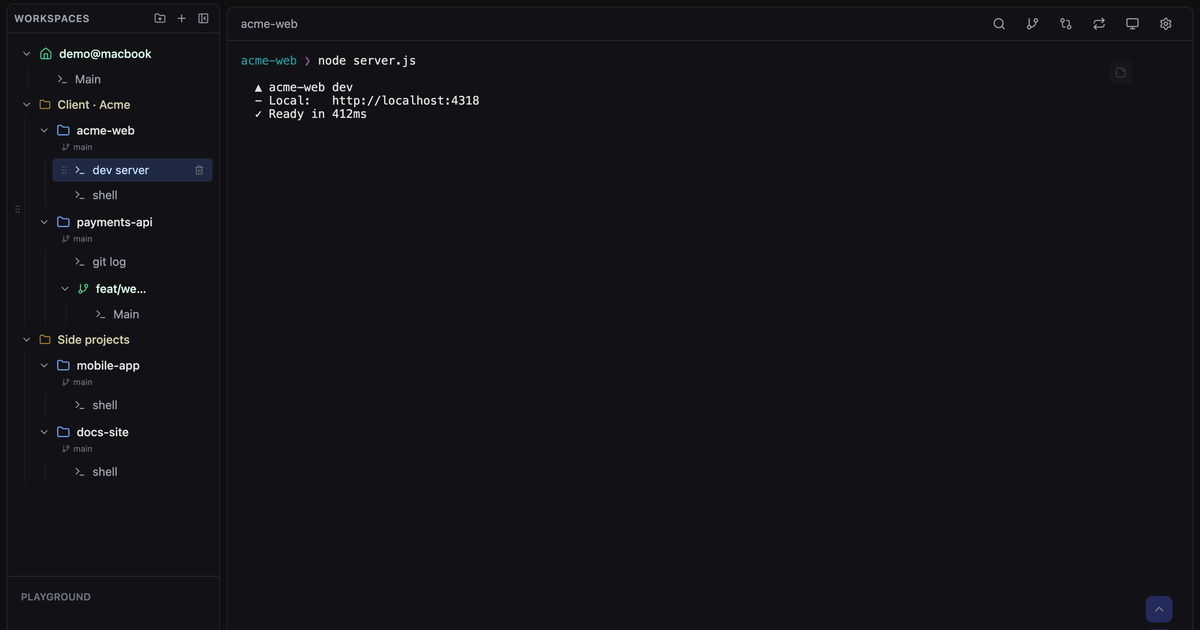
CLI Manager is a free, open-source macOS desktop app that puts every AI command-line agent a developer uses into a single dashboard. Instead of scattering Claude Code, Codex CLI, Gemini CLI and plain shells across separate terminal windows, it keeps them side by side in one sidebar, where projects can be grouped into folders, each session can be named for the role it plays, and every session keeps running even while you look elsewhere. It is built for developers who juggle multiple AI agents and lose context switching between them, and its stated purpose is to keep that work organized in one powerful workspace while leaving the user in control of the desktop agents.
Developers working with AI coding agents increasingly run more than one of them. Claude Code, Codex CLI and Gemini CLI each arrive as their own command-line tool, and a typical working day can mean several terminal windows, several projects, and a steady loss of context as the developer moves between them. Sessions get confused, tasks get forgotten, and there is no obvious place to note what a particular terminal was for. CLI Manager addresses that by treating agent sessions as organized objects rather than anonymous terminal tabs. The problem it solves is context: keeping every agent, every project and every running task visible in one place so the developer does not have to remember which window is doing what.
In one sidebar, CLI Manager places Claude Code, Codex CLI, Gemini CLI and plain shells next to each other. Projects can be grouped into folders, and each session can be named by the role it plays, so a glance at the sidebar shows what is running and why. Sessions can be switched with a shortcut, and as the site states, every session keeps running while you look elsewhere. Sidebar folders can also be dragged into any order, and that ordering is kept across restarts. Because any CLI tool can be added, including Claude Code, Gemini CLI, Codex and even apps, there is no vendor lock-in; the developer switches freely between tools.
The AI Control API, introduced in v1.9.0 and highlighted from v1.10, lets one AI agent open and drive another agent's terminal. Claude Code, Codex or any script can open sessions inside CLI Manager, send prompts, wait and read the screen, in ordinary terminals the developer can watch. Sessions an AI is driving turn green in the sidebar and are marked "AI connected"; the orchestrator gets a crown. At any time the user can type into those sessions or take them back, and "Disconnect AI" stops the agent in that session, while switching the API off ends its access entirely. The API is off by default, local only, running as REST plus MCP on 127.0.0.1, and requires a token. An accompanying agent skill can be installed with a single npx command so a coding agent can open visible sessions in CLI Manager, run another agent there, wait for it and read the screen.
CLI Manager includes an in-app diff review. A developer can open the diff for any workspace, select lines, and send a comment, with file and line numbers, straight back to the agent's terminal. Worktrees are compared against the branch they forked from, including new files. Git is built in as well: creating a Git worktree makes it its own workspace with its own sessions, and the Source Control panel lets the developer stage, commit, push and browse history without remembering commands. Worktrees can also be hidden entirely from Settings, terminal file links can be turned off, and file paths can be set to open only on Command-click; reloading worktrees no longer wipes terminal scrollback.
Session status is driven by official Claude Code and Codex hooks rather than guessed from terminal output, so a permission prompt is never mistaken for a finished task. Usage alerts warn before the 5-hour or weekly limit cuts an agent off, and usage-limit meters are shown alongside. Every session has a memo pad: pressing Command-J opens a place to write down what a session is for; memos save as you type, stay with the session across restarts, and an AI working through the Control API can read them. A separate Loop Dashboard window is dedicated to watching Claude Code /loop sessions per project, showing iteration count, status and timing at a glance.
CLI Manager's approach is to act as a management layer above the agents rather than a replacement for them. The tools remain ordinary terminals: the sessions an AI opens are the same terminals a person can type into. That is why the AI Control API is off by default, bound to localhost, and token-protected, so the agent's access is something the user explicitly grants and can revoke. Status information comes from the vendors' own hook events rather than screen scraping, and everything, including the memos and the git operations, lives inside the same workspace. Local-only processing is a stated design principle: the app does not send data externally, and it is Apple notarized.
The stated benefit is staying in control while multiple agents work. Developers stop switching between terminals and losing context, because everything is organized in one sidebar where folders, session names and shortcuts make the landscape readable. Because sessions keep running in the background and status comes from official hooks, the developer can be told when an agent actually needs attention instead of watching it. Usage alerts protect against an agent being cut off mid-task by a 5-hour or weekly limit. And because an AI can be given controlled access to open, prompt and read sessions that remain visible and take-back-able, orchestration happens without hiding what is going on.
Concrete scenarios include running an orchestrating agent: Claude Code or Codex opens a session in CLI Manager, runs another agent there, waits and reads the screen while the developer watches, then hands control back. Another is multi-project work: a developer keeps several projects grouped in folders with their own worktree workspaces and sessions, switching with a shortcut while each one keeps running. A third is reviewing agent output: opening a workspace diff, selecting lines and sending line-numbered comments back to the agent's terminal. A fourth is long-running Claude Code /loop sessions, watched from the Loop Dashboard for iteration counts and timing. Finally, developers can write per-session memos to record what each session is for, and let a Control API agent read them.
CLI Manager is aimed at developers who juggle multiple AI agents, described on the site as built for developers who want to stop switching between terminals and losing context. It integrates with Claude Code, Codex CLI, Gemini CLI and plain shells, and can add any CLI tool or app. Status hooks come from official Claude Code and Codex integrations. The AI Control API is local only, exposed as REST and MCP on 127.0.0.1, requires a token, and is off by default; the companion agent skill works with Claude Code, Codex and other agents. Pricing is free: the app is open source under the MIT license since v1.5.0, distributed for macOS (Apple Silicon ARM64 and macOS Intel x64, current version v1.13.0) and available on GitHub. Windows is coming soon; Linux is not yet on the roadmap.
CLI Manager's value proposition is straightforward: it gathers Claude Code, Codex CLI, Gemini CLI and plain shells into one macOS dashboard, keeps projects, sessions, worktrees, git operations, memos and status information in that same place, and optionally allows an AI to open and drive terminals the developer can watch and reclaim. Free, open source, local-only and Apple notarized, it is a management layer for developers whose daily work is already a crowd of AI agents.
Publisher
A
admin
Launch Date2026-10-14
Platformdesktop
Pricingfree
Tech Stack
#REST#MCP