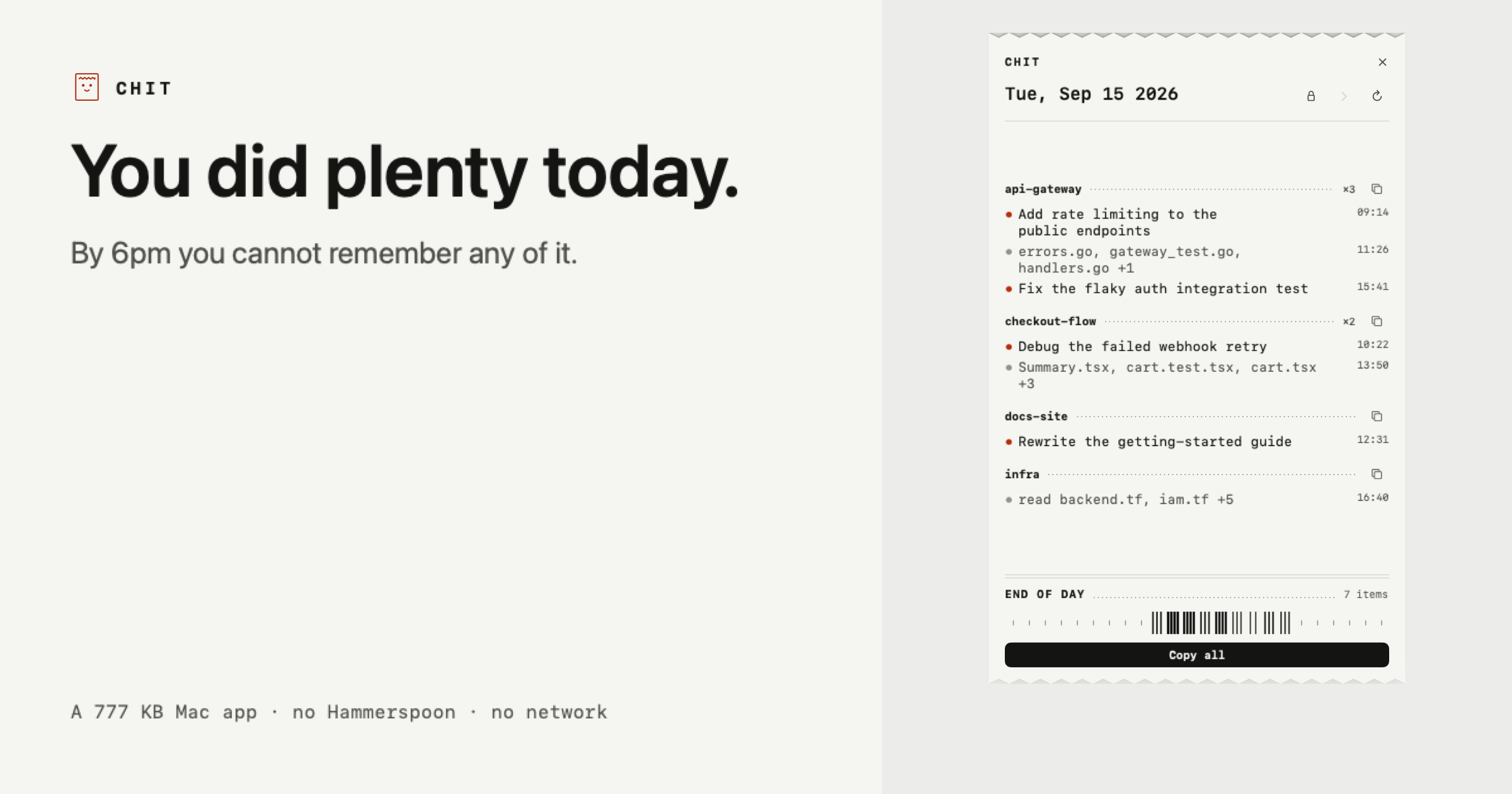
Chit is a small Mac application that reads the Claude Code transcripts already sitting on your own disk and prints your day back as a receipt — a compact, plain-text summary of what you actually did, grouped by project and ready to paste. It was made for developers and other Claude Code users who finish a working day with plenty of activity behind them but no reliable memory of it. The receipt is the app: Chit prints itself once a day, and how long that receipt is depends on how much you did. Nothing needs to be installed first — you double click the app and today is already on screen.
You did plenty today. The problem is that by 6pm you cannot remember any of it. The day's work is spread across many sessions, several repositories, and a transcript history that reads like chat logs rather than like work. Chit exists to convert that raw history into something that reads as a day of engineering: which projects you touched, what was done in each, and which files changed. That matters most at the moments when you have to account for your time — a standup in the morning, a timesheet at the end of the week, or a review of a day you have already forgotten. Rather than asking you to reconstruct the day from memory, Chit reads what Claude Code already wrote to disk.
The core of the receipt is its grouping. Every session is bucketed under its repository, busiest first, so the day reads as work rather than as a pile of chat logs. Agent worktrees fold back into their parent project instead of appearing as separate, unrecognisable entries — a detail that keeps parallel agent work from fragmenting your summary into strangers. Under each project the receipt lists the tasks that were worked on and the files that changed, with an explicit sample showing entries such as a rate-limiting task followed by a list of touched files. Because the ordering is by activity, the busiest project naturally appears first.
Chit's output is built to be pasted, not read twice. One click copies the whole day; another copies a single project on its own. Both are already phrased the way a task sheet or a standup wants them, so there is no reformatting step between the receipt and the place you need it. For destinations that render Markdown, there is a Markdown version as well. The sample receipt shown on the site demonstrates the shape of it: a date header, followed by project names such as api-gateway, checkout-flow and docs-site, each with its bulleted tasks and touched files underneath.
The receipt is not limited to today. You can step back through the week when you need to account for a day you have already forgotten, and a full scan of a 2.7 GB transcript folder takes about a second. That speed is what makes browsing backwards practical rather than a chore. Chit is also a CLI, which means the same material can be produced without the window at all: chit --today, --date=, --from= --to= and --markdown are the documented flags. The CLI output can be piped straight into whatever eats your timesheets, so a summary can flow into an existing tool instead of being copied by hand.
Privacy is the part of the design Chit spends the most words on, and the approach is unusually simple. Chit opens the files Claude Code already writes to ~/.claude/projects on your own disk. Nothing leaves the machine, and there is no network code in the binary at all — the site counts it as zero network calls, ever. The lines in a receipt come from the titles Claude Code generates for sessions, or, where Claude Code has not named a session, from the names of the files you touched; Chit names the line after those files. Your prompts never appear. What you typed is used only to decide whether a session counted as work, and is never stored or shown.
Two more protections follow from that. Lines contain file names, not paths — a line says audit.js, never a path that reveals your client directories, because a path would say who you are and who you work for. And whole projects can be hidden, keeping client, NDA or job-hunt work off the receipt entirely; hiding removes that project's lines, though the site is honest that it cannot hide a sentence you typed about that work inside a different project, and is not sold as if it could. Chit is read only: it never writes to ~/.claude, so nothing it does can affect a session. The app itself is 777 KB, requires zero things to install first, and takes a single double click.
One practical caveat is stated plainly on the site: Chit is not notarised yet, so a browser download gets flagged once. The terminal one-liner installs with no warning at all, and the SHA-256 is published next to it. The benefit of all of this is a daily artefact you did not have to write. Instead of reconstructing yesterday from memory, you get the day back in a form that already matches how standups, task sheets and timesheets want to receive it, produced from data that was already on your disk, without an account and without anything leaving your machine.
The scenarios Chit is described against are specific. The first is the standup: you open the receipt in the morning, copy the day, and paste it into a task sheet or standup thread already phrased for the occasion. The second is timesheets — the CLI's date flags let you produce a ranged summary and pipe it into whatever system eats your timesheets. The third is accounting for a day you have already forgotten, stepping back through the week until you find it. The fourth is keeping sensitive work quiet: hiding whole projects keeps client, NDA or job-hunt work off the receipt. And because a busy day produces a longer receipt than a quiet morning, the output scales with what you actually did.
Chit is aimed at people who use Claude Code heavily enough that their own history has become unreadable: developers running multiple sessions and repositories, and anyone who has to report what they did. Pricing is split in two. The free tier is free forever, not a trial, and covers the half used every morning: today's receipt in full, copying the day or any project, plain text and Markdown, hiding projects, and the CLI. Chit Pro is $12 once, not a subscription, and adds every past day, week and month statements, a dashboard, and a key tied to your Mac that works offline forever. The app is distributed as a zip you drag to Applications, or via a curl one-liner, and it is a Mac app at 777 KB with no account required.
Taken together, Chit is a deliberately small, local tool with a narrow job: read the Claude Code transcripts already on your disk, print the day back as a receipt grouped by project, and make it paste-ready. It asks for no account, makes no network calls, never shows your prompts, and keeps file names rather than paths. For developers who need to account for their time, that is the whole value: a printed receipt of your day, produced from your own machine.
Publisher
A
admin
Launch Date2026-09-27
Platformdesktop
Pricingfreemium