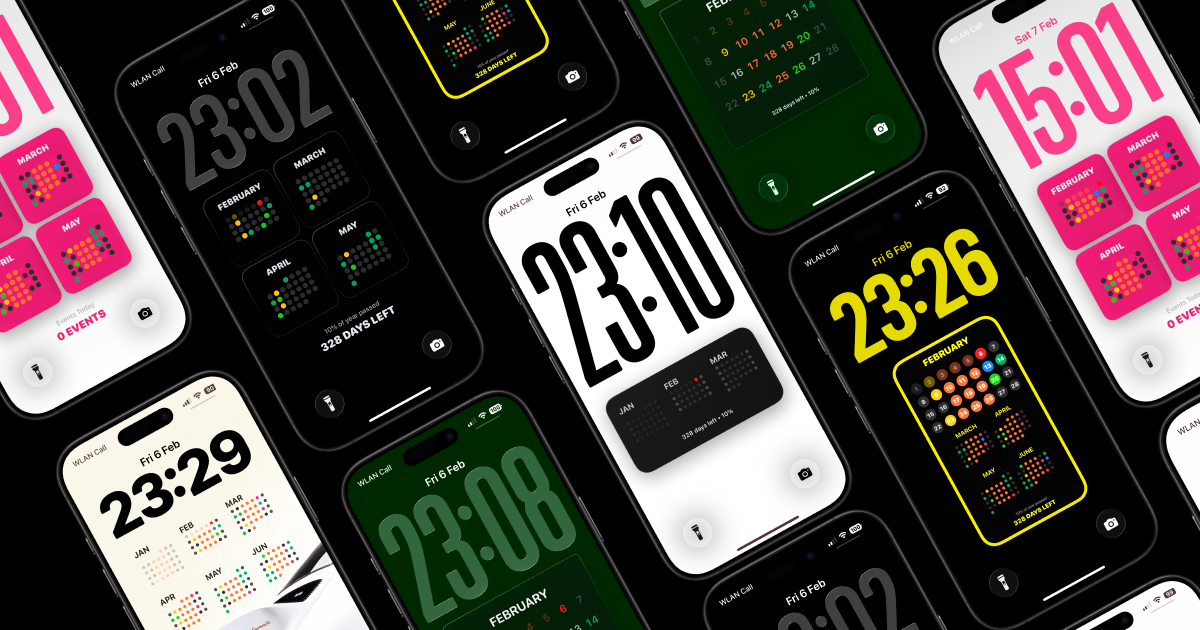
Calendarly is the first automated lock screen calendar app for iPhone, designed to integrate your daily schedule directly into your Lock Screen as a live, updating wallpaper. This innovative tool is built for busy professionals, students, and anyone who needs instant access to their calendar without the distraction of opening a separate app. By providing a reimagined approach to focus, it places your upcoming events front and center the moment you glance at your phone. The core value is effortless organization: your schedule is always visible, automatically refreshed, and requires zero manual updates or app navigation. This transforms how users interact with their day, making calendar checking a seamless, glanceable experience.
The primary problem Calendarly solves is the friction of accessing calendar information on mobile devices. Without such a tool, users must unlock their phone, locate the calendar app, and navigate to the current day or agenda. This process interrupts flow, wastes time, and often leads to forgetting or missing important events. For those who rely heavily on time management, each extra step can compound stress and reduce productivity. Calendarly eliminates this entire workflow by presenting the schedule on the Lock Screen, where a simple glance provides full context. This is especially valuable for individuals who check their calendar multiple times per day, such as attending back-to-back meetings or managing tight deadlines. The benefit is not just convenience, but a reduction in cognitive load and a tangible improvement in daily efficiency.
The first major feature group is automatic updates on the Lock Screen. Calendarly syncs with your iPhone's built-in Calendar app to fetch all events, then renders them as a live wallpaper that refreshes automatically throughout the day. There is no need to open any app or perform any action to see the most current information. This works because the app runs on-device processing that monitors calendar changes and updates the Lock Screen accordingly. The practical benefit is that users always have an up-to-the-minute view of their next meeting, free time, or all-day events without any manual intervention. This feature directly supports the core promise of 'No apps to open. No actions required,' making schedule checking as effortless as picking up the phone.
The second major feature group is full customization, allowing users to personalize every visual aspect of their lock screen calendar. Calendarly provides preset layouts and templates as a starting point, but each can be adjusted in many ways. Users can modify spacing and margins, choose from custom fonts and typography, and select unlimited color combinations to match their style or mood. The ability to personalize every detail ensures that the calendar not only functions well but also looks attractive on the Lock Screen. This customization goes beyond aesthetics; it allows users to optimize readability, for instance by increasing font size for quick scanning or adjusting spacing to avoid cluttered views. The outcome is a lock screen display that feels uniquely theirs while serving as a practical tool.
admin
The third major feature group is Calendarly's commitment to privacy and on-device processing. The app works entirely on your iPhone, meaning your calendar data is never sent to external servers or stored in the cloud. There is no account creation required, no tracking of user activity, and no data collection whatsoever. The app functions offline, which further ensures that sensitive schedule information remains under your control. For users concerned about data security and surveillance, this is a critical advantage. The privacy approach not only builds trust but also enables the app to work reliably without an internet connection, reducing potential points of failure. Combined with the automatic updates and customization, Calendarly delivers a complete solution that respects user privacy as a foundational principle.
Overall, Calendarly operates through a simple yet powerful workflow. After downloading the app, users grant it access to their existing iPhone calendar (the only permission needed). They then select a preferred layout from the available preset templates, customize colors, fonts, and spacing to their liking, and set the calendar as the Lock Screen wallpaper. From that moment, the app continuously syncs with the calendar in the background and updates the Lock Screen display whenever events change. The entire process is designed for minimal setup and zero ongoing maintenance. This methodology emphasizes focus by removing the need to check or interact with calendar apps throughout the day. Users simply look at their Lock Screen and instantly know their schedule.
Concrete use cases highlight how Calendarly improves daily routines. A project manager with multiple client meetings across time zones can glance at the phone and immediately see the next appointment without unlocking the device. A student balancing classes, study groups, and extracurriculars can quickly verify their timetable while walking between buildings. A fitness trainer checking their session slots during a busy day stays on schedule without opening any app. In each scenario, the outcome is saved time, reduced distraction, and a lowered chance of missing important events. The automatic updates ensure that even last-minute changes to the calendar are reflected instantly on the Lock Screen. Users report feeling more in control of their time and less burdened by constant app-checking.
Calendarly targets iPhone users who value both productivity and privacy. It is ideal for busy professionals, entrepreneurs, students, and anyone managing a packed calendar who wants instant schedule visibility. The app supports the latest iOS devices and uses native on-device processing, making it compatible with all iPhones running recent software. As there is no pricing information mentioned in the source, the exact plan remains unspecified, but the app is positioned as a premium solution for calendar accessibility. The key takeaway is that Calendarly redefines how users interact with their schedule by making it always visible on the Lock Screen, automatically updated, fully customizable, and completely private. It is a focused tool designed to reduce friction and enhance daily productivity.
Calendarly is designed for iPhone users who need instant access to their daily schedule without the friction of opening a calendar app. The primary audience includes busy professionals managing tight deadlines and meetings, students juggling multiple classes and activities, and anyone who values time management and productivity. It also appeals to privacy-conscious individuals who prefer on-device processing over cloud syncing. The app is ideal for those who regularly check their calendar throughout the day and want an always-visible display that updates automatically. Additionally, users who enjoy personalizing their device's appearance will appreciate the extensive customization options. Calendarly targets iOS users looking for a seamless, private, and customizable lock screen calendar experience.