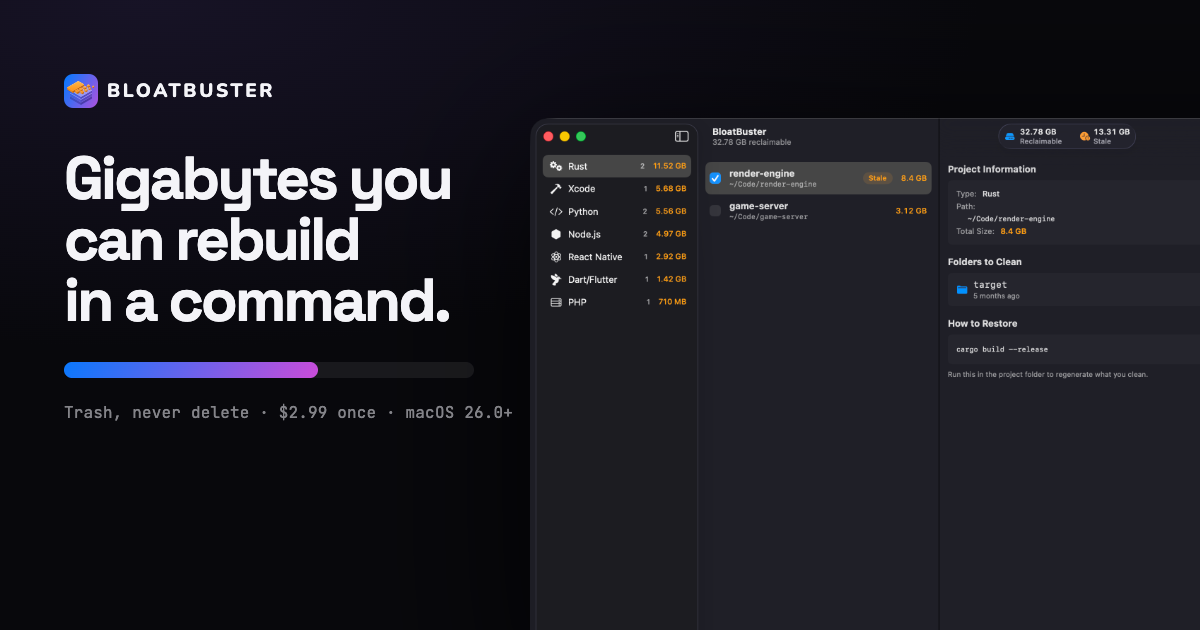
BloatBuster is a Mac app for developers who want to take back the disk space their own projects have left behind. You drop a project folder onto it and BloatBuster walks that tree, finds every build artifact hiding inside, sorts them biggest first, and tells you what each one costs to regenerate — a download, or a build. It is aimed at people who keep many code projects on a single machine, and its purpose is narrow and explicit: reclaim the gigabytes of build output that accumulate across those projects, without ever touching source code, and without anything leaving the Mac.
The site describes the problem in one line: every folder is big, and none of them says why. A plain size listing tells you which project is large, but it does not tell you which gigabytes are source and which are a cache, which come back from a registry and which cost a full build, or which you last needed in March. Faced with that ambiguity, the usual outcome is that you delete nothing and buy a bigger disk. BloatBuster's answer is to label the space rather than merely measure it, and to attach the cost of getting it back to every item it lists so the decision stops being guesswork.
Its primary workflow is a single drop. BloatBuster walks what you give it, recognises 17 kinds of project by their marker files — a Cargo.toml, a pubspec.yaml, an .xcodeproj — rather than guessing from the folder name, and it finds projects nested inside the folder you dropped, so a monorepo is one drop rather than one drop per package. Results are sorted by size, every artifact is described, and a reclaimable total is shown per project type alongside a running figure for the whole scan. The example on the site reports 32.78 GB reclaimable across ten projects, of which 13.31 GB was flagged stale.
The cleaning model separates artifacts into three groups. Dependency caches are the cheapest to lose because a package manager fetches them back from a registry — no compiler, no build, just bandwidth — and the examples given are node_modules, Pods, vendor and .venv, restored with commands such as pnpm install or pod install. Build output costs a build: target, DerivedData, .build and _build come back only after a full compile, so the size is worth weighing against the wait, with cargo build or xcodebuild as the restore command. Stale projects are the third group: whatever they cost to rebuild, they have been untouched for 90 days, which the site calls the easy win and usually the largest safe saving in the list.
Every project carries the exact command that rebuilds what you clean, and that command is read from the lockfile in the folder rather than guessed from the language, so a tree with a pnpm-lock.yaml says pnpm install, not npm install. Each row also shows the artifact's size and when it was last built. Two project types deliberately have no command, and BloatBuster says so rather than inventing one: Unity and Godot regenerate their caches on the next editor launch rather than from a shell.
Safety is the centre of the product. Cleaning calls trashItem, never removeItem, so everything BloatBuster touches sits in the Trash until you empty it, and what it touches is only ever a directory that a build produced. Nothing is pre-selected — every project is a checkbox with its size beside it, you check what you want and confirm once — and exclusion patterns keep a folder out of every future scan. Source files, lockfiles and .git are never in the list. The app also names what is never included: agent history and settings such as .claude, .cursor and .codex, Jupyter's .ipynb_checkpoints autosaves, package-keyed global stores like ~/.npm and ~/.pnpm-store, Carthage/Checkouts because it is checked-out source, and .wrangler or .vercel folders that hold local databases and deploy identity.
A Shortcuts action called Show Reclaimable Space lets you ask your Mac without opening the app. It runs from Spotlight, Siri and the Shortcuts app against any workspace you have saved, answers with a figure, and stops there — it cannot clean, cannot scan a folder you have not saved as a workspace, and cannot reach the network. Workspaces are folders you have already granted access to, remembered as security-scoped bookmarks, so the action cannot reach anything you have not handed the app yourself.
The overall approach is deliberately small: five screens and you are done. There is no dashboard to learn and no scheduled background sweep; you open it when the disk is full, drop a folder, and close it again with a running tally of everything you have reclaimed. The home screen offers a drop zone, a Choose Folder button, an Xcode section listing Derived Data, and a list of recently scanned workspaces. The app is explicit about what it is not: not a subscription, not a background agent, not a system optimiser, and not something with an account, because there is no server.
The 17 recognised project types are Rust, Node.js, React Native, Tauri, Unity, Python, .NET C#, Swift Package Manager, Xcode, Java, PHP, Dart/Flutter, Elixir, CMake, Godot, CocoaPods and Terraform, each matched by marker file and each paired with the folders it typically produces — target for Rust, node_modules and dist and .next for Node.js, DerivedData and build for Xcode, .venv and __pycache__ for Python, .terraform for Terraform, and so on.
Privacy is stated as an architectural fact rather than a policy. BloatBuster is sandboxed and ships without the network entitlement, so there is no version of it that reports what is on your disk — not a crash log, not an anonymous count. Analytics are none, no account is required, and the folders it scans are only the ones you drop. It needs no Full Disk Access and keeps its lifetime tally locally, on your Mac, where the number only ever goes up.
Pricing is a single one-time purchase of $2.99 on the Mac App Store, with no subscription, no in-app purchase and no locked feature behind a second payment; every Mac on your Apple ID has it. It requires macOS 26.0+ on Apple Silicon and is sandboxed with no network entitlement. The paid tier covers all 17 project types, monorepo handling, labelled cache and build output, rebuild commands read from your lockfile, stale flagging after 90 days, saved workspaces and scan exclusions, the read-only Shortcuts and Spotlight action, and the local lifetime reclaimed tally.
Typical use cases follow directly from that design. A developer whose disk is nearly full drops the top-level code directory and reviews every artifact inside, biggest first, with its rebuild cost attached. Someone working in a monorepo makes one drop and sees each package listed on its own. A developer who has not touched a project in months starts with the stale flags instead of size alone. Anyone whose Xcode output has grown across many projects uses the Xcode section and the Xcode project type to clear DerivedData and build folders, knowing xcodebuild build brings them back. And if all you want is a number, the Show Reclaimable Space action answers from Spotlight without opening the app at all.
BloatBuster is built for developers with many projects on one Mac — Node.js, Rust, Xcode, React Native, Flutter, Python, .NET, Java, PHP, Elixir, CMake, Terraform, Tauri, Unity, Godot, Swift Package Manager and CocoaPods — including people who work in monorepos rather than single packages. It also suits anyone who wants a review-then-confirm cleanup rather than an automatic sweep, since the site's stated position is that a cleaner you cannot undo is a cleaner you use once.
In short, BloatBuster turns an unreadable folder size into a reviewed list of build artifacts, each labelled with what it is and what it costs to bring back, and moves only what you tick to the Trash. The value proposition is the combination: reclaim gigabytes of rebuildable output across 17 project types, keep the command that regenerates each one, and do it entirely offline with no account, no telemetry and no permanent deletion.
Publisher
A
admin
Launch Date2026-11-16
Platformdesktop
Pricingpaid
Tech Stack
#macOS 26.0+#Apple Silicon#App Sandbox#Shortcuts#Spotlight