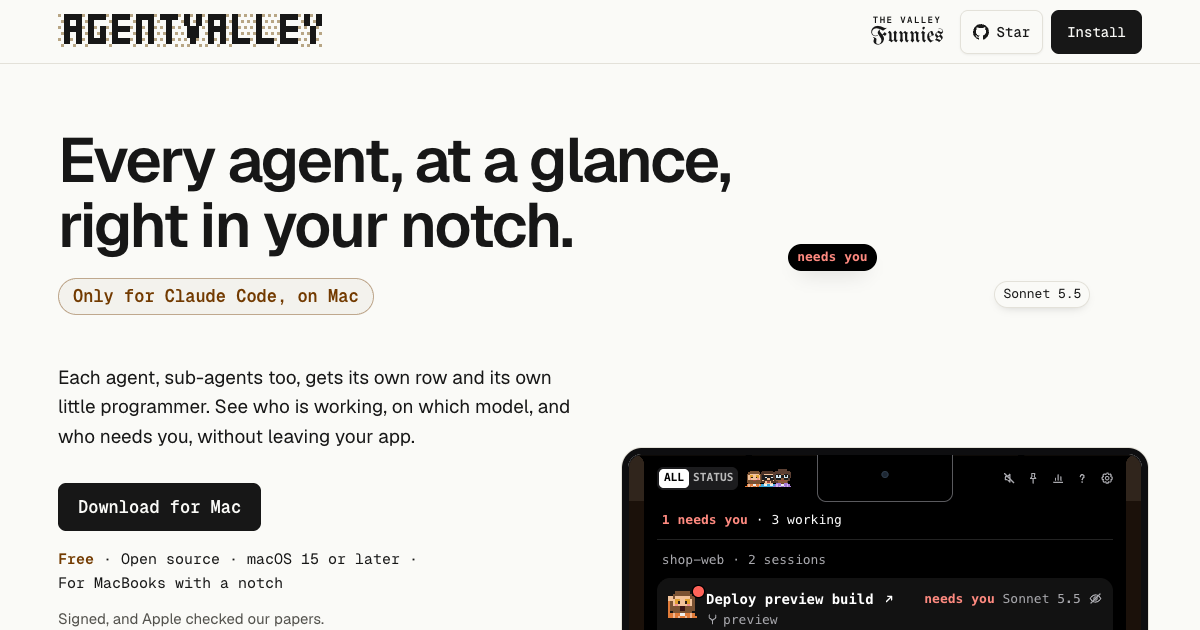
AgentValley is a free, open-source Mac app that shows every Claude Code agent, sub-agents included, in the notch at the top of a MacBook screen. It is built only for Claude Code and only for the Mac: it needs macOS 15 or later and is made for MacBooks with a notch. The app puts a panel under the notch, and inside that panel every Claude Code session appears as a card while each agent working inside the session appears as a row. Each agent, sub-agents too, gets its own row and its own little pixel programmer. The stated purpose is simple: see who is working, on which model, and who needs you, without leaving your app. It is aimed at developers who run Claude Code in a terminal and want one glanceable place to watch their sessions.
The problem it addresses appears the moment several Claude Code sessions run at once. Each agent reports in its own terminal, line by line, so running a few sessions at the same time means switching windows just to check on them. The product frames the situation directly: five agents running, which one is waiting for you? A waiting agent is the costly case. When Claude Code asks a question or waits for permission, it sits there; one of the site's comics is about an agent that asks to run npm install a minute after the developer leaves for lunch and then waits the whole hour for an answer. Another is about a terminal tab still holding a question from Tuesday. AgentValley exists to surface those moments, and the general state of every session, without a window-switching round trip.
Inside the panel, each session is a card and each sub-agent is a row underneath it. A row shows the task, the model and the latest step, and sub-agent rows also count their steps. That means you can read something like a task called "Map payment call sites" running for two minutes fifty-six seconds on Haiku 5.5, latest step Grep PaymentIntent, one step so far, type Explore. Sessions are listed together whichever terminal they run in and are grouped by project, and worktrees count as their project. Every project gets a regular: the same member of the crew takes every session in that project. The app is explicit that there are no guessed progress bars. If an agent goes quiet, meaning it has written nothing for two minutes, AgentValley says so instead of inventing a percentage.
When an agent asks a question or waits for permission, a red count appears beside the notch, and opening the panel lets you read the question or the command. From there you can jump to the agent's app in one click; with Go to the session's tab turned on, Terminal and iTerm2 open the exact tab, and so does Ghostty, unless two sessions are running in the same folder. You can also answer Claude Code from the notch with Allow once or Deny, using a plugin you install yourself. The app never answers for you, and Allow happens only when you choose it. Sounds add a second channel: whoever runs the session plays a few notes on their own instrument and says what it needs, whether a command, an edit, a question or a plan. A plain chime is available in Settings, sounds are on from the start, and one switch turns them off.
History, opened from the chart button at the top of the panel, shows what each project cost. You pick a day, a week or a month and can go back to any earlier one, choosing a day for its hours or a project for its sessions. Costs are shown at API prices, what Anthropic charges for each token used without a Claude plan, and are kept on your Mac even after Claude Code clears its old files. A month's numbers can be exported as a PDF statement of work, covering every project for you or one project for your team or a client. The panel also carries plan limits, showing your Claude 5-hour and weekly limits with the time left until reset; this is off until you turn it on, and when a limit runs out the crew goes fishing, or takes the van for the weekly one, while a sign says when they are back. Token use is shown for the last 5 hours and today with a 12-hour chart. The keyboard shortcut control-option-command-A opens the panel from any app, with arrows to pick and Return to jump.
The app's approach is deliberately read-mostly: it reads and does not touch. It reads ~/.claude/projects and ~/.claude/sessions, the files Claude Code writes as it works. It looks at Claude Code's processes and each project's .git to show which app and branch a session is in. It reads your Claude Code login from the Keychain only when you turn on Plan limits, and sends it only to api.anthropic.com. It asks GitHub once a day whether there is a new version, the whole conversation, and that can be turned off in Settings. Besides its own settings and updates, it writes only in one folder, ~/Library/Application Support/AgentValley, and nothing in ~/.claude changes unless you put the crew in your terminal, which you start yourself with a command from the app's settings. That command sets the status line in ~/.claude/settings.json and adds the crew's font to ~/Library/Fonts, plus one line in Ghostty's config if you use Ghostty, and a matching command undoes all of it. The only hooks are the plugin's two: one brings Allow and Deny to the notch, the other only waits at the end of a turn while you are Away with a phone paired. The code is open source and can be read line by line on GitHub.
The crew also shows up in the terminal. Claude Code's status line gets the face of whoever runs the session, with the model, your plan and your limits, and each sub-agent row under the prompt gets its own face, its model and the step it is on. In the terminal the crew holds still: until your first prompt only a coffee waits on standby, and when a limit runs out they go fishing or take the van. One command from the app's settings sets it up, and with the app closed your limits still show and the coffee still waits. The crew travels as a font and has been seen in Terminal, iTerm2, Ghostty and Cursor.
The benefits follow from that visibility. You stop cycling through terminal windows to find out whether an agent is still working, stuck or asking for something. A red count next to the notch tells you at a glance that one needs you, and the panel shows the exact question or command, so you can decide without hunting for the tab that asked. Quiet agents are named as quiet rather than hidden behind a guessed progress bar, and cost history turns an abstract monthly bill into per-project numbers you can read, revisit and export.
Typical use cases map onto that. A developer running several sessions across projects can see them grouped by project in one list, with worktrees counted alongside. Someone stepping away for lunch can leave sounds on and still catch the permission request that would otherwise wait an hour, or answer it from the notch with Allow once or Deny. A team lead or freelancer can open History, pick a month, and export a statement of work for one project to send to the client. Anyone watching their Claude plan can turn on Plan limits to see the 5-hour and weekly windows and the time until reset, and check token use for the last 5 hours and today. Someone debugging sub-agent behaviour can watch Explore or Plan rows count their steps and report their latest step.
AgentValley is free and open source, distributed as a signed app that Apple has checked, as a direct download or through a Homebrew cask. It requires macOS 15 or later, Claude Code, and a MacBook with a notch, and it fits Terminal, iTerm2, Ghostty and Cursor for tab jumping and the terminal status line. Installation is a drag into Applications, after which the panel opens once to show where it lives and pointing at the notch opens it thereafter; the app checks for a new version once a day and asks before it installs. Removing it starts with taking out anything you added yourself, the plugin or the terminal crew, before quitting and deleting the app, and History stays in ~/Library/Application Support/AgentValley until that folder is deleted.
In short, AgentValley puts the whole valley in your notch: every session, every agent and sub-agent, every model and every waiting question in one glanceable panel, at no cost, with the source open for anyone to read.
Publisher
A
admin
Launch Date2026-10-25
Platformdesktop
Pricingfree