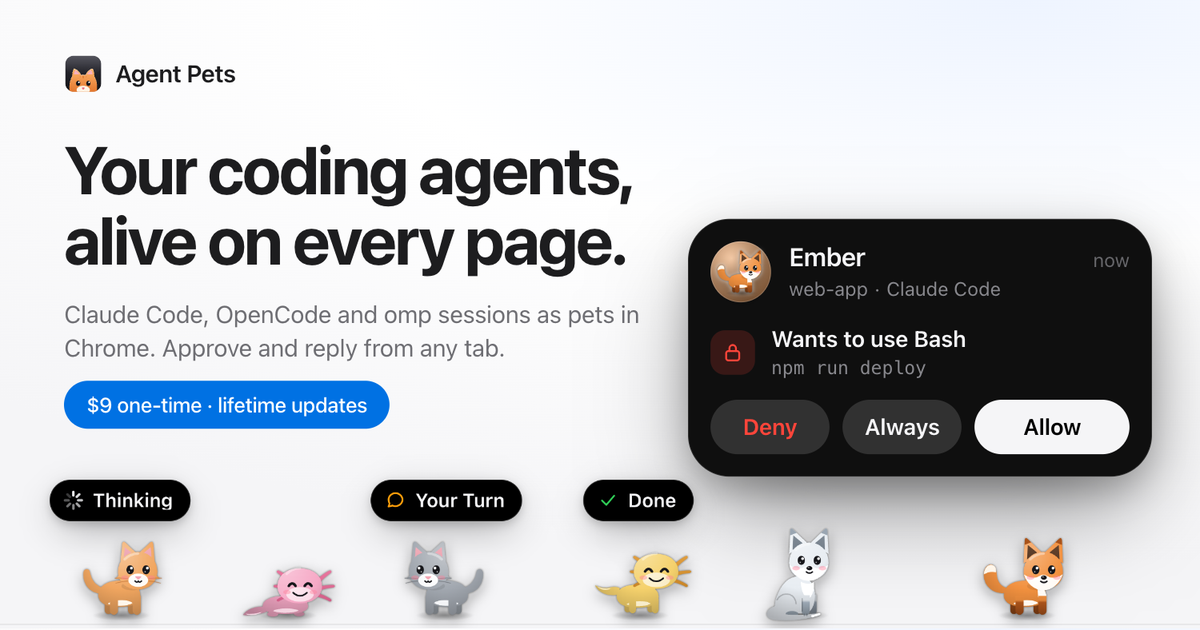
Agent Pets is a Chrome extension paired with a small helper that runs on your own computer. It turns each Claude Code, Codex, OpenCode and omp session into an animated pet — a cat, a fox or an axolotl — that walks along the bottom of every page in Chrome, Arc, Brave, Edge and other Chromium browsers. A capsule above each pet says what that agent is doing, and when an agent needs permission or a reply you answer from whatever tab you happen to be on instead of switching back to a terminal. It is built for developers who keep one or several coding agents running and want to stay in the browser without losing track of which session is waiting on them. It runs locally with no account and no cloud, and it is sold as a one-time purchase with lifetime updates.
Agent attention is the problem Agent Pets was designed around. Coding agents are asynchronous: you start a session, it works, then it stops and waits for you to approve a command, approve a file edit or answer a question. Running two or three agents at once makes it easy to forget whether a session is asking for permission or has already finished, and Claude Code only sends a desktop notification out of the box in Ghostty, Kitty and iTerm2 — elsewhere you have to turn on the terminal bell or write a Notification hook yourself. Agent Pets uses the hooks those tools expose to put session state on screen at all times: a bouncing pet means an agent needs you now, and the capsule above it names the state, so the animation has a practical reason to be there rather than being decoration.
The core interaction is approving from any tab. When an agent wants to run a command or edit a file, its pet starts bouncing. Click the pet, read exactly what it is asking for — the interface shows the specific request, such as wanting to use Edit on src/cart/Summary.tsx — and answer Allow, Always or Deny right where you are. Approvals work for Claude Code, Codex and OpenCode, with Codex offering Allow and Deny, while omp approvals stay in the terminal. The hooks never block your agent, and the prompt in your terminal keeps working as usual, so you can answer in either place. For Codex, the pet waits at most 15 seconds because Codex only shows its own prompt after the pet's turn.
A second feature group is knowing who needs you. Every live session gets its own named pet labelled with its project and agent, and a capsule over each pet shows what it is doing — Thinking, Your Turn, Allow Bash? or Done. A toolbar badge counts the sessions currently waiting on you, so that number stays visible even when you have scrolled away from the pets themselves. When you are working in another application, a desktop notification tells you which pet needs you and carries Allow and Deny buttons on the notification itself, so a permission request can be answered without opening the browser tab that started the session.
The third group covers replying and personalisation. You can read an agent's latest answer and send its next message from whatever page you are reading, without switching windows — the documentation shows an agent reporting that rate limiting was added to the login route and the next instruction being sent in place. Every live session is assigned a different one of eight pets — cats, foxes and axolotls, named Mango, Bubbles, Ember, Pebble, Skye, Frost, Midnight and Sunny in the examples — and any pet can be renamed or despawned without stopping its session. Your Cat lets you upload a photo of your own cat, crop it into a circle, choose a body colour and give it a name so it walks your pages as one of your pets. Gather mode sends the pets to a corner where they sit together, purring and grooming; Roam lets them wander.
Setup is a single command. Running npx getagentpets init adds Claude Code hooks to ~/.claude/settings.json, adds Codex hooks to ~/.codex/hooks.json, installs an omp extension at ~/.omp/agent/extensions/agentpets.ts, installs an OpenCode plugin at ~/.config/opencode/plugins/agentpets.js, places the Chrome extension in ~/.agentpets/extension and starts a daemon on 127.0.0.1. Codex users type /hooks once and trust the Agent Pets hooks. You then open chrome://extensions, turn on Developer mode, click Load unpacked and choose that folder (or drag it in), pin Agent Pets, paste the license key from your receipt and start a session. On macOS the helper starts automatically at login and updates itself; on Linux and Windows you run npx getagentpets start and update with npx getagentpets update. Node.js 18 or later is required.
Privacy is the fourth pillar and it shapes the architecture. Everything runs on your computer: a small helper on 127.0.0.1 talks to your agents and to the extension, there are no accounts and no cloud, and your code and prompts never leave your machine. The only network calls are the license check with Dodo Payments and update checks with npm. Because the extension is installed directly rather than through the Chrome Web Store, the flow is deliberate — you load it once through Developer mode, and on macOS updates install automatically after that, while Linux and Windows users update with one command. The hooks never block your agent, so a slow answer from you does not stall work that is already in flight; a permission request simply waits while its pet is on screen, and the terminal prompt remains available as a fallback.
The scenarios where Agent Pets fits are the ones described on its own site. If you typically start two or three different agents, the pets answer the recurring question of whether a session is asking for permission or has finished. If you are working in another app, the desktop notification with Allow and Deny keeps you from context switching back into a terminal. If you are reading something in the browser, you can reply to an agent's latest answer directly from that page. If you run agents across several browsers, one license covers up to three browsers — the site's example is Chrome on a laptop, Arc on a desktop and one more — and the pets appear on whichever tab you are on.
Agent Pets is a paid product with a simple structure: a one-time purchase, no subscription and no account. The early-bird price is $6, the regular price is $25, and 18% GST is added at checkout in India; payments are handled by Dodo Payments as merchant of record, including taxes and VAT. One license includes all eight pets plus Your Cat, approve/deny/reply from any tab, support for Claude Code, Codex, OpenCode and omp, activation on up to three browsers, lifetime updates (automatic on macOS) and local-only operation. There is a 7-day refund with no questions asked, and a post about the product on Reddit or X that reaches 2,000 views within 7 days of purchase earns a 100% refund while keeping the license. It runs in Chromium browsers on macOS, Linux and Windows.
In short, Agent Pets takes the attention problem of running coding agents and makes it visible, ambient and local. Sessions become pets on every page, their state is spelled out in a capsule, the toolbar badge counts who is waiting, and approvals, replies and desktop notifications all happen where you already are. Nothing leaves your machine beyond a license check and update checks, and a single one-time purchase covers every future update.
Publisher
A
admin
Launch Date2026-10-22
Platformdesktop
Pricingpaid
Tech Stack
#Node.js#Chrome extension#Local helper daemon on 127.0.0.1