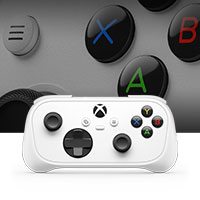
The XBOX Nano Controller is Xbox's smallest controller: a pocket-sized wireless gamepad that packs all 18 inputs into a portable form factor. Its stated purpose is to take play to more places and to let players fit more play into their everyday, in a design that Xbox says is fit for virtually every pocket, budget, and whim. The controller connects to Xbox consoles, Windows PC, iOS and Android devices, and select Smart TVs. Xbox positions it as an entry-level, rechargeable controller and as an easy way in — a controller for smaller hands, for someone being introduced to gaming, and for anyone who wants to gift it, share it, or play solo with no big setup required.
Console gaming has traditionally been anchored to a television and a full-size controller, which makes it awkward to carry play into the rest of the day. The Nano Controller is framed around closing that gap. Xbox describes it as a way to take play to more places, to fit more play into your everyday, and to make it your go-to for playing on the go. The pitch is explicitly about portability and accessibility rather than about replacing a full-size pad: the controller is small enough to slip into a sweatshirt front pocket, positioned as entry-level, and designed as a low-friction first step into gaming for new players. It is also described as a way to try something new or dive into a favorite, supported by the breadth of the Xbox games library across four generations of consoles.
Portability is the defining feature. Xbox calls the Nano Controller its smallest controller and says it is fit for virtually every pocket, and the marketing imagery shows a teenager pulling it out of a sweatshirt front pocket. The controller is described as portable, pocketable, and capable, and as an entry-level, rechargeable device that can become a go-to for playing on the go. Because it is a complete wireless controller rather than a clip-on accessory or a partial input add-on, it carries the full set of inputs — 18 of them, per the product tagline — so the small size does not mean a reduced control scheme. Games remain the same ones played with any other Xbox controller; Xbox points players toward titles such as Minecraft Dungeons II, Forza Horizon 6, Grounded 2, Bluey's Happy Snaps, Roblox, and LEGO Star Wars: The Skywalker Saga, all sold separately.
Connectivity is handled two ways. To Xbox consoles the controller connects with Xbox Wireless, and to Windows 10/11 PCs, tablets, iOS, Android devices, and compatible Smart TVs it connects wirelessly over Bluetooth. Xbox says the combination makes it easy to pair and switch between console, PC, mobile phones, Smart TVs, and more. That dual-radio approach is what turns the small controller into a multi-device device: the same pad can be used for a console session in the living room and then paired to a phone, tablet, laptop, or compatible Smart TV elsewhere. Xbox notes that compatibility details are covered on its controller-compatibility page, and that the controller is for use with controller-compatible games.
Customization is handled through software. Xbox says you can make the controller your own by customizing button mapping with the Xbox Accessories app, and the controller includes a programmable Action Button that can be assigned to different things you want quick access to. For a compact pad with a condensed layout, remapping is practically useful: it lets a player put the inputs they rely on most wherever they are easiest to reach. The programmable Action Button adds a dedicated shortcut that can be re-pointed as priorities change from game to game. Button mapping through the Xbox Accessories app and the programmable Action Button are the two customization levers Xbox explicitly documents for this controller.
How the product works overall is straightforward: it is a wireless controller first, with a charging requirement rather than swappable batteries. You pair it over Xbox Wireless to a console or over Bluetooth to a supported device, play controller-compatible games, and recharge the internal battery with a USB-C cable when needed. There is no complex setup described — Xbox frames it as an easy way in with no big setup required, aimed at getting someone playing quickly. The design intent is a single small controller that travels with you and re-pairs across the devices you already own, rather than a device-specific accessory tied to one screen or one platform.
The stated benefits follow from those design choices. Portability means more places to play and more chances to fit play into a day. The small size is called out as great for smaller hands, which makes it a natural first controller for a younger or newer player. The entry-level positioning and the framing around pocket, budget, and whim suggest an accessible purchase, and Xbox explicitly suggests gifting or sharing it with someone else. Dual connectivity means one controller covers console, PC, mobile, and select Smart TV play instead of one device only. Rechargeability removes the need to buy disposable batteries, though it does mean keeping a USB-C cable on hand, since the required charging cable is sold separately.
Xbox describes several concrete scenarios. Playing on the go is the headline: the controller is small enough to carry in a pocket and pair with a phone, tablet, or laptop. Introducing someone to gaming is another — the controller is positioned as an easy way in and as great for smaller hands, so it can be handed to a new player without a big setup. Gifting and sharing are called out directly, as is playing solo. Switching between devices is a described workflow: pair to a console with Xbox Wireless, then move to a Windows PC, mobile device, or compatible Smart TV over Bluetooth. And the games Xbox highlights — Minecraft Dungeons II, Grounded 2, Bluey's Happy Snaps, Roblox, LEGO Star Wars: The Skywalker Saga, and Forza Horizon 6 — illustrate the kind of everyday play the controller is pitched for.
The controller is compatible with Xbox Series X|S, Xbox One, Xbox on PC, Windows, Android, and iOS, and Xbox lists Xbox consoles, Windows PC, iOS and Android, and select Smart TVs as supported destinations. In the box: the wireless controller. Charging requires a USB-C cable, sold separately. Pricing is not published on the page beyond a note that prices and availability may vary by retailer; Xbox does describe the controller as entry-level and fit for virtually every pocket and budget. Alongside the controller, Xbox points to its accessory ecosystem and to Xbox Game Pass, a library of hundreds of games with titles added all the time.
In short, the XBOX Nano Controller's value proposition is compact, connected convenience: all 18 inputs in Xbox's smallest controller, dual Xbox Wireless and Bluetooth connectivity across console, PC, mobile and select Smart TVs, customizable button mapping with a programmable Action Button, and a rechargeable battery — packaged as an easy, entry-level way for more people to fit more play into more places.
Publisher
A
admin
Launch Date2026-10-19
Platformdesktop
Pricingpaid
Tech Stack
#Xbox Wireless#Bluetooth#USB-C