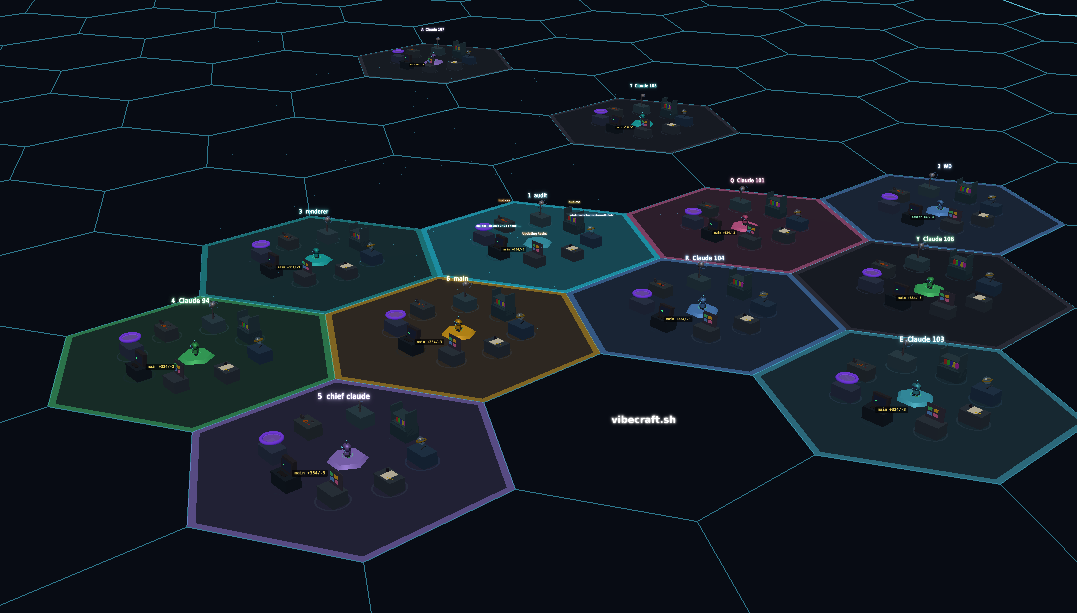
Vibecraft is a 3D visualization app built specifically for Claude Code, the AI coding assistant from Anthropic. Designed for developers who run multiple Claude Code sessions simultaneously, it offers a real-time graphical interface to monitor and manage each instance. The core value is bringing visual clarity and spatial organization to what would otherwise be a command-line-only experience, reducing cognitive load and boosting oversight. By visualizing each Claude Code session as a distinct zone on a hexagonal grid, Vibecraft transforms abstract processes into tangible, interactive elements. It is an interface that runs entirely on the user's local machine, ensuring no code or files ever leave their environment.
Developers juggling several Claude Code sessions quickly encounter a pain point: tracking which instance is doing what without switching terminals. Traditional monitoring involves attaching to tmux sessions or scanning logs, which is cumbersome and slow. Vibecraft solves this by presenting all active sessions in a single 3D view, with visual cues for status changes, permission requests, and stalls. The ability to see each zone's activity at a glance eliminates context switching and helps prevent missed errors or stuck processes. This spatial awareness is especially valuable during complex coding workflows where multiple agents collaborate or operate independently.
A standout feature is the hexagonal grid layout, which arranges each Claude Code session as a hexagonal zone. Users can navigate this grid in 3D, zoom in to inspect a specific session or zoom out for a holistic view. The grid size is adjustable (default 20 hex rings), giving users control over spatial density. This design leverages spatial memory—users quickly learn where each zone is located and can monitor activity peripherally. The 3D environment also supports drawing mode (accessible via the 'D' key) for marking notes or labels directly on zones, making it easy to annotate sessions with context. This visual approach transforms a list of processes into an intuitive map of work.
Real-time synchronization with Claude Code instances is achieved through a local agent that communicates with Vibecraft's server running on the same machine. The agent connection port is configurable, and the app displays a connection status indicator. Importantly, Vibecraft does not send any files or code to an external server—only session metadata and status events flow to the visualization. This privacy-first design means users retain full control over their proprietary code. The 'Streaming Mode' option further enhances privacy by hiding the local username from the interface. For organizations with strict data policies, this local-only architecture is a decisive advantage over cloud-based monitoring tools.
admin
Voice input is supported via integration with Deepgram, a speech-to-text API. Users can enable it by adding their API key to a local .env file. Once configured, pressing Ctrl+M activates voice mode, allowing natural language commands to be sent to Claude Code sessions. This hands-free interaction is particularly useful during debugging or when multitasking. Additionally, spatial audio is available: volume and pan adjust based on a zone's position in the 3D world, creating an auditory map of activity. Users can set overall audio volume and toggle spatial audio, making it possible to hear which session is demanding attention without looking at the screen.
Getting started is straightforward: run 'npx vibecraft setup' to install hooks, then 'npx vibecraft' to start the server. The app automatically discovers running Claude Code instances via the agent and displays them as zones. Users can create new zones by specifying a directory and options like continue mode ('-c'), skip permissions ('--dangerously-skip-permissions'), or Chrome integration ('--chrome'). If a zone becomes unresponsive, the app provides troubleshooting steps: list tmux sessions with 'tmux ls' and attach to the problematic session with 'tmux attach -t session'. Keyboard shortcuts are fully customizable, allowing users to map frequent actions to preferred key combinations. The interface also includes a settings panel for adjusting audio, privacy, grid size, and agent connection parameters.
Concrete use cases include monitoring a set of Claude Code agents during a large refactoring project. A developer can watch each session's progress on the hexagonal grid, immediately noticing if one is awaiting input or stalled. Voice input enables hands-free commands like 'refactor the authentication module' while keeping eyes on the code. Another scenario is troubleshooting: when a zone shows a 'Not Responding' status, the user can quickly attach to the underlying tmux session directly from the Vibecraft interface. Educators demonstrating Claude Code in workshops can use the 3D view to show multiple agents solving different problems simultaneously. In each case, the outcome is faster issue detection, reduced debugging time, and a clearer overview of distributed AI-assisted work.
Vibecraft targets developers, team leads, and power users of Claude Code who need to manage multiple AI coding sessions. It runs on any system supporting Node.js (via npx) and is compatible with Linux, macOS, and Windows environments where Claude Code is installed. The tool is currently at version 0.0.0 from Elysian Labs, indicating an early-stage but functional release. No pricing information is provided, suggesting it is available freely. For users who rely heavily on Claude Code, Vibecraft turns a text-based multiverse of terminal windows into a cohesive 3D command center, reinforcing the primary value of real-time visual management without compromising security.
Developers, team leads, and power users who rely on Claude Code for AI-assisted coding and need to manage multiple concurrent sessions. It is also suitable for educators demonstrating Claude Code workflows in workshops, and for any technical professional who wants a visual, real-time overview of coding agents without sacrificing data privacy. The tool assumes familiarity with command-line tools like tmux and Node.js, and targets users on Linux, macOS, or Windows who run Claude Code locally via npx.