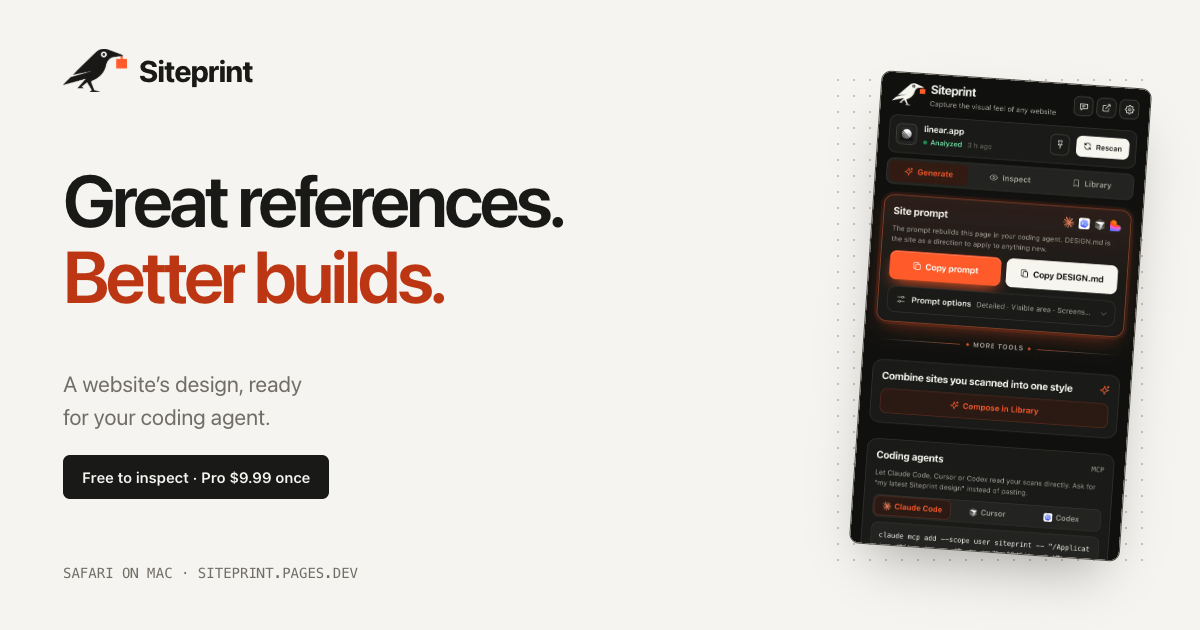
Siteprint is a Safari extension for Mac that measures the design of any website and turns what it finds into one exact prompt for a coding agent. Open a page in Safari, click the crow in the toolbar, and Siteprint reads the page's colors together with their roles, its type scale, spacing, corners and layout. From that measurement it produces a single prompt that can be pasted into Claude Code, Codex, Cursor, Lovable or any other AI tool, which then builds a new page from those values. It is made for designers, developers and founders who find a design they love and want their AI to work from measured values rather than guesswork. The extension runs on your Mac, with no account, no tracking and no uploads.
The problem Siteprint addresses is that design inspiration is trapped in the browser. You find a site whose colors, type and spacing feel right, but the usual way to pass that look to an AI coding agent is to describe it in words. Words do not carry hex codes, font sizes or spacing scales, so the agent improvises: colors that are close but not the same, type at the wrong scale, layout that drifts away from the reference. Siteprint replaces that guesswork with measurement taken directly from the page. Instead of describing a design in vague terms, you hand your agent the values the page actually uses. Siteprint frames this as real values, not vibes, and that framing is the core of the product's purpose.
The free Inspect view is where the measurement becomes visible. It shows the palette of the page with each color's role, the font families and the typography in use, and a blueprint of every section on the page. Alongside that, Siteprint includes an eyedropper and a grid overlay so you can check individual colors, spacing and alignment directly in Safari. Inspect, token export and the Library are available without paying, which means you can measure any site and study its design system before deciding whether you need the rest of the workflow.
Generate is the Pro step that turns a scan into something your coding agent can use. It copies one prompt containing the exact values Siteprint measured, and it can also copy a DESIGN.md file. Themes are part of Pro as well. The published example DESIGN.md shows what the output looks like: a design direction section with canvas, surface, text and muted colors as hex values, a type section listing a display size at a specific weight and a body size at a specific weight, and a shape section listing corner radii. That file is the same kind of artefact you would normally assemble by hand from a browser inspector, and Siteprint produces it from a single click on the page.
Compose is the second Pro capability and it is the one that goes beyond copying a single reference. Compose mixes two saved sites into a new style, so a palette from one design can be combined with the typography and layout of another. The product's own illustration of this is mixing Stripe's colors with Linear's type and layout. Because both sites have already been scanned and stored in your Library, the values are exact on both sides of the mix rather than approximated. This gives you a way to build a hybrid design direction that no single reference site could provide, while still keeping every value grounded in a real, measured page.
For teams that work with coding agents, Pro also lets your AI read your scans directly. In the extension you open Generate, then Coding agents, and follow the setup for Claude Code, Cursor or Codex. On Macs that have Apple Intelligence, Siteprint additionally reviews each scan and answers your questions about the design, for example how to match a particular site's look. Apple Intelligence is optional: Siteprint states that everything works without it, and it is simply an extra layer of review and question answering on machines that support it. Siteprint itself does not build the site; it measures the design, and your coding agent builds from the prompt.
The overall workflow is deliberately short. Siteprint describes it as three clicks: open any site, click the crow, and paste into your AI. Getting set up takes about a minute: get the extension from the Mac App Store, turn it on in Safari Settings, and click the crow on any site. Everything happens locally on your Mac, which is why the product can promise no account, no tracking and no uploads. There is nothing to sign up for and nothing leaving your machine, which matters when the pages you are measuring are client work, unreleased designs or internal tools.
The benefit for users is that a design reference stops being an inspiration image and becomes a set of exact values an agent can act on. You no longer eyeball a hex code, guess a type scale or describe spacing in words, and you no longer accept output that is merely close to the reference. Because the prompt is generated from measurement, the design direction you hand to Claude Code, Codex, Cursor, Lovable or any other AI is consistent and repeatable. And because the pricing model is buy once rather than a subscription, the tool is a one-time purchase that keeps working.
Concrete scenarios follow directly from the workflow. You might see a site whose palette you like and scan it to get the exact colors with their roles, then ask your agent to build a completely different product page using that palette. You might scan Linear and ask your coding agent to build a pricing page in that design direction, using the copied prompt or the DESIGN.md file. You might use Compose to mix Stripe's colors with Linear's typography and layout for a hybrid style. You might export tokens to carry a measured design into your own system, or open the blueprint in Inspect to study how a page structures its sections, spacing and corners before writing anything. On a Mac with Apple Intelligence you can also ask the design questions and get answers grounded in the scan.
Siteprint is a Safari extension for Mac and requires macOS 14 or later. It is not available for Chrome or iPhone yet. It is aimed at designers, developers and founders, and specifically at anyone who uses an AI coding agent such as Claude Code, Codex, Cursor or Lovable, or any other AI that can take a prompt. The free tier covers colors, type and layout measurement, the eyedropper and grid overlay, token export and your Library. Pro costs $9.99 as a one-time purchase and adds one exact prompt, DESIGN.md and themes, mixing two sites with Compose, and agent access so your AI can read your scans. Support and the setup guide are available through the site, and feedback goes to the product's support email address.
The takeaway is that Siteprint turns a design you admire into precise, measured instructions your AI can build from. By measuring colors with their roles, type scale, spacing, corners and layout inside Safari and packaging them into one exact prompt, it removes the guesswork that normally sits between a reference site and a new build. Free to inspect, $9.99 once for the full prompt workflow, no account and no uploads: Siteprint gives your coding agent real values instead of vibes.
Publisher
A
admin
Launch Date2026-10-06
Platformdesktop
Pricingfreemium
Tech Stack
#Safari extension#macOS 14 or later#Apple Intelligence