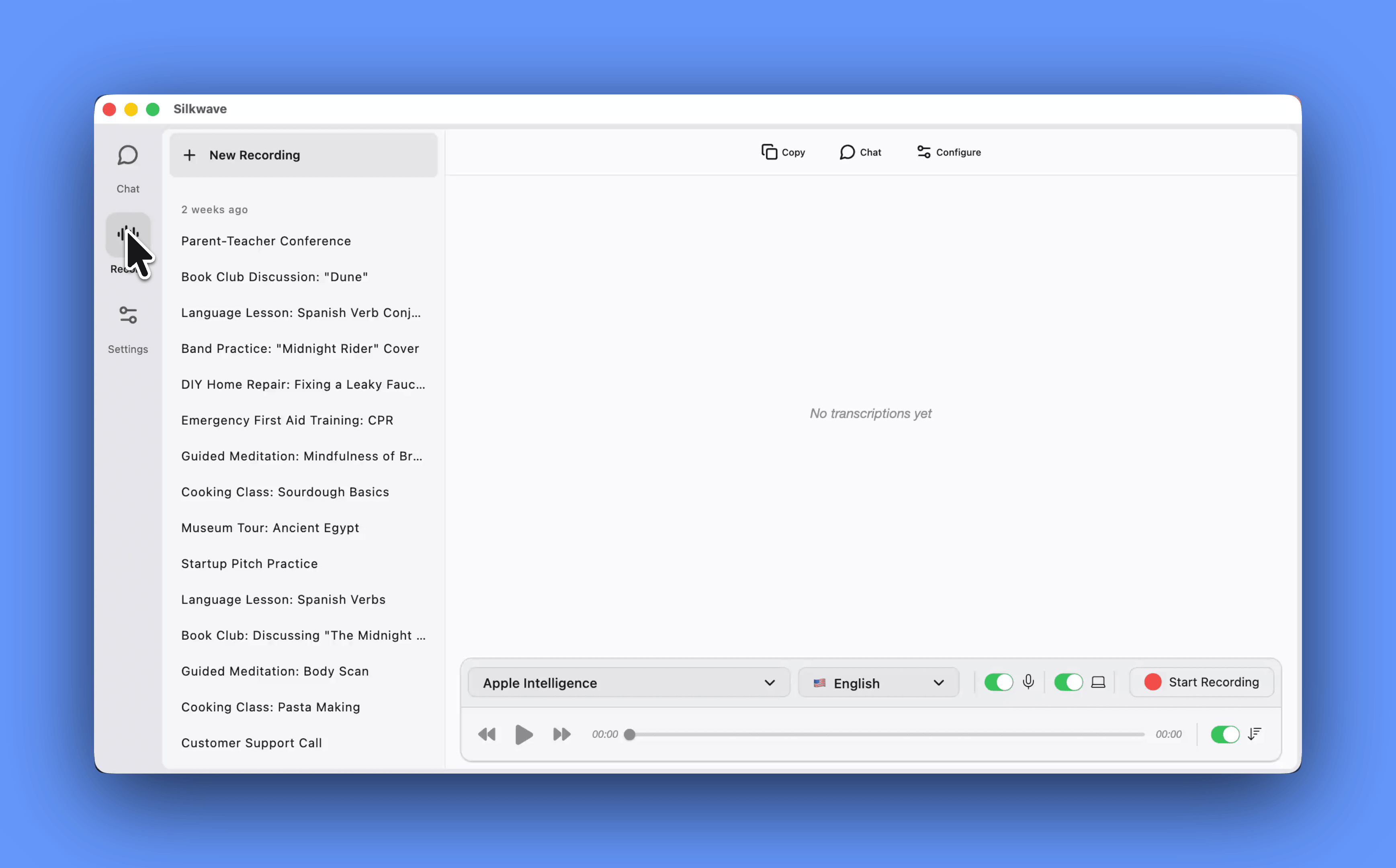
Silkwave is a comprehensive AI transcription and chat app for Mac that brings together high-fidelity audio capture, on-device speech-to-text, and flexible AI conversation into a single, privacy-focused workspace. Built specifically for macOS and optimized for Apple Silicon, it serves professionals, students, and anyone who regularly works with spoken content and wants to leverage large language models without juggling multiple tools or subscriptions. By merging local transcription using Apple's powerful speech recognition engine with a bring-your-own-key chat client that supports ChatGPT, Claude, Gemini, and Ollama, Silkwave transforms how you capture, understand, and interact with information. Its core value lies in giving you complete control over your data and AI costs while offering a seamless, intelligent environment for all your meeting notes, lecture recordings, podcast transcripts, and AI-assisted analysis.
Today's workflows are fragmented: you might use one app to record a meeting, another to transcribe it, and yet another to summarize or ask questions about it. This splintering wastes time, exposes sensitive audio to multiple cloud services, and forces you to manage numerous subscriptions and API keys. Silkwave solves these pain points by unifying recording, transcription, and AI chat under one roof. The app uses on-device Apple speech-to-text models that process audio directly on your Mac's Neural Engine, so your recordings never leave your machine unless you explicitly choose to send them to a cloud AI. This local-first approach ensures privacy, eliminates transcription latency, and works even when you're offline. By bringing your own API keys for cloud models, you retain cost transparency and avoid vendor lock-in, while the option to run completely local models via Ollama provides an additional layer of security for truly sensitive conversations.
Silkwave Voice is the recording and transcription engine that powers the experience. It captures audio from your microphone or system audio, letting you record meetings, lectures, podcasts, or any other audio source with a single click. You can also import existing audio files you already have, such as saved call recordings or voice memos. Once recorded, Silkwave transcribes the content in more than ten languages using Apple's on-device speech recognition, delivering fast, accurate text without an internet connection. The transcripts are placed directly into your workspace, where they become interactive. This means you can edit the text, highlight key sections, or immediately ask an AI model about the content. The local transcription engine handles multiple speakers reasonably well and preserves timestamps, making it easy to navigate long recordings. By eliminating the need for a cloud transcription subscription, Silkwave Voice saves you money and keeps confidential meeting details private.
admin
After transcription, Silkwave leverages Apple Intelligence to deliver ChatGPT-powered summaries and AI chat with your recordings. This integration allows you to ask natural language questions about the transcript—such as "What were the main action items?" or "Summarize the client's concerns"—and receive instant, contextually aware answers. The summarization feature condenses hour-long meetings into concise bullet-free recaps, highlighting decisions and deadlines. Because this processing can happen on-device through Apple Intelligence's private cloud compute architecture, sensitive content remains protected. For users who need more powerful reasoning, the app also lets you route transcripts to external models like GPT-4o or Claude Sonnet using your own API keys. This flexibility ensures you get the best of both worlds: the privacy and speed of on-device intelligence when appropriate, and the advanced reasoning of frontier models when you need deeper analysis or creative suggestions.
Silkwave Chat is the bring-your-own-key AI chat client that integrates seamlessly with the transcription workflow. It supports all major model providers—ChatGPT, Claude, Gemini, and Ollama—all within a single, clean interface. Instead of managing separate apps or browser tabs for each AI, you enter your API keys once and switch between models from a unified dropdown. This design simplifies your workflow and helps you compare model responses side by side. A standout feature is the ability to chat with your files: you can drag in PDFs, documents, or other text-based files, and the AI will answer questions grounded in their content. For complete privacy, you can run local models through Ollama, which processes data entirely on your Mac without any network requests. Silkwave Chat also retains conversation history locally, so you can revisit past interactions and build on previous analyses without relying on cloud storage.
The product works through an integrated, linear workflow that mirrors how people actually handle audio information. You launch Silkwave, set up your API keys for any cloud models you want to use (which are stored securely in the macOS keychain), and choose a recording source. As you capture audio, the waveform is displayed in real time; when you stop, the file is immediately transcribed on-device. The transcript then appears in a chat thread, where you can ask Apple Intelligence or any connected model to summarize, extract key points, or answer specific questions. If you import an audio file, the same process applies. The whole environment is persistent, so you can return to a project days later, review the transcript, and continue the conversation. This tight coupling between media and AI makes Silkwave feel less like a set of tools and more like an intelligent research assistant that grows with your work.
Concrete use cases demonstrate the app's versatility. A business consultant recording a strategy meeting gets a verbatim transcript and immediately asks, "What objections did the client raise?" The AI scans the text and lists each concern with timestamps, allowing the consultant to address them in a follow-up email. A university student captures lecture audio, then chats with the transcript to generate a study guide or to clarify confusing concepts by asking the AI to explain jargon terms. A podcaster imports a finished episode, receives a transcript for show notes, and uses a prompt like "Generate three social media posts from this episode" to accelerate promotion. A software developer working on proprietary code uses local Ollama models to discuss architecture decisions without sending code to the cloud, keeping intellectual property completely secure. Each scenario highlights how Silkwave saves time, preserves privacy, and unlocks deeper insight from audio information.
Silkwave is built exclusively for macOS and is optimized for Apple Silicon, taking full advantage of the hardware's machine learning accelerators for fast, efficient on-device transcription and AI processing. The target audience includes professionals who handle sensitive meetings, such as consultants, lawyers, and HR managers; students and academics who need to capture lectures and research interviews; content creators and podcasters who rely on accurate transcripts and AI-assisted content repurposing; and developers and power users who demand flexible, privacy-respecting AI tools. The app requires no monthly subscription for transcription, as it relies on built-in Apple technologies; for AI chat features, you only pay for the API usage of the models you choose to connect, while local models via Ollama incur no additional cost beyond the computing resources of your Mac. In summary, Silkwave is a thoughtfully crafted AI workspace for Mac that puts privacy, control, and integration at the forefront, enabling you to record, transcribe, and converse with your world in one fluid experience.
Silkwave is designed for macOS power users who frequently handle audio content and need flexible, privacy-first AI tools. This includes business professionals and consultants who record sensitive meetings and want on-device transcription and summarization without third-party data exposure; students and academics capturing lectures and research interviews for later study; podcasters and content creators seeking an all-in-one recording-to-publish workflow; developers and technical users who demand local AI model support for secure code and data discussions; and anyone frustrated with juggling multiple subscription apps. The app is ideal for those who prefer to bring their own API keys, maintain cost control, and leverage Apple Silicon's performance for intelligent, offline-capable note-taking and chat.