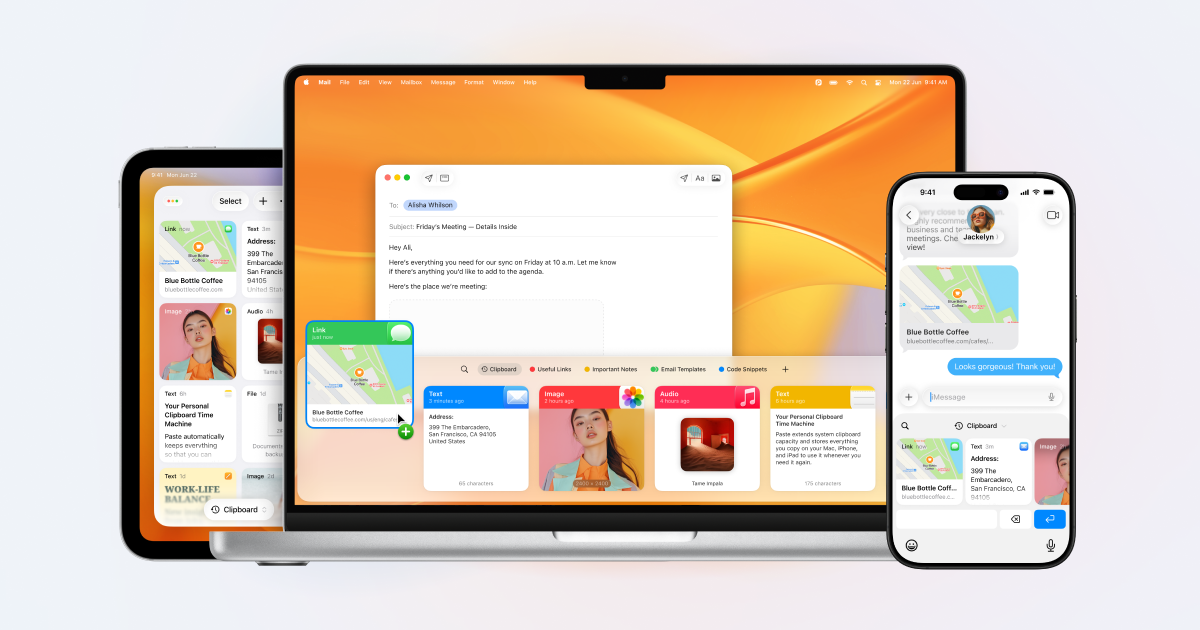
Paste is a clipboard manager for Mac, iPhone, and iPad that remembers everything you copy and keeps it organized, searchable, and in sync across your devices. Anything you copied, on any of those devices, is back in seconds. It is made for people who constantly move snippets, links, images, files, colors, and templates between apps — developers, designers, writers, and teams — and who need that material to be instantly retrievable instead of disappearing the moment something new is copied. Paste describes itself as more than a clipboard: it also suggests what you will most likely paste next based on what you are working on, and it can connect your clipboard history to the AI tools you already use.
The default clipboard on any operating system is a single slot. It holds exactly one thing, and the moment you copy something else, the previous item is gone with no way to get it back. That is fine until the moment it isn't: a paragraph you forgot to paste back, a link you copied ten minutes ago, a color value, an address, or a code snippet that took time to assemble. This single-slot behavior forces people to juggle apps, retype text, re-copy the same things over and over, and lose work they had already done. Paste exists to remove that friction. It treats the clipboard not as a temporary holding area but as a persistent, searchable memory of everything you have copied, so the cost of copying something new is no longer the loss of everything you copied before.
The first thing Paste changes is the assumption that copied content is disposable. Everything you copy is saved, with no limit, and it stays there — an hour ago or a year ago, it is still in your history. Because an unlimited history is only useful if you can navigate it, Paste also lets you search your whole clipboard history and find what you need in seconds. Instead of scrolling back through dozens of entries, you type what you remember about the item and jump straight to it. Reviewers have noted that the visual nature of the app makes it quick to identify the item you want to paste, and that Paste can be the clipboard star around which your devices orbit.
For the things you reach for constantly, Paste lets you pin the snippets, links, colors, and templates you use all the time, so reusable material sits close at hand rather than buried in history. Pinning turns frequently pasted material into a stable shelf: a signature block, a set of brand colors, a boilerplate reply, a template paragraph, an icon, or a link you send repeatedly. Paste is also built to follow you: your clipboard history syncs across Mac, iPhone, and iPad, so an item copied on one device is available on the others. Teams can go further and share pinboards to keep their team in sync, giving a group a common set of snippets and references instead of scattering them across individual inboxes and documents.
In Paste, Intelligent Clipboard adds a predictive layer. Paste suggests which of your copied items you will most likely paste next, based on what you are working on. The feature is powered by Apple Intelligence and runs privately on your Mac, so the suggestion is generated locally rather than in the cloud. A separate capability takes the clipboard into AI: Paste connects your clipboard history to Claude, Codex, Cursor, and other AI tools so they can use what you have already copied as context. The connection runs on your Mac, and you choose what to share, which means your history becomes an input to your AI workflows without leaving your control.
Paste's overall approach is local-first and permission-based. Your clipboard stays on your device and in your private iCloud; according to Paste, it never touches the company's servers. You can set rules so Paste ignores passwords and other sensitive apps, which keeps credentials out of your history while everything else continues to be captured. The Intelligent Clipboard suggestions are generated by Apple Intelligence on the Mac, and the connection to AI tools also runs on the Mac with you deciding what is shared. Taken together, the design is a clipboard that is expansive in what it remembers and conservative in where that memory travels — the opposite of the usual trade-off between convenience and privacy, and the reason the app describes itself as private by design.
The outcome Paste promises is simple: nothing you copy is lost, and nothing you have copied is hard to find. Instead of remembering to paste something before it is overwritten, you can copy freely and retrieve later. Instead of retyping a paragraph, you search for it. Instead of losing an important item because you copied something else, you have both. Developers keep code snippets saved and organized, designers keep colors, icons, and links a keystroke away, writers never lose a paragraph they forgot to paste back, and teams stay aligned through shared pinboards. Users describe Paste as core to their everyday workflows, with some saying it makes them crazy efficient and provides them with superpowers in daily computer use, while others treat it as a must-have Mac app they use dozens if not hundreds of times a day.
Concrete workflows show up throughout Paste's own examples. A developer copies one snippet and then the next without losing the first, because everything stays saved and organized. A designer keeps colors, icons, and links a keystroke away while working. A writer drafts a long document and never loses a paragraph that was copied but not yet pasted back. In a messaging or email scenario, someone writing 'Here's the cabin:' finds the copied cabin link already surfaced at the front of the row, because Paste predicted it as the next item to paste. In an AI workflow, a user can ask a tool to find the notes they copied earlier that day in Paste and draft a team update for a launch using them. Teams share pinboards so everyone pulls from the same set of snippets and stays in sync.
Paste is aimed at Mac, iPhone, and iPad users, and explicitly at developers, designers, writers, and teams. Its integrations extend to AI tools including Claude, Codex, and Cursor, and its predictive feature relies on Apple Intelligence running on the Mac. Sync is handled through the user's private iCloud, and the app's privacy controls let you exclude passwords and sensitive apps from capture. Paste has been on the App Store for ten years and holds a 4.5 rating from more than 16,000 ratings. Pricing is presented through plans and a purchase option, and the site offers a free seven-day trial of the one app for Mac, iPhone, and iPad, alongside 'Try for free' and 'See plans' links and a direct 'Buy now' option.
Paste's value proposition is that the clipboard should remember everything and you should never have to worry about what is on it. By saving every item with no limit, making the whole history searchable, letting you pin what you reuse, syncing across Mac, iPhone, and iPad, and keeping the whole system private on your device and in your private iCloud, it turns a single-slot utility into a durable, searchable memory. Intelligent Clipboard adds prediction on top of that memory, powered by Apple Intelligence on the Mac, and the AI connections let that memory feed the tools you already work in. The result is a clipboard manager that is both broader and more careful than the system default.
Publisher
A
admin
Launch Date2026-09-30
Platformdesktop
Pricingpaid
Tech Stack
#Apple Intelligence#iCloud
Traffic Insights
Month2026-09
Estimated Visits74K
MoM Visits GrowthN/A
Avg Time on Site-
MoM Time GrowthN/A