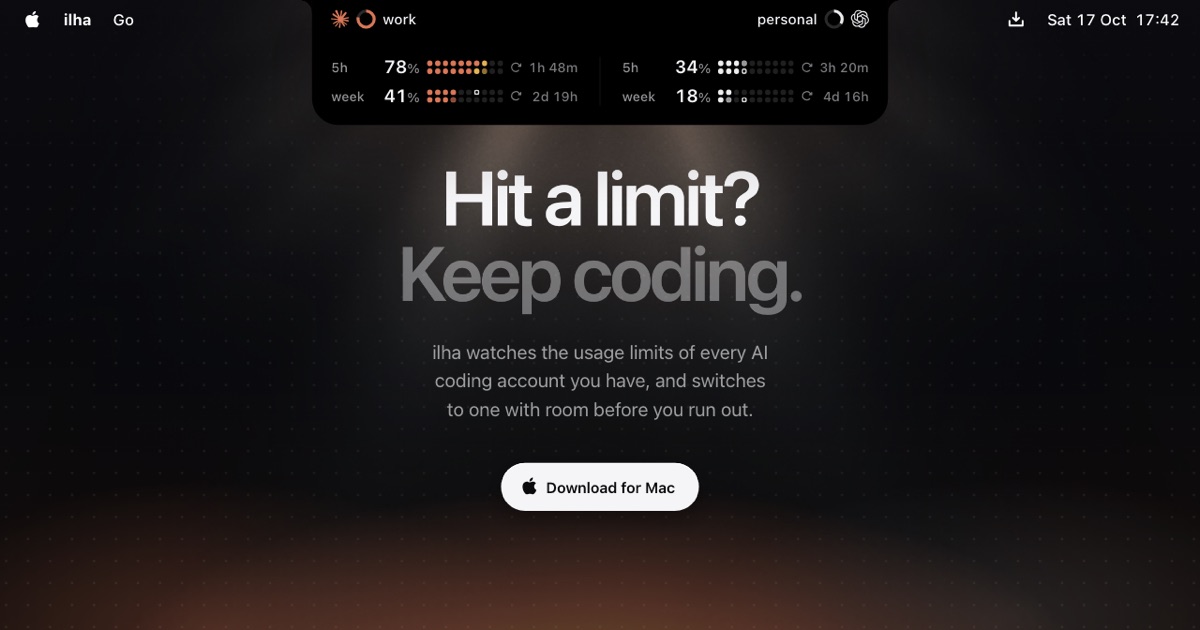
ilha is a native Mac app that lives in the notch of a Mac's display — and appears as a small pill on other displays — to show how much of the usage limits on your AI coding accounts you have already spent. It watches the usage limits of every Claude Code, Codex and Grok Build account you have, reporting the 5-hour and weekly windows for each one, when those windows reset, and whether you are on pace to run out. Its stated purpose is short: "Hit a limit? Keep coding." Rather than letting a session stop mid-task when a limit lands, ilha moves the CLI to an account that still has room — offering the switch at 90% and making it automatically at 98%. It is built for developers who run these coding agents daily, often across more than one paid account.
The problem ilha addresses is described directly on its site: the limit hits mid-task, your session stops, and the reset is hours away. Every account carries a 5-hour window and a weekly window, and when either one fills, the work simply stops until it refills — even though another account you already pay for may have capacity sitting unused. Tracking that by hand means guessing at percentages, losing track of reset times, and discovering too late that a work account has run dry while a personal one is barely touched. ilha puts that information in constant view and then acts on it, so the boundary between accounts stops being a stopping point for the work itself.
The core of the app is the live view in the notch. For each account it shows how much of its 5-hour and weekly limits has been used, along with the time remaining until each window resets — for example a work account at 78% of its 5-hour window with 1h 48m left, and 41% of its weekly window with 2d 19h left. You pick any two accounts to sit beside the notch, so a work account and a personal account can be compared side by side, and the app keeps every tool you use balanced whether it is beside the notch or not. A fuller Usage view lists each account with both windows and their percentages, and one click switches to the account you choose.
Switching is where the notch display becomes an action. At 90%, ilha offers a way out: before the limit, one click moves you to an account with room. At 98%, it switches for you, so your session keeps running on an account with room, with undo right there if you want to go back. The site stresses that nothing is logged out in the process, and that Claude Code, Codex and Grok Build are each switched the way it expects. There is also a separate control for banked resets: if you are out of room but have a reset in the bank, one press on the ticket uses it, framed as "banked resets, never wasted."
Insights answers a different question: what the week cost. Every hour and every project are priced at API rates, read from the logs your CLIs already keep on your Mac, and nothing leaves it. The view shows a weekly total in dollars at API prices, the share of usage across your accounts, a day-by-day chart for the week, a projection such as usage rising to a given percentage by a particular day, the share taken by subagents, and how many 5-hour limits were hit. That turns an abstract limit percentage into a concrete cost picture, project by project and day by day.
Alongside the band and the Usage view, ilha provides alerts, a forecast and sounds. The hourglass forecast says when a window fills, so you know how long you have before a limit lands rather than finding out when the session stops. Sounds accompany each moment — or none, if you prefer silence. These items are listed among the free features, together with the band, the peek and the Usage view covering both windows and their resets at a glance.
Overall, the product's approach is to sit locally on the Mac and watch rather than to intercept or proxy your work. It reads the logs the CLIs already write, keeps your logins in the Keychain, requires no account to create, and states that it never sees your usage. The single piece of behaviour that changes your workflow is the handoff: at a threshold the CLI is pointed at another account you already own, in the manner that CLI expects, without a logout. The notch is simply where that state lives, always visible, one click from being acted on.
The outcomes ilha promises follow from that: sessions that keep running when a limit would otherwise have stopped them, no wasted capacity on accounts you already pay for, visibility into both the 5-hour and weekly windows and their reset times, a forecast of when a window will fill, and a weekly cost picture priced at API rates and attributed to projects. Because undo is offered after an automatic switch, the change is reversible, and because banked resets can be spent with a press, a saved reset does not have to sit unused.
Concrete scenarios come straight from the site. A developer deep in a task on a work account at 90% clicks once and continues on the personal account instead of waiting hours for a reset. Another, at 98%, is switched automatically and keeps the session running, with undo available if the switch was not wanted. Someone who wants to know where the week went opens Insights to see the weekly cost at API prices broken down by project, the daily chart and the projection for the rest of the week. A team member juggling a work and a personal account keeps both beside the notch, comparing their 5-hour and weekly percentages at a glance, and switches with one click. And when a limit is reached but a reset is banked, one press on the ticket spends it.
The product is a Mac app requiring macOS 15 or later, aimed at people running Claude Code, Codex or Grok Build who may hold several paid accounts across those tools. Pricing is free to watch, Pro to switch: every Mac starts with 14 days of Pro with no account and no card. The Free tier covers the island for the account each CLI is using, including the band, peek and Usage view, alerts and the forecast, and sounds, at $0 forever with no license needed. Pro is $20 once for one, two or three Macs, paid once with a year of updates, and covers every account of every CLI, switching and auto-switch, and Insights. After the year of updates, every version from that year keeps Pro for good, and you can renew any time; moving to a new Mac means pasting your key, with the Mac seen longest ago giving up its seat. Prices are in US dollars plus tax where it applies, sold by Paddle.com as reseller.
The site is explicit about data. There is no account to create, no trackers or ads, and logins stay in the Keychain. Once a day the app sends an update check and an anonymous count under a random id — app version, plan, macOS, Mac type, how many accounts you keep per CLI, and where auto-switch is on — plus a crash or hang report of where and why, never your data. No IP address is kept, and Settings › General › Anonymous counts and crashes turns both off. With Pro, the key and a hash of your Mac's ID are involved, and a download keeps only its time. Usage, logins and logs are never sent.
In short, ilha's value proposition is to keep coding past the limit: it keeps every account's Claude Code, Codex and Grok Build usage in the notch, warns before a window fills, moves the CLI to an account with room when you are close, spends banked resets on request, and shows what the week actually cost at API prices — all from logs that stay on your Mac.
Publisher
A
admin
Launch Date2026-10-22
Platformdesktop
Pricingfreemium