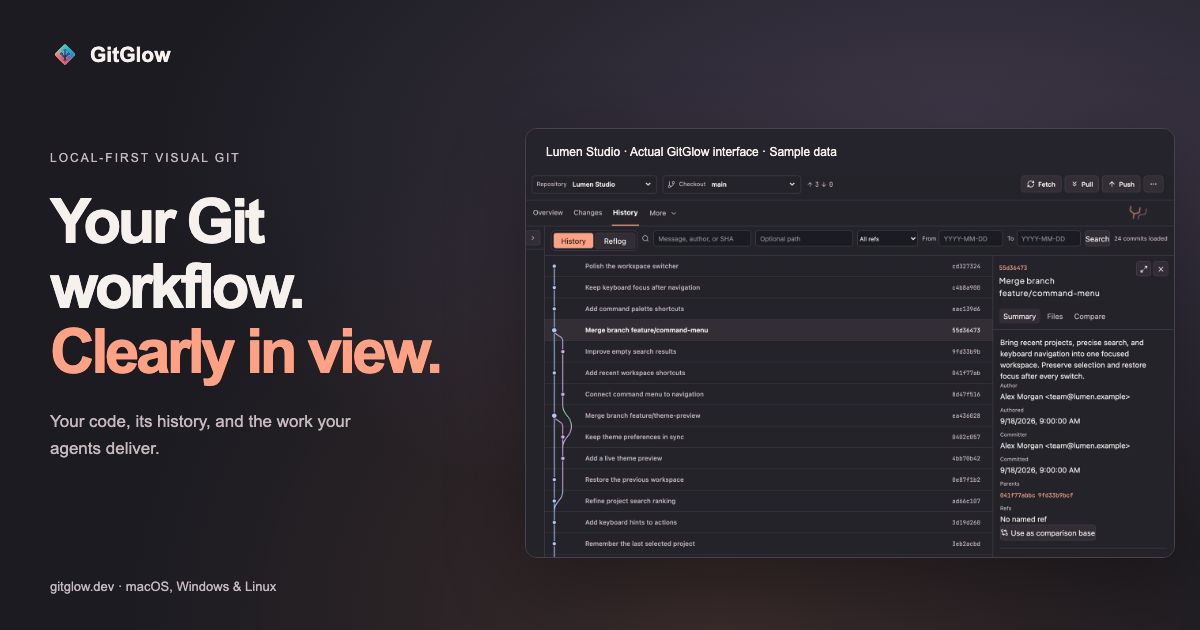
GitGlow is a local-first visual Git workbench for independent developers who want to know what their code and their agents will ship. It brings precise staging, clear commit history, conflict resolution, a checkout-aware terminal, coding-agent review, and release preparation into a single desktop workspace. Instead of switching between separate tools, a developer opens a clone, reviews the current diff file by file, stages precisely, and ships with confidence. GitGlow is available as desktop builds for macOS, Windows, and Linux, and the free tier works with a private local clone without requiring an account.
The problem GitGlow addresses is that producing changes is easy, but verifying them is not — particularly when some changes come from AI coding agents. Developers need to inspect what actually changed, decide which parts belong in a commit, and remember what they have already reviewed. GitGlow's review confidence approach is explicit about this: mark files reviewed and run checks, and later edits bring files back to your attention while making earlier results stale. Agent context is also connected to the checkout, so observed and managed runs can carry repository, checkout, event, and attributed-file context into the same Changes workflow. Local private work remains useful on the free tier, covering precise staging, commits, branches, conflicts, history, blame, and reflog without a GitGlow account.
Staging in GitGlow is deliberately granular: review files, hunks, or selected lines before composing a clean commit, so only what belongs is staged. This is available on the free tier for a local repository. Building on that, the Pro review confidence feature lets developers mark files reviewed and run an explicit check with timeout and cancellation, keeping results tied to the checkout that was tested. When a file is edited again later, it returns to attention and the previous verification becomes stale. Nearby, checkout-aware terminal tabs let developers run Git, tests, and installed agent CLIs beside the diff; one checkout is free, while concurrent checkouts are part of Pro.
History in GitGlow is presented as topology rather than a flat list: explore real topology, compare revisions, and trace file or line history, with core history free and editing features in Pro. Developers work with branches, remotes, stashes, tags, and trusted worktrees — daily actions are free, while managed worktrees are Pro. Conflict resolution focuses on understanding the real operation: GitGlow explains the roles in merge, rebase, cherry-pick, and revert conflicts, and continuation and recovery are free. For people working across several clones, GitGlow keeps registrations, context, and workspaces without flattening local data, with one active repository free and concurrency in Pro; Pro also adds a selected-repository fetch that brings repositories up to date together with clear per-repository results.
Agent work is treated as something to be reviewed rather than merely watched. GitGlow follows authentic provider and Git signals across live, observed, and managed runs, with basic observation free and managed controls in Pro. Observed sessions remain owned by their originating Desktop or CLI client: GitGlow monitors supported hook events and independent Git changes, but hides message, approval, and interrupt controls unless the provider exposes a supported channel, while runs launched by GitGlow are Managed and can expose those controls. An Activity Tape lets developers search and replay sanitized operational detail in context, with the latest Replay free and advanced retention in Pro. Through a packaged MCP sidecar, GitGlow gives agents bounded Git context by exposing read tools and reviewed native actions; reads are free and approved writes are Pro. Free MCP access is read-only, and every MCP-originated write waits for native approval in Agent Observatory while the desktop app is open.
GitGlow's overall approach is local-first, with an explicit privacy boundary: local status, diffs, history, repository paths, previews, and audit records stay on the device. Optional GitHub, agent-provider, billing, and consented analytics connections have separate, explicit data boundaries. If GitHub is connected, GitGlow sends only the GitHub requests needed for installed repositories through the GitGlow API, and tokens never enter the desktop webview or MCP responses. For agent observability, an encrypted local flight recorder can retain sanitized provider-visible plans and commentary, commands, bounded output and tests, approvals, collaboration, relative paths, statistics, and safe text diff hunks. It excludes raw prompts, full transcripts or final replies, credentials, absolute paths, binary or oversized bodies, and contents or hunks from secret-prone files, and redaction and truncation are always disclosed. GitGlow states that it never exposes or stores hidden reasoning.
Pro also extends the workspace beyond the local clone. A GitHub connection lets developers review authorized GitHub repositories, pull requests, issues, workflows, and checks. Release Workspace helps prepare a release you can review by bringing checks, merged work, notes, and tags into one guarded sequence; release publication is available only there, after a fresh guarded preview and explicit final confirmation. Insights explore the shape of the work — activity, commits, graphs, trends, complexity, work types, rhythm, sessions, and exports — with commits and activity free and advanced insights varying by plan. Indie Log turns evidence into a useful work log, written manually or produced as an analysis-only report pack built from selected sources, with manual logging free and managed reports in Pro.
The stated benefits follow from these capabilities. Review confidence means knowing what you reviewed and what changed, so verification does not silently drift out of date. Fetching selected repositories together gives clear per-repository results when catching up across a workspace. Precise staging produces clean commits that contain only intended changes. Checkout-aware terminals keep tests and agent CLIs beside the diff they relate to. Agent observability makes agent work reviewable and ties it to the checkout, while bounded MCP context keeps agent access controlled through native approval. Moving between repositories safely preserves context and local data instead of flattening it.
Concrete workflows start with onboarding: install GitGlow, open a clone, and create a first reviewed commit. From there, the daily Git loop covers reviewing changes, working with refs, resolving conflicts, and inspecting history. Developers who use coding agents connect supported clients, review events, and open the exact changed files, with repository, checkout, event, and attributed-file context carried into Changes. Developers preparing a ship can run the guarded release sequence in Release Workspace. They can also search the Activity Tape or replay sanitized operational detail when they need to return to the moment that matters, and produce a work log with Indie Log. The documentation additionally covers finding every control — exact button labels, shortcuts, availability, and recovery behavior.
GitGlow describes itself as local Git for independent developers. It ships desktop builds for macOS, Windows, and Linux; GitGlow 2.0.5 has been manually checked on macOS, while Windows x64 and Linux x86_64/aarch64 packages are build-validated for version, architecture, payloads, sidecars, and checksums. Pricing is free for private local clones with no account needed, including one active repository or checkout, precise staging, commits, branches, sync, merge, conflict resolution, stashes, tags, topology history, compare, blame, reflog, basic observation, latest Replay, manual Indie Log, analytics, export, read-only MCP, and terminal tabs in the active checkout. Pro costs €2.99/month or €29/year and adds concurrent terminal sessions, review freshness, verification tied to checkout state, multi-repository fetch, guarded history editing, concurrent workspaces, managed agents, advanced Observatory review and Replays, GitHub integration, Release Workspace, managed Indie Log, and MCP writes. AI provider subscriptions and API usage are separate.
Taken together, GitGlow is a local-first Git workbench that treats review as the central act of shipping software. It keeps everyday Git free and local, adds confidence and control through review marks, checkout-tied checks, concurrent workspaces, managed agents, GitHub integration, and release tooling in Pro, and gives coding agents bounded, approved access rather than open-ended control. For independent developers who want to know exactly what they reviewed and what will ship, the product's value proposition is simple: review every change and ship with confidence.
Publisher
A
admin
Launch Date2026-10-11
Platformdesktop
Pricingfreemium
Tech Stack
#MCP sidecar#GitHub API