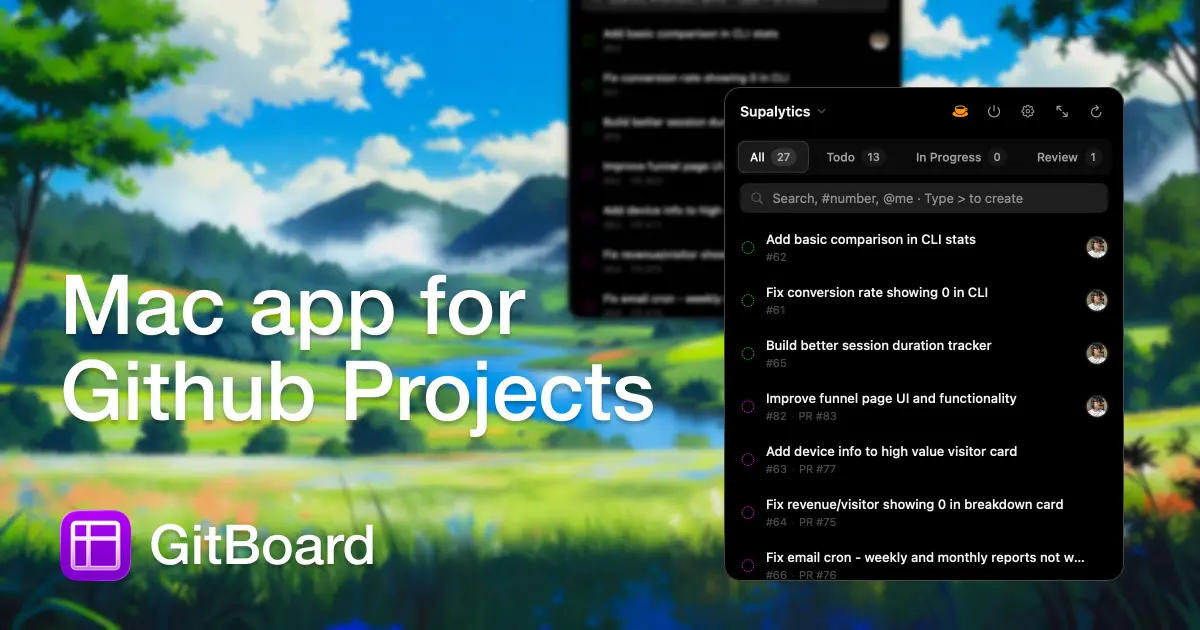
GitBoard is a native macOS menu bar application for GitHub Projects. It provides quick access to your kanban board, allowing you to filter by status, search issues, and create new ones without disrupting your workflow.
GitBoard is a native macOS menu bar application designed specifically for users of GitHub Projects. As a dedicated kanban board tool, it serves developers, project managers, and team leads who rely on GitHub for issue tracking and project management. Its core value lies in providing instant, always-available access to your project board without the need to open a browser or switch contexts. By living in the menu bar, GitBoard ensures that your GitHub Projects are never more than a click away, enabling seamless monitoring and management of tasks throughout the day. This category of productivity tools for developers focuses on reducing friction and maintaining flow, which is essential for complex work.
The primary problem GitBoard solves is the constant context switching required to manage GitHub Projects. Developers and project managers often need to check issue status, review assignments, or search for specific items multiple times per day. Without a dedicated tool, this means navigating to GitHub's website, logging in, and locating the correct project board. This interruption breaks focus and reduces productivity. GitBoard eliminates these steps by offering a one-click gateway to your kanban board from the macOS menu bar. Users can quickly glance at their board, filter by status to see what is in progress or blocked, and take action without losing their place in their work. Maintaining this flow is critical because even short interruptions can significantly impact cognitive performance and output.
The first major feature group is the native macOS menu bar integration. GitBoard lives as an icon in your menu bar, providing immediate access to your GitHub Projects kanban board at any time. By clicking the icon, a dropdown or small window appears showing your board overview. This feature works seamlessly in the background, requiring no separate window management or app switching. The utility is clear: you can monitor project status with a single click, whether you are coding in Xcode, writing documentation, or in a video call. The menu bar placement is non-intrusive yet always available, ensuring that your board is literally at your fingertips. This design respects your workflow and minimizes disruption, allowing you to stay in the zone while keeping an eye on your tasks.
The second major feature is the ability to filter issues by status directly from the menu bar. GitBoard integrates with GitHub Projects' native status fields, such as To Do, In Progress, and Done. Users can select a specific status to narrow down the visible issues, focusing only on the tasks that matter most at that moment. This is particularly useful for identifying bottlenecks or checking what is currently in progress. The filtering is instant and does not require reloading a web page. By providing this targeted view, GitBoard helps users manage their workload more effectively. Filtering reduces mental overhead when triaging a large board, enabling you to quickly see which issues need attention. This feature turns the menu bar into a dynamic dashboard aligned with your current priorities.
Publisher
A
admin
Launch Date2026-02-07
Platformdesktop
Pricingfree
Tech Stack
#GitHub CLI