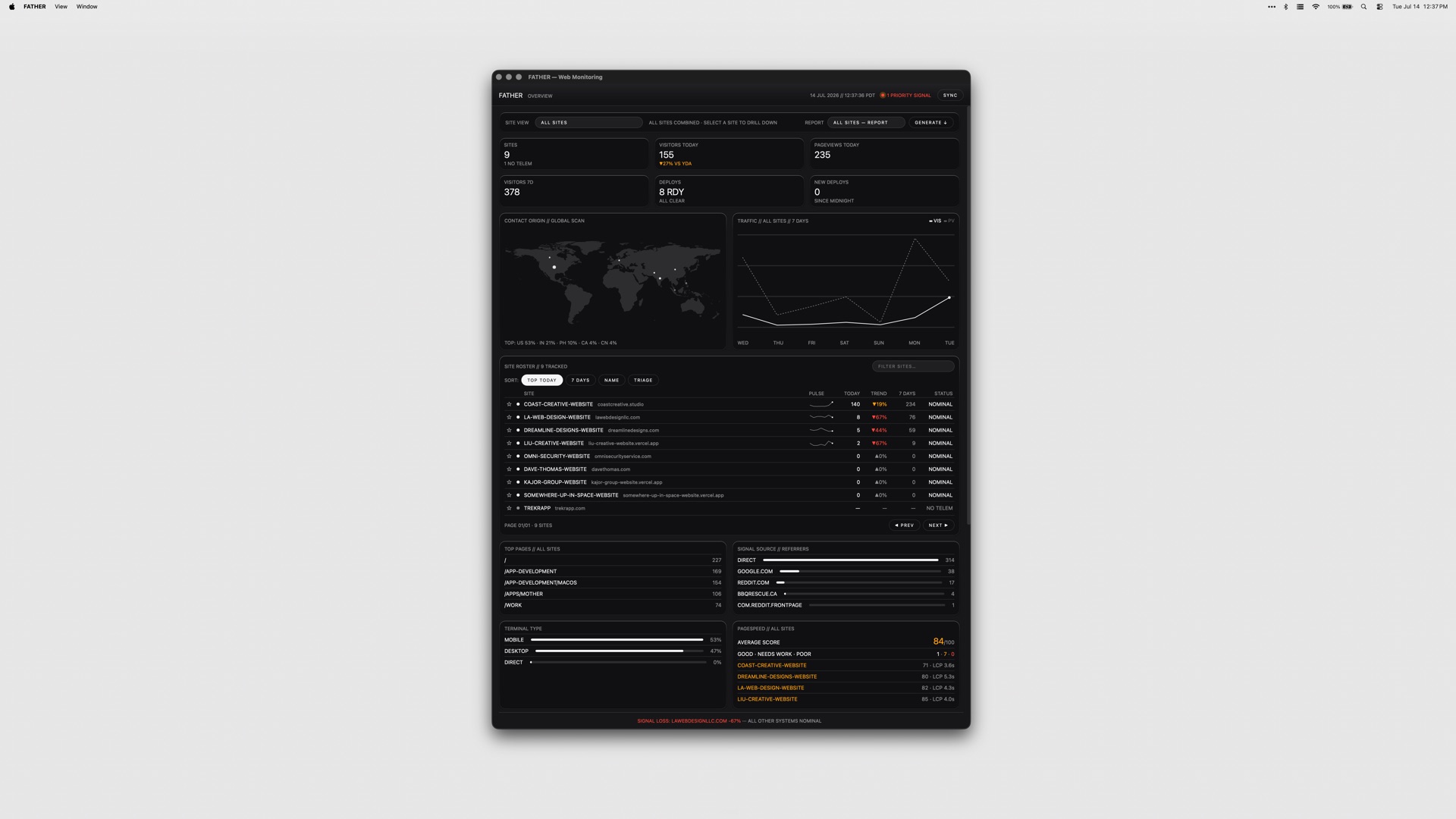
FATHER is a macOS application that serves as a mission-control dashboard for websites and deployments, built specifically for teams shipping on Vercel. Its stated purpose is simple: it watches the fleet so you do not have to, and it makes sure you know that a site is down before your clients do. The app is aimed at people who are responsible for more than one live site — studios, agencies and developers running client projects — and who need a single screen that answers the question of what is healthy, what is broken and what is about to expire. Connect your Vercel account and the dashboard fills itself: deployments, uptime and speed metrics appear live.
The underlying problem is fragmentation. A team shipping on Vercel typically has to visit the Vercel dashboard for deploys, a search console for clicks and rankings, a separate source for page-speed scores, and yet another place to check whether an SSL certificate or a domain is about to lapse. GitHub checks live somewhere else again, and a failed build can sit unnoticed for hours if nobody happens to be looking at a browser tab. FATHER pulls those signals into one native macOS window, and — more importantly — into the menu bar, so monitoring stops being something you have to remember to do and becomes something that comes to you.
FATHER is built on Vercel. Deploy tracking and the speed and uptime metrics all come from the Vercel API, so the integration is not a bolt-on but the foundation of the app. You connect your account token and your projects appear automatically; there is no manual inventory to maintain and nothing to keep in sync. Projects that are hosted somewhere other than Vercel can still be added manually so they get basic status checks, which means the dashboard can serve as a single view even for a mixed hosting estate. Because the app relies directly on the Vercel API, the numbers it shows come from the same place your deployments do.
The core view is the fleet at a glance: the status, uptime and response of every site on one screen. Rather than opening projects one at a time, you get a single list you can scan in seconds to see which sites are responding, which are slow and which are down, so the morning check on a portfolio of client work takes moments instead of a tour through several dashboards. Deploy tracking is the second pillar. FATHER lets you watch builds progress and catch failures the moment they land, live from Vercel, so a broken deploy does not have to wait for a client email or a casual check-in to be discovered.
Two features make sure that information actually reaches you. Menu-bar status shows an F in the macOS menu bar: it displays a dot while builds are running and turns red when something needs your attention, so the health of the fleet is legible at a glance from wherever you are on the Mac. Alerts go further — notifications fire even when the dashboard is closed, so a failed build or a site going down will find you rather than waiting to be found. Together they turn the app into something closer to a pager for your web estate than a traditional dashboard you have to remember to visit.
Beyond deployments and uptime, FATHER covers the surrounding signals that usually live in separate tools. Traffic, PageSpeed scores, Search Console data and Bing data all appear in the dashboard, with clicks, rankings and indexing visible without leaving the app. SSL certificates and domain renewals get a countdown, so expirations stop being a nasty surprise, and failing GitHub checks get flagged alongside everything else. The result is a dashboard that answers both the operational question of whether a site is up and the marketing question of whether it is performing.
The app's approach is deliberately local and deliberately simple. Tokens stay on your Mac rather than being shipped to a hosted service, and the product is sold as a one-time purchase instead of a subscription. It is a native macOS application — universal, so it runs on both Apple Silicon and Intel Macs — and it is menu-bar-first rather than browser-first. Every app in the studio's suite ships with the same set of themes, so the dashboard can be themed to taste like the rest of the collection.
For the user, the benefit is timing. Knowing that a site is down before your clients do changes the conversation entirely: it turns a defensive, apologetic call into a proactive fix. Catching a failing deploy the moment it lands shortens the window in which a broken build is live. A countdown on SSL and domain renewals removes a class of avoidable outages, and having traffic, PageSpeed and search data in the same window reduces the number of tabs and logins needed to answer routine questions. All of it runs from the menu bar, so the information arrives without anyone having to go looking for it.
Typical use looks like an agency or studio with a portfolio of client sites on Vercel: the dashboard becomes the first thing checked in the morning and the thing that taps you on the shoulder when a build fails overnight. Freelance developers use it to keep an eye on their own and their clients' projects without logging into the Vercel dashboard repeatedly. Teams with mixed hosting add their non-Vercel sites manually so the fleet view stays complete. Marketers and SEO-minded owners watch clicks, rankings and indexing alongside speed scores, and anyone responsible for renewals relies on the SSL and domain countdowns.
FATHER is made for teams shipping on Vercel — studios, agencies and independent developers managing client work. The integrations named in the product material are Vercel, Google Search Console, Bing and GitHub, with PageSpeed scores surfaced in the dashboard. It is a macOS app that runs on Apple Silicon and Intel Macs. Pricing is a one-time $7.99 for FATHER alone, or $22.99 for the full Suite of all four apps from the same studio.
In short, FATHER is a macOS mission-control dashboard that turns a scattered set of monitoring chores — deploys, uptime, speed, search visibility, renewals and checks — into a single live view with menu-bar alerts attached. Its value proposition is early warning: you find out first, act first, and keep your clients out of the loop only because there is nothing for them to worry about.
Publisher
A
admin
Launch Date2026-09-16
Platformdesktop
Pricingpaid