Dayglass is a Mac app that takes meeting notes without a bot joining the call. It records Zoom, Microsoft Teams and Google Meet sessions directly on Apple Silicon, capturing both sides of the conversation from macOS system audio — including AirPods — together with your microphone. Transcripts, screen text and notes are stored locally on the Mac under ~/.dayglass, and audio is transcribed on the machine and not kept by default. Dayglass positions itself as a private AI memory for your work day, aimed at engineers and founders who run their working day through calls and want their coding agents to know what was decided. Concretely, Claude Code and Cursor can read a live call over a local MCP server while the meeting is still in progress, so an agent can turn a decision made on the call into an implementation plan without anyone retyping the request.
The problem Dayglass addresses is the gap between what is said on a call and what the tools around you actually know. Dayglass describes the routine pain of re-explaining client calls to Claude Code: the decisions live in a conversation, and by the time you want to act on them you are digging through notes or asking people again — what the product calls follow-up email archaeology. The alternative it argues against is the cloud notetaker. Many cloud notetakers join the call as a bot by default and process and store recordings and notes on the vendor's servers; the page notes that Otter, for one, says it stores data on AWS S3, and that your notes live in their account system. Dayglass was built by AI systems engineer Igor Ganapolsky after getting tired of cloud meeting bots joining sensitive engineering and customer calls, and it is designed around a different assumption: the recording, the transcript and the search index stay on the laptop, and no bot appears in your calendar invites.
The centrepiece for developers is the live meeting link over MCP. When a meeting is in progress, Claude Desktop, Claude Code, Cursor and the other agents running on your Mac can read who is talking and what was just said by calling the local MCP tool dayglass_get_live_meeting. The MCP server runs on your Mac, and it is installed with the command dayglass doctor --install-mcp. The page illustrates this with a terminal exchange: asked what Alex just committed to on the call, the agent calls the tool, reads three speakers and five live turns, and answers that Alex committed to having the retry change ready by Thursday 4 PM, that Mina asked for it, and that Sam will confirm the design review. In the FAQ, Dayglass states that the agent receives the speaker-tagged transcript, the people on the call and the shared screen while the meeting continues.
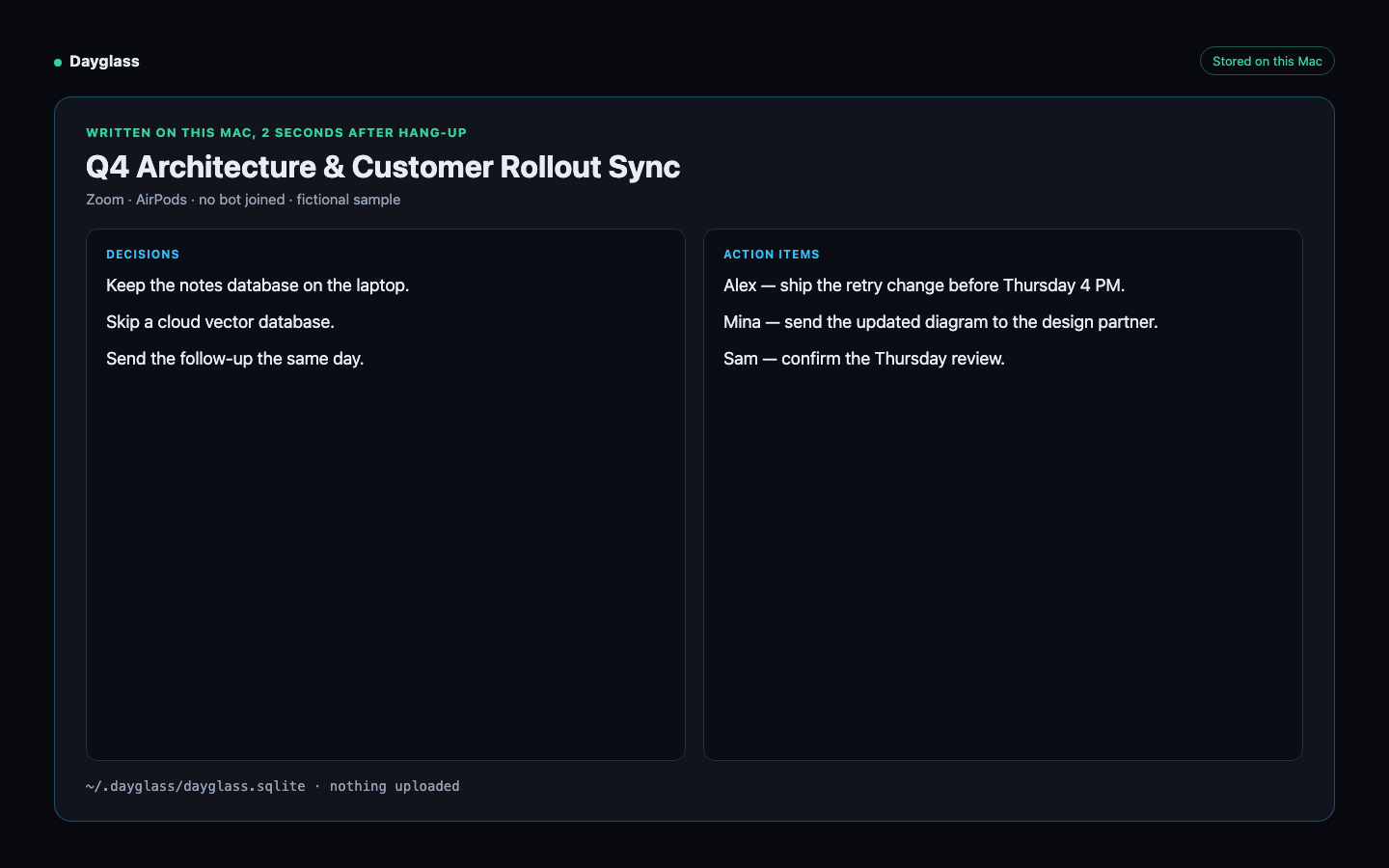
Capture itself is bot-free and built on native macOS technology. Dayglass uses ScreenCaptureKit to grab headphone and system audio plus your microphone for Zoom, Google Meet and Teams calls, and transcribes with a local Whisper model to a local WAV file at 16kHz PCM. Because no recording bot joins the call, nothing is added to the participant list. When a call ends, Dayglass generates notes locally — the sample note is described as generated locally two seconds after hanging up. Those notes pull out key decisions, action items grouped by owner, and a ready-to-send follow-up email draft, and can be exported in one click as Markdown. The sample note shows a decisions list, action items assigned to named people, and a one-click call consent chat note.
Dayglass also captures the screen, not just the audio. During a call it records the meeting screen and slides, with Apple Vision neural OCR turning what was shared into searchable text indexed in SQLite FTS5. That means you can find any shared slide, terminal stack trace, document or spoken quote across your calls afterwards, rather than only searching transcripts. There is also an optional continuous screen memory setting that captures your screen outside meetings too, so you can search what you saw last week; it can be turned on or off in settings.
Two further capabilities support the working day around meetings. Live Call Catch-Me-Up, bound to ⌘⇧Space, is for the moments when you joined late or zoned out: it shows what was just proposed, how it connects to prior meetings, and the sharpest questions to ask next, with an optional private HUD. Starred Work Sessions, triggered with ⌘⌃B while debugging or shipping a workflow, summarise the exact steps you took into a clean checklist or a reusable agent skill. Ask AI underpins the question-answering side: it runs on a local model or a cloud model, whichever you pick. With a local model nothing leaves the Mac; with a cloud model, your question and the relevant meeting text are sent to that model, and by default only terms on your Never-share list are withheld before text goes to a cloud model you choose.
The overall method is a four-step pipeline on the Mac. First, macOS captures: ScreenCaptureKit Audio plus Apple Vision Neural OCR. Second, a local SQLite memory stores everything with SQLite FTS5 and hybrid search in ~/.dayglass. Third, privacy guards apply: windows of password managers such as 1Password and Bitwarden are skipped during capture, and Never-share terms are withheld. Fourth, your workflow receives clean Markdown notes plus the Claude and Cursor MCP link. The design is deliberately inspectable: every table lives in plain SQLite at ~/.dayglass/dayglass.sqlite, which you can open with sqlite3, and the page invites you to watch network activity with Little Snitch or lsof -i if you want to verify the claims. Dayglass also ships a built-in one-click call consent snippet, because recording without a bot still requires etiquette and consent — clicking it drops a friendly one-liner into Zoom or Meet chat explaining that you are taking local notes on your Mac with Dayglass and are happy to share the summary afterwards.
The benefits the product claims are practical rather than abstract. Decisions do not get lost, because every call ends with a record of who decided what. There is no follow-up email archaeology, because you can ask what was agreed instead of digging for it. Your agent already knows what was decided, because Claude and Cursor read the call as it happens. And privacy becomes something you can point at: transcripts and screen text stay on your Mac, and the one thing that can leave is text sent to a cloud model, and only if you turn one on for Ask AI. Dayglass frames this as a selling point in its own comparison table, contrasting its local ~/.dayglass storage with vendors that keep notes and transcripts on their cloud.
Concrete use cases appear throughout the page. The clearest is a client call where the client changes a requirement — retry the payment webhook two times, not five — and while the call is still running you ask Claude Code or Cursor to plan that change; the agent reads the live transcript from Dayglass over MCP and works from what was said, so you do not retype what the client asked for. Another is joining a call late and using Catch Me Up to see what was just proposed and which questions to ask next. A third is recovering context after the fact by searching for a shared slide, terminal stack trace or spoken quote across past calls. A fourth is pressing ⌘⌃B during a debugging session so the steps become a reusable checklist or agent skill. And a fifth is running sensitive engineering or customer calls without a bot joining and with a consent note in the chat.
Dayglass is built for engineers and founders, and it is explicit about its technical and commercial requirements: macOS 13+ on Apple Silicon, free for your first 10 meetings with no card, downloadable as a DMG or installable through the Homebrew cask for the Apple-Notarized build. The free trial includes everything for those ten meetings, including Ask AI, AI briefs and the Claude/Cursor live link. After that, capture, transcripts, search and export stay free, while Ask AI on older history, AI briefs and the Claude/Cursor live link require Pro. Pro is $19 a month or $149 a year, unlocking unlimited meetings, summaries, action items, follow-up drafts and Starred Focus Sessions, and there is a founding Lifetime price of $199 once for the first 100 buyers, then $249. Both paid tiers come with a 14-day money-back guarantee.
The takeaway is straightforward: Dayglass turns the Mac itself into the meeting recorder and memory, so the notes never depend on a bot joining the call or on a vendor's servers holding the transcript. It keeps capture, storage and search local, adds screen and slide capture to the record, and exposes that record to Claude Code and Cursor over a local MCP server while the call is still live — which is the difference between a notetaker that writes things down afterwards and a memory your agent can act on during the meeting.
Publisher
A
admin
Launch Date2026-11-21
Platformdesktop
Pricingfreemium
Tech Stack
#ScreenCaptureKit#Local Whisper#Apple Vision Neural OCR#SQLite FTS5#MCP