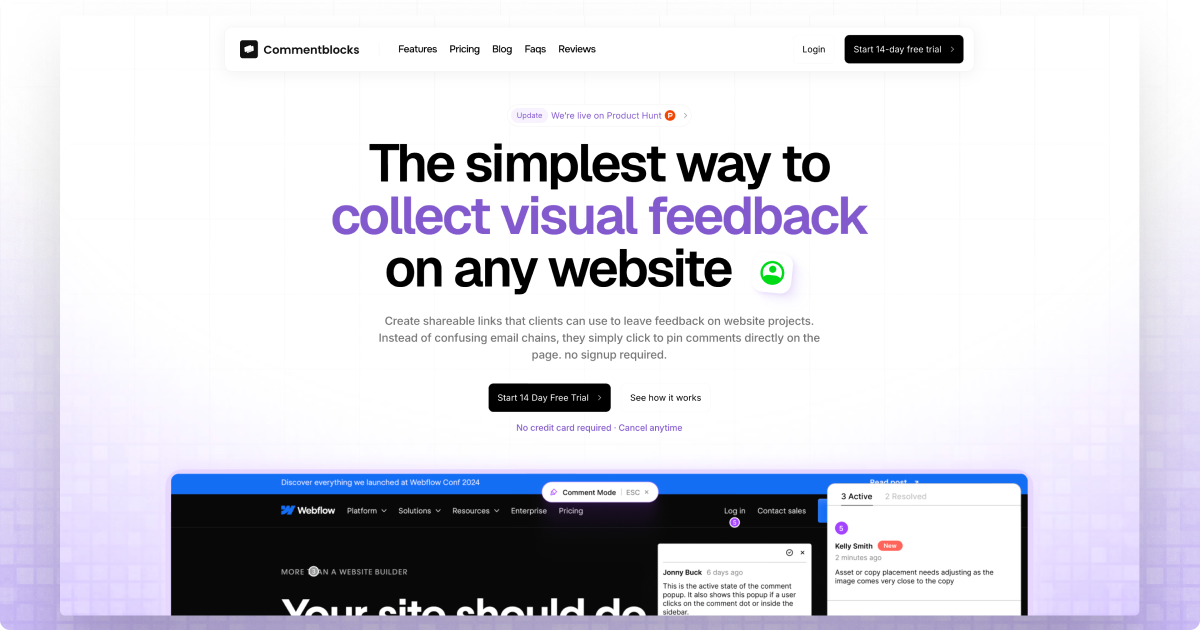
Commentblocks is a website feedback tool that allows clients to visually provide feedback without requiring login. Users can pin comments directly on any website by sharing a simple link.
Commentblocks is a visual website feedback tool tailored for agencies, freelancers, and web development teams that need to collect precise client input on website projects. It replaces the usual back-and-forth of emails, screen recordings, and vague descriptions with a single, shareable link. When a client clicks that link, they see the live website and can pin comments directly onto any element on the page. No account creation is required, and no software installation is needed. This instant visual feedback eliminates ambiguity, saving hours of clarification time. The core value is simplicity: clients can immediately communicate their thoughts in context, leading to faster revisions and smoother project delivery. The tool integrates into any existing workflow because it demands zero setup from the client side, making it incredibly easy to adopt across diverse teams.
The primary problem Commentblocks solves is the costly friction of client feedback collection. Traditional methods—email threads, PDF markups, or project management tools with steep learning curves—often lead to misinterpretation, delayed responses, and missed details. Clients may struggle to articulate exactly what they want, resulting in multiple revision cycles and frustration for both parties. By providing a visual, point-and-click interface directly on the live website, Commentblocks removes guesswork. Clients can say exactly what they mean by placing a pin on the specific element, eliminating phrases like "move that bit up" or "the thing on the left." This clarity reduces feedback rounds by half, as noted by project managers, and accelerates project timelines. For agencies, this means happier clients and more efficient operations.
The first major feature group is Single Link Sharing and No Client Signup. The workflow begins by pasting any website URL into Commentblocks, which instantly generates a unique feedback link. The user shares this link with clients via email, Slack, WhatsApp, or any communication channel. The client clicks the link and is taken to the live website with a floating toolbar that allows them to click anywhere on the page to leave a comment. No signup, no login, no password—just immediate interaction. This zero-friction approach ensures high client adoption, even with non-technical stakeholders. The benefit is clear: clients are more likely to provide feedback because there are no barriers, leading to faster turnarounds and fewer excuses.
The second major feature group is Visual Comments and Instant Clarity. When a client clicks on an element, a pin appears at that exact spot, and a comment box opens where they can type their feedback. The pin stays anchored to the element, so even if the page scrolls, the comment remains contextually relevant. This point-and-click method eliminates vague references and ensures the team knows precisely what needs changing. The comment thread also supports replies, allowing for clarification or further discussion without leaving the page. This feature is especially valuable for designers and developers who need specific visual feedback. It turns subjective opinions into actionable tasks, reducing back-and-forth and ensuring every revision addresses the actual issue.
Publisher
A
admin
Launch Date2026-02-06
Platformweb
Pricingfreemium
Domain Authority
Ahrefs DR1/100