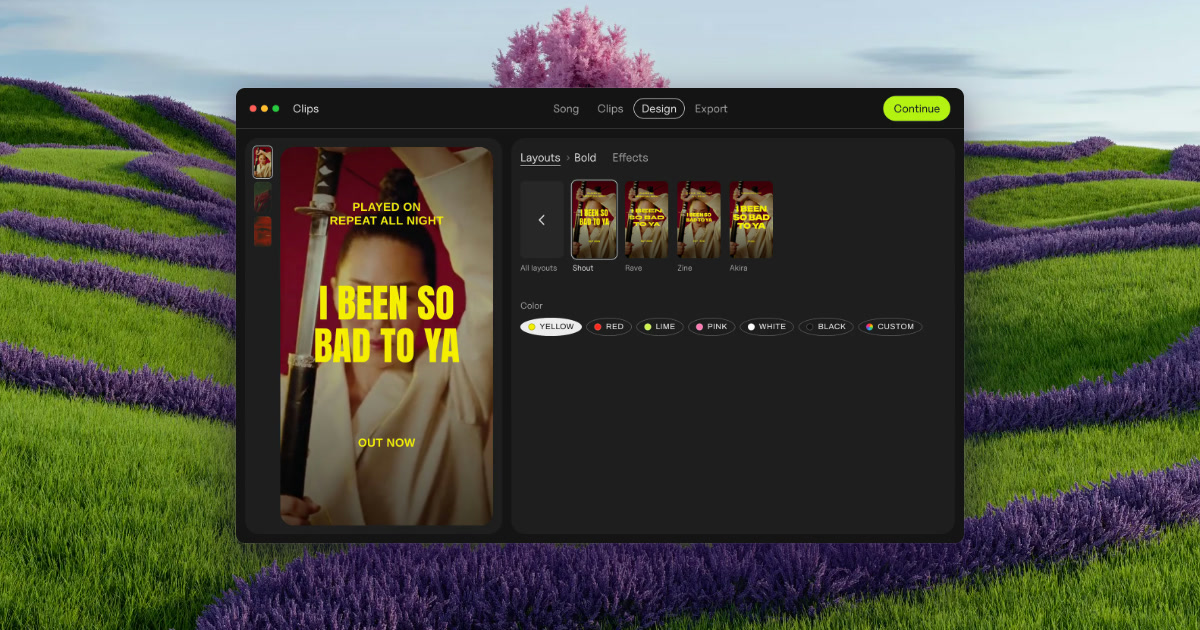
Clips by Plastic is a lyric and lip-sync video maker for Mac that turns a finished song into vertical videos for every part of it. You drop in a song along with your own footage or photos, and the app cuts every part and its catchiest snippets into vertical videos, on the beat, with the lyrics synced word by word. It is built for music artists, and for the people who promote their songs, who need ad creative for a release without opening a timeline-based editor. The point of the app is stated plainly on its site: find the part of your song that sells it, test them all, then spend on the one that works.
The problem Clips was built around is stated on its own site: making 15 videos takes all evening, so you cut two and pray. A single song has multiple parts — intro, verses, pre-chorus, chorus and bridge — and any one of them might be the fragment that makes a listener stop scrolling. Producing a separate video for each part, on each backdrop, by hand in a conventional video editor is slow, repetitive work, and it competes directly with the time an artist wants to spend on music. The founder's note on the page makes the same point from personal experience: Clips was built while promoting an album, because cutting the same song fifteen ways was eating the time that was meant for music. Instead of guessing which section to promote, the product is designed to let results from real ad spend pick the hook.
Clips begins by analyzing a finished song. It finds the tempo — the page shows an example at 124 BPM — and it detects every part of the song, listing sections such as Verse 1, Pre, Chorus, Verse 2, Bridge, Chorus and Intro. Each of those parts then becomes one clip, and the clip is cut on the beat rather than at arbitrary timestamps; the page describes a chorus section as "16 beats, cut on the beat." This matters because a vertical ad that starts and ends on the musical grid feels intentional and loops cleanly, and because the artist does not have to scrub a waveform to find section boundaries. The work of mapping the song's structure is done automatically, so the first step of the four-step workflow is simply dropping the song in.
The second layer is lyrics. Clips syncs the words to the music and offers two modes: word by word, on the beat, or line by line, on the beat. A word-level sync puts each word on screen as it is sung, which keeps a short vertical clip visually busy and readable without the viewer needing sound. The page also shows a third element: a hook line placed on top of the video — a short phrase that stays visible while the synced lyrics run below. The hook is what makes a clip legible at a glance in a feed; the word-level lyrics are what hold attention once the clip starts playing. Together they allow one song section to be presented as a self-contained ad rather than an excerpt that needs context.
Visually, Clips separates the words from the treatment applied over them. You pick a layout, then choose from 54 effects — the page lists Paper, Glow, Vertigo, Riso, Xerox, Tape, Bitmap, Lines, Heatwave, Drift and Negative among them — and drag a strength slider to set how strong the effect is. Because the effect sits on top of the same footage, one chorus can be produced in 54 different looks, so ads can match the visual language of a release instead of looking like a template. The page frames the output as ads that look like your release, not like a template. A backdrop in Clips is effectively that combination of footage and treatment: the export screen shows the same set of parts repeated across backdrops named katana, neon and eye.
Export is where the multiplication happens. Rather than rendering one video at a time, Clips exports every part of the song on every backdrop in a single batch — the page shows 15 videos being exported at once, in vertical 1080 × 1920, with square 1080 × 1080 also supported. Files are named by song, part and backdrop, so a batch drops straight into Ads Manager without a renaming session. The page contrasts this directly with the manual route: a video editor handles one video at a time, Flowstage limits posts, Hypeddit's maker restricts output, and none of them produce every part of the song in one batch. Clips is presented as producing about 30 ads a song.
The four-step workflow is stated explicitly: drop your song, and Clips finds the tempo and every part; pick the parts, and each becomes one clip, cut on the beat; add your hook, a line on top with lyrics synced word by word; and export, every part on every backdrop, ready for Ads Manager. The methodology continues past export into a testing loop the page calls Test first. Then spend. On Day 1 you upload the batch. On Days 2 to 6 you let them all run at a few dollars a day each, so strangers rather than your own guess decide the winner. On Day 7 you keep the winner and put your budget behind it. The example given is deliberately counterintuitive: the intro won, not the chorus — $0.21 cost per result against $0.63 for the chorus — which is the argument for testing rather than assuming the hook is the chorus. Cost per result is tracked one line per part: Intro, Verse 1, Pre, Chorus, Verse 2 and Bridge.
The stated benefit is time and confidence. A batch that would take an evening of timeline work is produced in one export, so the artist can ship many variants instead of two. Decisions about ad spend are made on measured cost per result rather than intuition about which section is catchiest. Because the app runs offline and on the Mac, an unreleased song never leaves the machine — a meaningful point for artists sitting on music before release. And the pricing is a one-time purchase of $99 for the Artist license: no subscription, no credits, no caps, free updates, with a 30-day refund. The free version is not a trial with a timer; it includes every feature and unlimited exports, and the only difference is a small Clips tag on exports, which you remove by buying the license before putting money behind an ad.
Concrete situations described on the page include an artist with a new single who wants a batch of ad creative in minutes rather than an evening; an artist without footage, who can use photos since Clips animates stills, a single phone clip for a whole batch, or free high-quality vertical videos from Pexels matched to the mood of the song; an artist between releases, who can use the non-expiring free version on an old song; a label, studio or manager producing videos for a roster or clients under the Label / Studio license, which covers client and commercial work and up to 10 Macs; and an artist testing the same chorus across many effects to find a look that fits the release. The Day 1 to Day 7 workflow is itself a use case: running every part of one song as a small-budget ad set for a week and consolidating budget on the winner.
Clips is aimed at music artists promoting their own releases and at the labels, studios and managers promoting artists they work with. The site distinguishes the two in licensing terms: Artist at $99 once covers your own music, removes the Clips tag and allows up to 3 of your own Macs with free updates; Label / Studio at $299 once covers up to 10 Macs for a team, client and commercial work, and priority email support. A bundle with Plastic's DOT app is $125 once for both apps unlocked, up to 3 Macs and free updates. Requirements are macOS 13 or later on Apple silicon or Intel, with lyric sync described as best on macOS 26; Clips is Mac only today, and the page invites Windows users to write in. Delivery is a DMG download (Clips-1.3.2.dmg) with a step-by-step guide sent by email.
Clips by Plastic packages a repetitive production job into a four-step Mac app and pairs it with a testing method: analyze the song, cut every part on the beat, sync the lyrics word by word, add a hook, export every part on every backdrop in one batch, then let a week of small ad spend reveal which part sells the song. Free to try without a time limit and $99 once for the Artist license, it is built for artists who would rather test fifteen versions than cut two.
Publisher
A
admin
Launch Date2026-10-26
Platformdesktop
Pricingfreemium