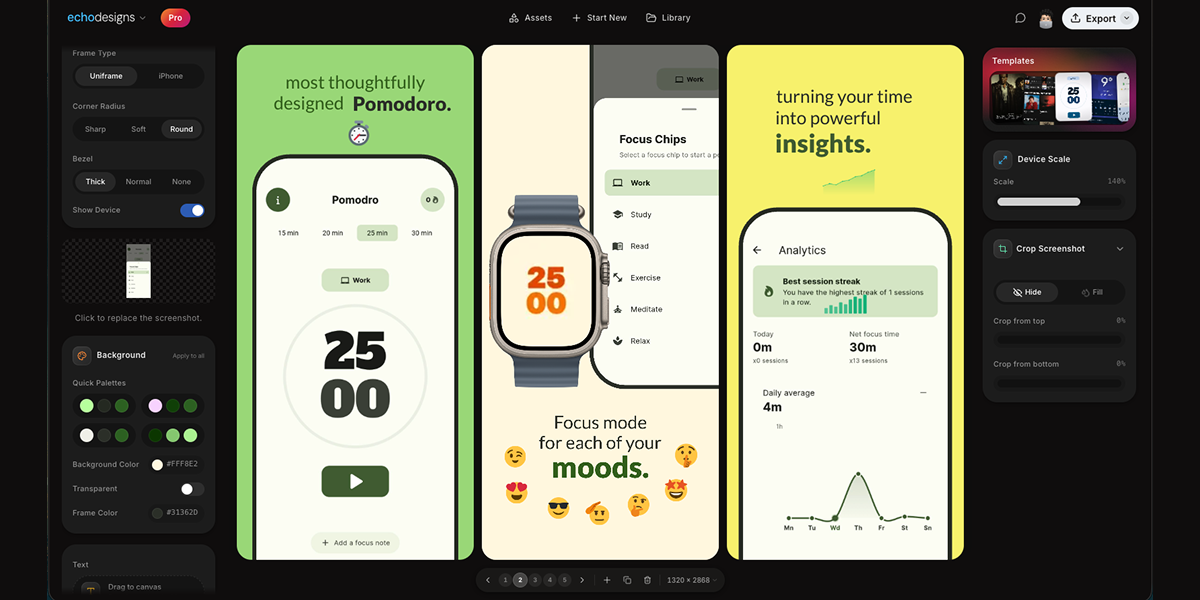
appdesigns is a free, in-browser editor for making App Store and Google Play screenshots. It is aimed at people who need to create app listing visuals, including app developers, designers, and marketers. The product's stated purpose is to help users design amazing app screenshots completely free. Users can drop in their screens, frame them in device mockups, add headlines, backgrounds and stickers, and export at the exact sizes App Store Connect asks for. The website emphasizes that no account is needed, there is no watermark, and exports are unlimited. The editor is accessed through appdesigns.click and is described as needing a laptop-sized window. The Product Hunt tagline says Design amazing appstore screenshots for free.
The problem context is stated directly: many screenshot tools are free to start but then impose limits. appdesigns positions itself as truly free, not free to start. It highlights unlimited exports, no watermark, and no account required. This matters for app developers and teams preparing store listings because screenshots are a required part of presenting an app on the App Store and Google Play. The product removes sign-up friction and export restrictions, while keeping the creation process inside the browser. The metadata description says Make App Store and Google Play screenshots in your browser. Truly free, not free to start: unlimited exports, no watermark, no account required. The website also says support is appreciated but never required, reinforcing that the tool does not require payment to use its stated core capabilities.
Device framing is a core part of the editor. The Device section lists Mobile, iPad, Mac, and Watch. Frame Type includes Uniframe and iPhone. Available device options include iPhone Duo, marked New; iPhone 18 Pro, marked New; iPhone 18 Pro Max, marked New; iPhone 17 Pro Max; and three more. Users can choose Portrait or Landscape orientation. There is a Show Device toggle, which lets users decide whether the device frame is visible. The product description also mentions framing screens in the latest iPhone, iPad or Mac. These options help users present screenshots in the context of real devices and match the type of app being shown. The Device section provides Mobile, iPad, Mac, and Watch options, while the Frame Type section offers Uniframe and iPhone choices.
Uploading and customizing the screenshot content happens on the canvas. Users upload a screenshot, and the interface includes a Background section with Apply to all, Background Color, and Transparent. The background color example shown is #FF512F, and Transparent is an available choice. Text can be added directly to the canvas; users can click or drag to place it, or press T to place text. The Text section includes an Add text control and instructions: Click or drag to the canvas. Press T to place. The canvas displays slides numbered 1, 2, and 3, along with a canvas size of 1242 × 2688. These controls support adding headlines and visual treatments to app screens before export.
Templates and transformation tools help shape the overall screenshot set. The website displays a Templates section with template artwork that users can browse. The Product Hunt description states users can start from a community template. Scale & Tilt controls let users adjust device presentation; the interface shows Scale at 135% and Tilt at 0°. The interface shows Scale 135% and Tilt 0° as example values, with the ability to adjust scale and tilt. The product description says users can design the whole set side by side, tilt and scale devices, or start from a community template. This combination supports creating a coordinated group of screenshots rather than editing each image in isolation.
The overall workflow is explained in three steps: 1 Upload your app screenshots, 2 Choose a device frame, 3 Customise and export. This straightforward approach is presented as the main method for using the editor. Users begin with their own app screens, select a frame from the available device options, then customise with backgrounds, text, templates, scale, and tilt before exporting. The editor runs in the browser and the website notes that the editor needs a laptop-sized window, with a prompt to copy the link for your laptop. This indicates the tool is used in a desktop or laptop browser environment. Exporting is aimed at the exact sizes App Store Connect asks for, and the free offer includes unlimited exports, no watermark, and no account needed to start.
Benefits and outcomes stated or directly implied by the content include creating app screenshots for free and without an account. The product removes the need to sign up before starting, and it does not add a watermark to exports, according to the website and metadata. Unlimited exports mean users can produce as many screenshot files as their listing requires. The in-browser editor avoids a separate desktop installation. The three-step workflow and community templates provide a guided path for users who may not be professional designers. The product also supports every device, every size, and no account needed, as stated on the website.
Concrete use cases include preparing App Store and Google Play listing screenshots. A developer can upload app screens, frame them in iPhone, iPad, Mac, or Watch device mockups, add headlines and backgrounds, and export at required sizes. A designer or marketer can create a consistent set of screenshots side by side, using templates and background colour changes applied to all. A user who wants a device mockup without signing up can open the editor in a laptop browser, upload a screenshot, choose a frame such as iPhone 18 Pro or iPad, add text, and export. The editor also shows slides numbered 1, 2, and 3, which supports working with multiple screens in one session.
The target users are app developers, designers, marketers, and teams who need store listing visuals. The product is designed for users who want a free, browser-based screenshot editor with no account required, no watermark, and unlimited exports. It supports Mobile, iPad, Mac, and Watch device frames and references exact export sizes for App Store Connect. Because the website states the editor needs a laptop-sized window, it is intended for use on a laptop or desktop browser rather than on a mobile phone. The website mentions support is appreciated, never required, but does not present it as a mandatory part of using the free editor. No pricing tiers, paid plans, or subscription details are stated; the pricing model is free.
In summary, appdesigns is a free in-browser tool for making App Store and Google Play screenshots. It combines device frames, background controls, text, community templates, and scale and tilt adjustments with a simple upload, frame, customise, and export workflow. Its primary value proposition is stated clearly: amazing app screenshots for free, with no account, no watermark, and unlimited exports.
Publisher
A
admin
Launch Date2026-09-15
Platformweb
Pricingfree